2021-2023 Nissan TCU Reset After Collision Notification
This Nissan Technical Service Bulletin (NTB20-085B) details the procedure for resetting the Telematics Control Unit (TCU) in various 2021-2023 Nissan models after an automatic collision notification, which can disable the eCAll function and trigger DTC B2E1B-97.
 Ahmet Topcu2023 Nissan Sentra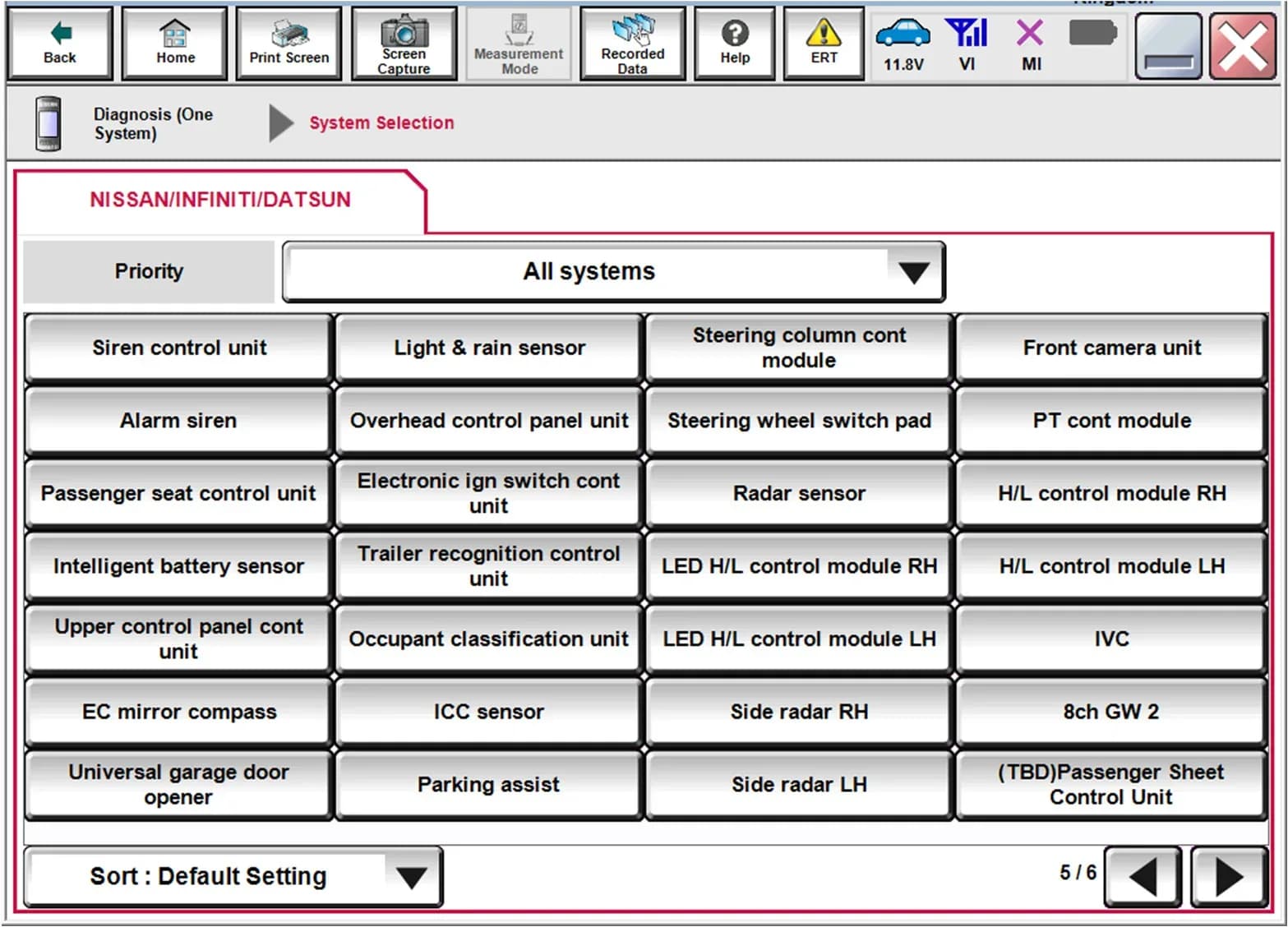
Also applies to
- Nissan Altima
- 2023
- Nissan Armada
- 2021–2023
- Nissan Frontier
- 2022–2023
- Nissan Kicks
- 2021–2023
- Nissan Maxima
- 2021–2023
- Nissan Pathfinder
- 2022–2023
- Nissan Rogue
- 2021–2023
- Nissan Sentra
- 2021–2022
- Nissan Titan
- 2021–2023
- Nissan Versa
- 2023
▸ Show 4 more▾ Show fewer
Nissan has issued Technical Service Bulletin (TSB) NTB20-085B to address an issue where the Telematics Control Unit (TCU) may become disabled after the vehicle is involved in an accident and performs an automatic collision notification. This condition prevents the automatic collision notification function from working until the TCU is reset. This TSB provides the necessary steps for technicians to perform a Nissan TCU reset B2E1B-97 to restore full functionality.
Symptoms
Owners may notice that the automatic collision notification system is no longer active after an incident. While there might not be a direct dashboard warning for the owner, the vehicle's diagnostic system will store a specific fault code indicating the issue, signaling the need for a Nissan TCU reset B2E1B-97.
Fault Codes / DTCs
When the automatic collision notification function is disabled, the Telematics Control Unit (TCU) may store the following Diagnostic Trouble Code (DTC):
| Code | Description | Module |
|---|---|---|
| B2E1B-97 | "Automatic eCAll locked" | TCU |
This DTC will typically be displayed as "CURRENT" when the function is disabled, indicating an active fault that requires attention.
Diagnosis / Trigger Conditions
The primary trigger condition for this issue is the performance of an automatic collision notification by the vehicle's Telematics Control Unit (TCU) following an accident. Once this notification occurs, the TCU's eCAll function becomes locked, disabling its ability to send further automatic collision notifications. The presence of the "Automatic eCAll locked" status or DTC B2E1B-97 confirms the need for a Nissan TCU reset B2E1B-97.
Repair Procedure Summary
The repair involves using the Nissan CONSULT-III plus diagnostic tool to reset the Telematics Control Unit (TCU) and clear any stored Diagnostic Trouble Codes (DTCs). The general steps for technicians are as follows:
- Preparation: Before beginning, technicians must ensure that the ASIST software on the CONSULT PC is synchronized to the current date and all CONSULT software updates have been installed.
- Connect Diagnostic Tool: Confirm the CONSULT PC is connected to Wi-Fi. Connect the Vehicle Interface (VI) to the vehicle and start the CONSULT-III plus software.
- Login: If prompted, select "USA/CANADA Dealers" from the drop-down menu and then select "OK". Log in using NNAnet credentials. If not prompted for login, ensure the CONSULT PC is connected to Wi-Fi, close C-III plus, and reopen it.
- VI Recognition: Wait for the VI to be recognized; its serial number will display on the screen, as shown in Figure 1 of the bulletin.
- Select Diagnosis: From the main menu, select "Diagnosis (One System)".
- Select IVC: On the System Selection screen (Figure 2), select "IVC" (Intelligent Vehicle Control).
- Access Work Support: Under the IVC menu, select "Work support" (Figure 3).
- Initiate Reset: Select "Automatic report prevention release" and then click "Start".
- Check Status: If "LOCK” is displayed next to "Current status" (Figure 4), select "Start" to unlock the automatic report prevention. If "UNLOCK” is displayed (Figure 5), the TCU does not need to be reset, and the technician can proceed to select "End".
- Finalize: Select "End" once the status is confirmed or the reset is complete.
- Erase DTCs: Perform an "Erase All DTCs" to clear the stored B2E1B-97 code and ensure the system is fully reset.
Important Warnings
Nissan explicitly states that these bulletins are intended for use by qualified technicians, not 'do-it-yourselfers'. Qualified technicians possess the proper training, equipment, tools, safety instructions, and know-how to perform the job correctly and safely. Owners should not attempt this procedure themselves. If you believe this condition applies to your vehicle, do not assume it does; instead, see your authorized Nissan dealer to confirm applicability.
Bulletin History
This bulletin, NTB20-085B, is the latest revision. It supersedes previous versions:
- NTB20-085: Original bulletin published on November 30, 2020.
- NTB20-085A: Published on April 21, 2022, with updates to "APPLIED VEHICLES", "SERVICE INFORMATION", and Figure 5, and the addition of step 11.
- NTB20-085B: Published on January 23, 2023, with revisions to the classification number, "APPLIED VEHICLES", and login steps moved to page 2.
NHTSA ID: 10231423
Gallery
5 images
Frequently Asked Questions
- What does DTC B2E1B-97 mean for my Nissan?
- DTC B2E1B-97, labeled as "Automatic eCAll locked," indicates that your Nissan's Telematics Control Unit (TCU) has become disabled after an automatic collision notification was performed. This means the eCAll function, which automatically alerts emergency services after an accident, is currently inactive.
- Why does my Nissan's TCU need to be reset after an accident?
- After an automatic collision notification is triggered by an accident, the Telematics Control Unit (TCU) locks its eCAll function as a safety measure. To re-enable the system and ensure it can send future automatic collision notifications, a specific reset procedure must be performed by a qualified technician using Nissan's diagnostic tools.
- Can I perform the Nissan TCU reset B2E1B-97 myself?
- No, this procedure requires specialized diagnostic equipment, specifically the Nissan CONSULT-III plus system, and trained technicians. Nissan's TSB NTB20-085B explicitly states that these bulletins are for qualified technicians, not 'do-it-yourselfers.' You should visit your authorized Nissan dealer to have the TCU reset.
- Which Nissan models are affected by the TCU reset issue in TSB NTB20-085B?
- This TSB applies to various 2021-2023 Nissan models, including the Altima, Armada, Frontier, Kicks, Maxima, Pathfinder, Rogue, Sentra, Titan/Titan XD, Versa, and Z. If you own one of these models and your vehicle has been involved in an accident, your dealer can check if this bulletin applies to your specific vehicle.
Related Articles
2021-2024 Nissan ICC Inoperative with DTC C1A16 or C2582
Nissan has issued TSB NTB19-033G for 2021-2024 models experiencing Intelligent Cruise Control (ICC) malfunctions, AEB/FEB warning lights, or radar obstruction messages with DTCs C1A16 or C2582. The bulletin outlines diagnostic steps and potential ICC distance sensor replacement.
2020-2025 Nissan Sentra Loss of Power DTC P2100 P2101
Nissan has released TSB NTB25-005 for 2020-2025 Sentra models experiencing a loss of power. This issue is often accompanied by diagnostic trouble codes P2100 ('ETC MOT PWR-B1') or P2101 ('ETC FNCTN/CIRC-B1') stored in the Engine Control Module (ECM). The bulletin provides a revised diagnostic…
2020-2023 Nissan Models: DTC B2E1B-06 (Automatic eCall) Bulletin Inactive
Nissan Technical Service Bulletin NTB23-031A, concerning DTC B2E1B-06 (Automatic eCall) in various 2020-2023 models, has been declared inactive. Owners who previously encountered this diagnostic trouble code should note that this specific bulletin is no longer applicable.
2021-2024 Nissan Remote Command DTCs B2E4B-06, B2E60-06
Nissan has issued TSB NTB21-037D for 2021-2024 Sentra, Pathfinder, and Rogue models experiencing NissanConnect remote command issues with DTCs B2E4B-06, B2E60-06, B2E61-06. The problem is linked to a cloud-server, and replacing the TCU is not the solution. Learn what steps to take.
2021-2024 Nissan BCM Replacement Service Bulletin
Nissan TSB NTB20-074B provides crucial service information for replacing the Body Control Module (BCM) in 2021-2024 ARIYA, Pathfinder, Rogue, and Sentra vehicles. It outlines essential steps for module configuration and intelligent key pairing to prevent damage and ensure proper function.
Leave a comment
Comments are moderated and may take a moment to appear. Only your first name and the initial of your last name are shown publicly.
Comments
Be the first to comment.