2022-2023 Hyundai Display Audio & AVN Software Update
Hyundai Technical Service Bulletin (TSB) 25-01-045H details a critical software update for the Display Audio 2.0V and AVN 5th Gen Wide infotainment systems in various 2022-2023 Hyundai models. This update ensures optimal performance and is part of Service Campaign TBW.

Şu araçlar için de geçerli
- Hyundai Elantra
- 2022–2023
- Hyundai Elantra N
- 2022
- Hyundai Kona
- 2022–2023
- Hyundai Kona N
- 2022–2023
- Hyundai Palisade
- 2022
- Hyundai Santa Cruz
- 2022–2023
- Hyundai Santa Fe
- 2022–2023
- Hyundai Sonata
- 2022–2023
- Hyundai Tucson
- 2023
- Hyundai Veloster N
- 2022
- Hyundai Venue
- 2022
▸ 5 tane daha göster▾ Daha az göster
Hyundai has issued Technical Service Bulletin (TSB) 25-01-045H, also known as Service Campaign TBW, to address a software update for the Display Audio 2.0V and AVN 5th Gen Wide infotainment systems. This TSB supersedes the previous bulletin 24-01-045H-2 and includes an updated software verification section and new operation codes for applicable models. The Hyundai Display Audio software update is a preventative measure to maintain optimal system functionality.
This software update applies to a wide range of 2022-2023 Hyundai models, including the Elantra, Elantra Hybrid, Elantra N, IONIQ Hybrid, IONIQ Plug-in Hybrid, Kona, Kona Electric, Kona N, Palisade, Santa Cruz, Santa Fe, Santa Fe Hybrid, Santa Fe Plug-in Hybrid, Sonata, Sonata Hybrid, Tucson, Tucson Hybrid, Tucson Plug-in Hybrid, Veloster N, and Venue.
Important Warnings for Owners
Dealers are instructed to perform this service campaign on all affected vehicles before customer retail delivery and whenever an affected vehicle is in the shop for any maintenance or repair. Owners will not receive a separate notification for this update; it is handled during routine service visits or pre-delivery inspections.
During the update process, it is crucial that the 12-volt battery is sufficiently charged and the vehicle's power remains ON to prevent battery drain. Additionally, technicians must verify that the AVN system is a genuine Hyundai part before proceeding with the software update.
What This TSB Addresses
This TSB provides a comprehensive Hyundai Display Audio software update for vehicles equipped with either the Display Audio 2.0V or the AVN 5th Gen Wide system. The update aims to optimize the performance and stability of these infotainment units. While no specific symptoms are listed as being resolved, software updates typically improve system responsiveness, fix minor bugs, and enhance compatibility.
Software Verification
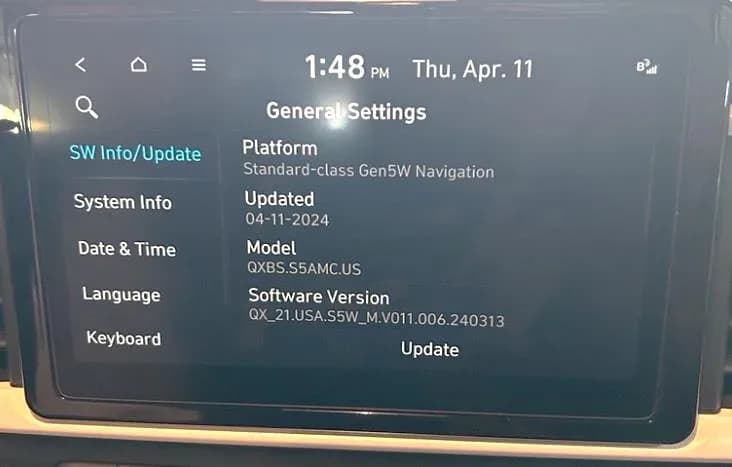
To determine if a software update is required, a technician will perform a software verification check. This involves turning on the vehicle and navigating to the 'Setup' menu, then selecting 'General' to access the 'General Settings' screen. From there, they will select 'SW Info/Update' to view the current software version.
The technician will compare the head unit's software version against a detailed list provided in the TSB. If the current version is the same as or newer than the specified version, no update is required. If the version is older, the update procedure will be initiated.
Repair Procedure Summary
The software update procedure involves several steps:
- Preparation: The vehicle's ignition is turned ON, and the technician accesses the 'Setup' and 'General' menus on the infotainment screen.
- USB Insertion: A prepared USB flash drive, containing the latest software, is inserted into the vehicle's USB slot.
- Initiate Update: The technician selects 'Update' from the 'SW Info/Update' screen. A confirmation prompt will appear, and they will select 'Yes' to proceed.
- Update Process: The system will begin updating automatically. This process takes approximately 15 minutes. During this time, the Hyundai logo may appear multiple times, and the display may go black. It is critical NOT to remove the USB flash drive or turn power OFF during the update, as this could lead to data loss or system failure.
- Completion and Reboot: Once the update is complete, the system will automatically reboot.
- Verification: After reboot, the technician confirms the new software version on the 'SW Info/Update' screen. They must also capture a photo of the updated software version screen, along with the last 6 digits of the VIN and the repair date, for digital documentation.
- Final Steps: The engine/power is turned ON, and if applicable, the warning volume is adjusted to 'Low' via the 'Driver Assistance' menu. Finally, the USB flash drive is removed.
Required Tools and Parts
For this software update, specific USB flash drives are required. Each dealer is shipped four different types of USB drives: VDS1TYPE, VDS2TYPE, VDS3TYPE, and VDS6TYPE. The correct USB drive is selected based on the vehicle model and its head unit part number. The TSB provides detailed tables linking specific head unit part numbers to the appropriate USB drive and updated software version.
Warranty Information
Hyundai provides specific operation codes and labor times for performing this software update under warranty. These codes differentiate between software inspection and the actual update procedure:
Display Audio Software Inspection Operation Codes
| Model | Op. Code | Operation | Op. Time |
|---|---|---|---|
| All models under 40D059R0 | 40D059I0 | Display Audio Software Inspection | 0.2 M/H |
| All models under 40D059R2 | 40D059I2 | Display Audio Software Inspection | 0.2 M/H |
| All models under 40D059R3 | 40D059I3 | Display Audio Software Inspection | 0.2 M/H |
Display Audio Software Update Operation Codes
| Model | Op. Code | Operation | Op. Time |
|---|---|---|---|
| Elantra (CN7/CN7A) | 40D059R0 | Display Audio Software Update | 0.3 M/H |
| IONIQ Hybrid/Plug-in (AE HEV/PHEV) | 40D059R0 | Display Audio Software Update | 0.3 M/H |
| Kona (OS) | 40D059R0 | Display Audio Software Update | 0.3 M/H |
| Palisade (LX2) | 40D059R0 | Display Audio Software Update | 0.3 M/H |
| Santa Cruz (NXT) | 40D059R0 | Display Audio Software Update | 0.3 M/H |
| Sonata (DN8A) | 40D059R0 | Display Audio Software Update | 0.3 M/H |
| Tucson (NX4) | 40D059R0 | Display Audio Software Update | 0.3 M/H |
| Santa Fe (TMA) | 40D059R0 | Display Audio Software Update | 0.3 M/H |
| Venue (QX) | 40D059R0 | Display Audio Software Update | 0.3 M/H |
| Elantra Hybrid (CN7 HEV) | 40D059R2 | Display Audio Software Update | 0.3 M/H |
| Kona Electric (OS EV) | 40D059R2 | Display Audio Software Update | 0.3 M/H |
| Sonata Hybrid (DN8 HEV) | 40D059R2 | Display Audio Software Update | 0.3 M/H |
| Tucson Hybrid (NX4 HEV) | 40D059R2 | Display Audio Software Update | 0.3 M/H |
| Santa Fe Hybrid/Plug-in (TM HEV/PHEV) | 40D059R2 | Display Audio Software Update | 0.3 M/H |
| Tucson (NX4A) | 40D059R3 | Display Audio Software Update | 0.3 M/H |
AVN Software Inspection Operation Codes
| Model | Op. Code | Operation | Op. Time |
|---|---|---|---|
| All models under 40D059R1 | 40D059I1 | AVN Software Inspection | 0.2 M/H |
| All models under 40D059R4 | 40D059I4 | AVN Software Inspection | 0.2 M/H |
| All models under 40D059R5 | 40D059I5 | AVN Software Inspection | 0.2 M/H |
AVN Software Update Operation Codes
| Model | Op. Code | Operation | Op. Time |
|---|---|---|---|
| Elantra (CN7/CN7A) | 40D059R1 | AVN Software Update | 0.3 M/H |
| IONIQ Hybrid/Plug-in (AE HEV/PHEV) | 40D059R1 | AVN Software Update | 0.3 M/H |
| Kona (OS) | 40D059R1 | AVN Software Update | 0.3 M/H |
| Kona N (OS N) | 40D059R1 | AVN Software Update | 0.3 M/H |
| Palisade (LX2) | 40D059R1 | AVN Software Update | 0.3 M/H |
| Santa Cruz (NXT) | 40D059R1 | AVN Software Update | 0.3 M/H |
| Santa Fe (TMA) | 40D059R1 | AVN Software Update | 0.3 M/H |
| Sonata (DN8) | 40D059R1 | AVN Software Update | 0.3 M/H |
| Tucson (NX4/NX4A) | 40D059R1 | AVN Software Update | 0.3 M/H |
| Veloster (JSN) | 40D059R1 | AVN Software Update | 0.3 M/H |
| Venue (QX) | 40D059R1 | AVN Software Update | 0.3 M/H |
| Elantra Hybrid (CN7 HEV) | 40D059R4 | AVN Software Update | 0.3 M/H |
| Kona Electric (OS EV) | 40D059R4 | AVN Software Update | 0.3 M/H |
| Santa Fe Hybrid/Plug-in (TM HEV/PHEV) | 40D059R4 | AVN Software Update | 0.3 M/H |
| Sonata Hybrid (DN8 HEV) | 40D059R4 | AVN Software Update | 0.3 M/H |
| Tucson Hybrid/Plug-in (NX4 HEV/PHEV) | 40D059R4 | AVN Software Update | 0.3 M/H |
| Elantra N (CN7 N) | 40D059R5 | AVN Software Update | 0.3 M/H |
| Kona N (OS N) | 40D059R5 | AVN Software Update | 0.3 M/H |
Detailed Software Versions for Display Audio 2.0V
This table outlines the specific head unit part numbers and the corresponding updated software versions for vehicles equipped with Display Audio 2.0V:
| Model Year | Model | Head Unit Part Number | Updated Software Version | USB Drive for Update |
|---|---|---|---|---|
| 2022-2023 | Elantra (CN7/CN7A) | 96160-AA230, 96160-AA240, 96160-AA250 | D2V.003.200.240318 | VDS 1 type |
| 2022-2023 | Elantra Hybrid (CN7 HEV) | 96160-BY090 | D2V.003.200.240318 | VDS 1 type |
| 2022 | IONIQ Hybrid (AE HEV) | 96160-G7GB0, 96160-G2GA0 | D2V.003.200.240318 | VDS 1 type |
| 2022 | IONIQ Plug-in Hybrid (AE PHEV) | 96160-G2GB0, 96160-G2MA0 | D2V.003.200.240318 | VDS 1 type |
| 2022-2023 | Kona (OS) | 96160-J9630, 96160-J9650 | D2V.003.200.240318 | VDS 1 type |
| 2022-2023 | Kona Electric (OS EV) | 96160-K4710 | D2V.003.200.240318 | VDS 1 type |
| 2022 | Palisade (LX2) | 96160-S8710 | D2V.003.200.240318 | VDS 1 type |
| 2022-2023 | Santa Cruz (NXT) | 96160-K5010, 96160-K5120, 96160-K5130 | D2V.003.200.240318 | VDS 1 type |
| 2022 | Sonata (DN8) | 96160-L0200, 96160-L0500, 96160-L0250 | D2V.003.200.240318 | VDS 1 type |
| 2022-2023 | Sonata Hybrid (DN8 HEV) | 96160-L5700, 96160-L5650 | D2V.003.200.240318 | VDS 1 type |
| 2022 | Tucson (NX4) | 96160-N9410, 96160-N9470, 96160-N9480 | D2V.003.200.240318 | VDS 1 type |
| 2022-2023 | Tucson (NX4A) | 96160-CW000, 96160-CW010, 96160-CW020 | D2V.003.200.240318 | VDS 1 type |
| 2022 | Tucson Hybrid (NX4 HEV) | 96160-P0100, 96160-P0110, 96160-P0120 | D2V.003.200.240318 | VDS 1 type |
| 2022-2023 | Santa Fe (TMA) | 96160-S2570, 96160-S2580, 96160-S2590 | D2V.003.200.240318 | VDS 2 type |
| 2022 | Santa Fe Hybrid (TM HEV) | 96160-CL070, 96160-CL080 | D2V.003.200.240318 | VDS 2 type |
| 2022 | Santa Fe Plug-in (TM PHEV) | 96160-CL520, 96160-CL530 | D2V.003.200.240318 | VDS 2 type |
| 2022 | Venue (QX) | 96160-K2893, 96160-K2793 | D2V.003.200.230302 | VDS 3 type |
Detailed Software Versions for AVN 5th Gen Wide
This table outlines the specific head unit part numbers and the corresponding updated software versions for vehicles equipped with AVN 5th Gen Wide:
| Model Year | Model | Head Unit Part Number | Updated Software Version | USB Drive for Update |
|---|---|---|---|---|
| 2022-2023 | Elantra (CN7/CN7A) | 96560-AA070, 96560-AA240 | CN7.USA.S5W_M.V011.006.240313 | VDS 6 type |
| 2022-2023 | Elantra Hybrid (CN7 HEV) | 96560-BY130, 96560-BY320 | CN7HEV.USA.S5W_M.V011.006.240313 | VDS 6 type |
| 2022 | Elantra N (CN7 N) | 96560-IB310, 96560-IB330 | CN7N.USA.S5W_M.V011.006.240313 | VDS 2 type |
| 2022 | IONIQ Hybrid/Plug-in (AE HEV/PHEV) | 96560-G7150, 96560-G2150, 96560-G2650 | AEPEHEV.USA.S5W_M.V011.006.240313, AEPEEV.USA.S5W_M.V011.006.240313, AEPEPHEV.USA.S5W_M.V011.006.240313 | VDS 1 type |
| 2022-2023 | Kona (OS) | 96560-J9650, 96560-J9660 | OS_PE.USA.S5W_M.V011.006.240313 | VDS 1 type |
| 2022-2023 | Kona Electric (OS EV) | 96560-K4760, 96560-K4730 | OSEV.USA.S5W_M.V011.006.240313, OSPEEV.USA.S5W_M.V011.006.240313 | VDS 2 type |
| 2022-2023 | Kona N (OS N) | 96560-I3150 | OSNPE.USA.S5W_M.V011.005.240313 | VDS 2 type |
| 2022 | Palisade (LX2) | 96560-S8EB0 | LX2.USA.S5W_M.V011.006.240313 | VDS 6 type |
| 2022-2023 | Santa Cruz (NXT) | 96560-K5100 | NX4OB.USA.S5W_M.V011.006.240313 | VDS 2 type |
| 2022-2023 | Santa Fe (TMA) | 96560-S2520 | TM_FL.USA.S5W_M.V011.006.240313 | VDS 1 type |
| 2022 | Santa Fe Hybrid/Plug-in (TM HEV/PHEV) | 96560-CL060, 96560-CL520 | TM_H.USA.S5W_M.V011.006.240313, TM_P.USA.S5W_M.V011.006.240313 | VDS 1 type |
| 2022-2023 | Sonata (DN8) | 96560-L0BC0, 96560-L0BD0, 96560-L1DS0, 96560-L1CT0 | DN8.USA.S5W_M.V011.006.240313, DN8_22.USA.S5W_M.V011.006.240313 | VDS 1 type |
| 2022-2023 | Sonata Hybrid (DN8 HEV) | 96560-L0BD0, 96560-L1DT0, 96560-L1CT0 | DN8HEV.USA.S5W_M.V011.006.240313, DN8_H_22.USA.S5W_M.V011.006.240313 | VDS 2 type |
| 2022-2023 | Tucson (NX4/NX4A) | 96560-N9430 | NX4.USA.S5W_M.V011.006.240313 | VDS 2 type |
| 2022 | Tucson Hybrid/Plug-in (NX4 HEV/PHEV) | 96560-P0100, 96560-P0500 | NX4HEV.USA.S5W_M.V011.006.240313, NX4PHEV.USA.S5W_M.V011.006.240313 | VDS 2 type |
| 2022 | Veloster N (JS N) | 96560-K9700 | JSN.USA.S5W_M.V011.006.240313 | VDS 1 type |
| 2022 | Venue (QX) | 96560-K2370 | QX_21.USA.S5W_M.V011.006.240313 | VDS 6 type |
Owner Action
If you own a 2022-2023 Hyundai model equipped with either Display Audio 2.0V or AVN 5th Gen Wide, it is recommended to have this Hyundai Display Audio software update performed. Since Hyundai is not directly notifying consumers, you should mention TSB 25-01-045H to your dealer during your next service appointment. The update will be performed free of charge under warranty.
Source: NHTSA ID: 11020693
Galeri
20 görsel
Frequently Asked Questions
- What is Hyundai TSB 25-01-045H?
- Hyundai TSB 25-01-045H is a Technical Service Bulletin that provides a software update for the Display Audio 2.0V and AVN 5th Gen Wide infotainment systems in various 2022-2023 Hyundai models. It ensures optimal performance and is part of Service Campaign TBW.
- Which Hyundai models are affected by this software update?
- This software update applies to many 2022-2023 Hyundai models, including the Elantra, Kona, Santa Fe, Sonata, Tucson, Palisade, Santa Cruz, Veloster N, IONIQ Hybrid, and Venue, equipped with Display Audio 2.0V or AVN 5th Gen Wide systems.
- How do I know if my Hyundai needs the Display Audio software update?
- A Hyundai technician can check your vehicle's current software version by navigating through the infotainment system's 'Setup' and 'General Settings' menus. They will compare it against the updated software versions specified in TSB 25-01-045H.
- What happens during the Hyundai Display Audio software update?
- The update is performed by inserting a specific USB flash drive into your vehicle's infotainment system. The process takes about 15 minutes, during which the system will reboot. It is crucial not to interrupt power or remove the USB drive during this time.
- Is the Hyundai Display Audio software update free?
- Yes, this software update is performed free of charge under warranty as part of Service Campaign TBW. You should inform your Hyundai dealer about TSB 25-01-045H during your next service visit.
What Hyundai Tucson owners report
Counted from the records in our database across 22 model years.
- 6,738
- Owner complaints
- 37
- Recalls
- 564
- Service bulletins
- 276
- Crashes reported
- 145
- Fires reported
- 256
- Injuries reported
The 2022 model year
509 complaints, the 3rd most of 22 model years on file. Owners reported 31 crashes, 5 fires and 56 injuries for this year, which also has 3 recalls on file.
Electrical System, the system this article covers, accounts for 849 of 6,738 complaints (13%), including 83 for 2022.
Complaints by model year
| 2012 | 255 | |
|---|---|---|
| 2013 | 266 | |
| 2014 | 202 | |
| 2015 | 229 | |
| 2016 | 1,626 | |
| 2017 | 1,095 | |
| 2018 | 399 | |
| 2019 | 385 | |
| 2022 | 509 | |
| 2025 | 451 |
Most-reported systems
- Engine — 2,451
- Power Train — 1,273
- Electrical System — 849
- Service Brakes — 761
- Forward Collision Avoidance — 432
Latest recalls for the 2022 model year
- 25V893000 — Trailer Hitches (Dec 2025) — Park outside
- 23V038000 — Structure (Jan 2023)
- 21V938000 — Electrical System (Dec 2021)
Recent owner reports about electrical system
The contact owns a 2022 Hyundai Tucson. The contact stated while driving at an undisclosed speed, several unknown warning lights illuminated. The vehicle was taken to an independent mechanic, where it was diagnosed with ECU software error.
Read owner complaints →While driving my 2022 Hyundai Tucson Hybrid, the vehicle suddenly lost power, began shaking, and all warning lights illuminated at once. The car would not accelerate properly and became unsafe to operate in traffic.
Complaints are owner reports filed with NHTSA. They are unverified, and counts depend on how many vehicles were sold, so they are not a failure rate.
Related Articles
2021-2024 Hyundai Santa Fe / Tucson DTC U028700 EOP
Hyundai has issued Technical Service Bulletin (TSB) 26-AT-002H for certain 2021-2024 Santa Fe and Tucson vehicles. This TSB addresses diagnostic trouble code U028700, indicating a "Lost Communication With Trans Fluid Pump Module," which can cause the Idle Stop & Go (ISG) system to become…
2022 Hyundai Tucson Inoperable Horn Warranty Extension
Hyundai has issued a warranty extension for certain 2022 Tucson (NX4A) vehicles experiencing an inoperable horn. This issue, detailed in TSB 26-BE-004H, is caused by foreign substances oxidizing internal horn parts. Coverage is extended to 10 years/120,000 miles.
2022 Hyundai Tucson Inoperative Horn TSB 26-BE-004H
Hyundai has issued Technical Service Bulletin 26-BE-004H for certain 2022 Tucson (NX4A) vehicles experiencing an inoperative horn. This TSB extends warranty coverage to 10 years/120,000 miles for horn replacement due to internal oxidation from foreign substances.
2021-2022 Hyundai Anti-Theft Ignition Cylinder Protector TSB
Hyundai has issued Technical Service Bulletin 25-01-089H (Customer Satisfaction Campaign P33) to address vehicle theft concerns by installing an anti-theft ignition cylinder protector and anti-theft decals on various 2021-2022 models.
2021-2022 Hyundai Anti-Theft Ignition Cylinder Protector Campaign P33
Hyundai has launched Customer Satisfaction Campaign P33 for 2021-2022 models, offering a free anti-theft ignition cylinder protector and decals. This hardware upgrade, detailed in TSB 25-01-089H, is available upon customer request to counter social media theft methods.
Yorum bırakın
Yorumlar moderasyondan geçer ve görünmesi biraz zaman alabilir. Sadece adınız ve soyadınızın baş harfi herkese açık olarak gösterilir.
Yorumlar
İlk yorum sizden olsun.