2025 Hyundai Tucson Fingerprint Module Update
Hyundai has issued Service Campaign 25-01-032H for certain 2025 Tucson (NX4M) vehicles to address a "Check User Authentication" error message and DTC B18CC00. This update resolves issues with the Fingerprint Module (FPM) preventing its proper use.
 Ahmet Topcu2025 Hyundai Tucson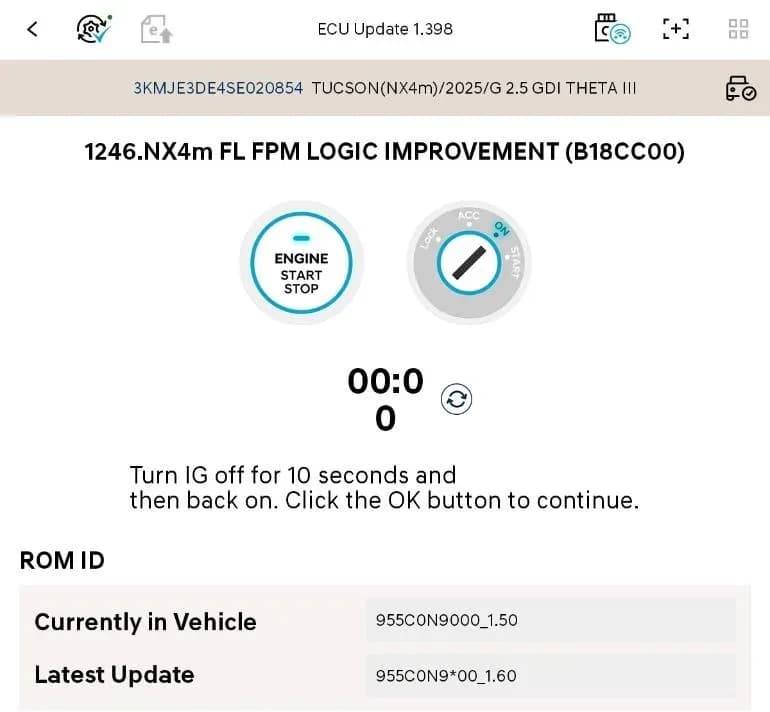
Hyundai has released Service Campaign 25-01-032H, also known as campaign TCZA, to address a software issue affecting the Fingerprint Module (FPM) in certain 2025 Hyundai Tucson (NX4M) vehicles. Owners may encounter a "Check User Authentication" error message on the instrument cluster display, which can prevent the FPM from functioning correctly. This condition is associated with Diagnostic Trouble Code (DTC) B18CC00, described as "IAU Teaching Error (w/FPM)".
This service bulletin provides instructions for dealers to perform a software update on the Fingerprint Module to resolve the issue. The update ensures proper operation of the FPM and eliminates the error message.
Important Warnings for Owners and Technicians
Several critical instructions are provided within Service Campaign 25-01-032H to ensure a successful software update and prevent further issues:
- Dealers are required to perform this service campaign on all affected vehicles before customer retail delivery and whenever a vehicle is in the shop for maintenance or repair.
- The software update must initially be performed in Auto Mode using the GDS ECU update procedure.
- If the ECU update begins but then fails in Auto Mode, technicians must perform the update in Manual Mode to recover.
- Before starting the software update, the vehicle's battery charge must be above 12.0 Volts, and the tablet used for the update must have a charge above 30% to prevent update failure.
- During the update, all lamps and accessories must be turned OFF. The headlamp switch should NOT be left in auto mode.
- The update must be performed with the ignition switch in the ON position.
- Technicians must NOT disconnect any cables connected to the vehicle or the scan tool during the update process.
- The engine must NOT be started during the update.
- The ignition switch must NOT be turned OFF during the update.
- If the update fails, the power connector from the in-cabin fuse box or the negative (-) battery terminal must be disconnected for at least 5 seconds and then reconnected to retry the update.
- The software update may also be completed by customers with active Bluelink subscriptions via an Over-the-Air (OTA) option.
Symptoms
Owners of affected 2025 Hyundai Tucson vehicles may observe the following symptoms related to the Fingerprint Module:
- A "Check User Authentication" error message displayed on the instrument cluster.
- Inability to use the Fingerprint Module (FPM) for its intended functions.
Fault Codes / DTCs
The primary diagnostic trouble code associated with this issue is:
- B18CC00: IAU Teaching Error (w/FPM)
Diagnosis and Trigger Conditions
This condition specifically affects 2025 Hyundai Tucson (NX4M) models equipped with a fingerprint reader. The error message and DTC B18CC00 are triggered when the Fingerprint Module encounters an internal teaching error, preventing proper user authentication. The issue is diagnosed by the appearance of the "Check User Authentication" message and the presence of DTC B18CC00.
Repair Procedure Summary
The repair involves performing a software update on the Fingerprint Module (FPM) using specialized diagnostic tools. The process is as follows:
- Preparation: Ensure the vehicle battery is above 12.0 Volts and the diagnostic tablet is above 30% charge. Turn off all vehicle lamps and accessories. The ignition must be in the ON position.
- Tool Setup: Connect the necessary diagnostic equipment. This may involve a VCI 2 or VCI 3 unit and an Ethernet Communication Interface (ECI) kit, depending on the setup. Refer to TSB 23-GI-006H for Ethernet configuration and TSB 24-GI-012H for tablet-based GDS-Smart ECU update procedures.
- ECU Update: Perform the ECU update in Auto Mode. After selecting Auto Mode, verify the control unit's ROM ID. If the update fails in Auto Mode, it must be performed in Manual Mode using the provided password (3692 for Event 1246, ECM Menu NX4m FL FPM 955C0-N9000).
- ROM ID Check: Select the FPM system to scan the vehicle's current ROM ID. Compare it to the ROM ID Information table, which indicates that old ROM IDs 1.40 and 1.50 should be updated to the new ROM ID 1.60 for ECU Part Number 955C0-N9000.
- Post-Update Reset: Once the ECU update shows 100% completion, cycle the ignition OFF for at least 10 seconds (up to 30 seconds for some models) to reset the control unit.
- OTA Initialization: The Over-the-Air (OTA) initialization should occur automatically. If it fails, it must be completed manually through the S/W Management menu under CCU_CCNF > OTA Initialization.
- Documentation: Take a screenshot of the "ECU update complete" screen for repair validation.
- Clear DTCs: Perform an "All Systems Fault Code" search and erase any incidental DTC history that may have occurred during the ECU update.
- Power Cycle: Disconnect the power connector from the indoor fuse box or the negative (-) 12V battery terminal for at least 5 seconds, then reconnect it.
- Verification: Start the engine to confirm proper operation of the vehicle and the Fingerprint Module.
Required Tools or Parts
Technicians will require specific tools to perform this software update:
- VCI 3: Tool Number G0VHNNN06 (includes 19-Pin Cable G1XDDCA020)
- VCI 2: Tool Number G1XDDMN001
- Ethernet Communication Interface (ECI) Kit: Tool Number G0XDDMN052 (required if using VCI 2 for software updates)
The causal part for warranty claims is identified as 955C0-N9000, which is the Fingerprint Module ECU.
Owner Action
If you own a 2025 Hyundai Tucson (NX4M) and are experiencing the "Check User Authentication" error message or issues with your Fingerprint Module, you should contact your authorized Hyundai dealer. They will be able to check for open campaigns, such as Service Campaign 25-01-032H, and perform the necessary software update. This repair is typically covered under warranty as a service campaign.
NHTSA ID: 11018875
Gallery
9 images
Frequently Asked Questions
- What is Service Campaign 25-01-032H for the 2025 Hyundai Tucson?
- Service Campaign 25-01-032H (TCZA) is a software update for the Fingerprint Module (FPM) in certain 2025 Hyundai Tucson (NX4M) vehicles. It addresses a "Check User Authentication" error message and Diagnostic Trouble Code B18CC00, which can prevent the FPM from working correctly.
- What does the DTC B18CC00 mean in my Hyundai Tucson?
- DTC B18CC00, or "IAU Teaching Error (w/FPM)", indicates an internal error within the Fingerprint Module (FPM) that affects its ability to function properly. This often leads to a "Check User Authentication" error message on the instrument cluster.
- Can I perform the FPM software update myself?
- While the bulletin mentions an Over-the-Air (OTA) option for customers with active Bluelink subscriptions, the primary method for this update is through an authorized Hyundai dealer. The dealer has specialized tools and procedures to ensure the update is performed correctly and safely.
- What should I do if my 2025 Hyundai Tucson shows a "Check User Authentication" error?
- If your 2025 Hyundai Tucson displays a "Check User Authentication" error, you should schedule an appointment with your Hyundai dealer. They will diagnose the issue and perform the necessary software update under Service Campaign 25-01-032H to resolve the problem with the Fingerprint Module.
Other revisions of this TSB
Related Articles
Should 2025 Hyundai Tucson Owners Worry? Recall & TSB Roundup
The 2025 Hyundai Tucson has faced 4 recalls, addressing critical issues like potential engine damage and roll-away risks. Owners should also be aware of 20 service bulletins, many related to software updates for telematics and infotainment systems.
2024-2025 Hyundai Sonata, Tucson DTC P2B59F0 TSB
Hyundai Technical Service Bulletin 26-EM-009H addresses a warning lamp and Diagnostic Trouble Code (DTC) P2B59F0 in 2024-2025 Sonata and Tucson models. This issue, related to the Integrated Thermal Management Module, requires an Engine Control Module (ECM) software update.
2021-2026 Hyundai Front View Camera Warning and Calibration
Hyundai Technical Service Bulletin (TSB) 26-AD-001H details issues with the front view camera in 2021-2026 Hyundai models, leading to warning lights and diagnostic trouble code C272246. This TSB outlines diagnosis and repair procedures for calibration problems.
2025 Hyundai Tucson Inoperative Horn TSB 26-BE-002H
Hyundai has issued Technical Service Bulletin (TSB) 26-BE-002H for 2025 Hyundai Tucson models experiencing an inoperative horn. This TSB outlines a procedure to replace both high and low-pitch horn assemblies due to internal oxidation, ensuring proper vehicle safety.
2025-2026 Hyundai Tucson DCU Software Update TDFC
Hyundai has re-launched Service Campaign TDFC for 2025-2026 Tucson (NX4A) vehicles to correct a Data Communication Unit (DCU) software error. This issue can cause telematics services to shut down after one year. The fix involves a software update, available via OTA for Bluelink subscribers or at a…
Leave a comment
Comments are moderated and may take a moment to appear. Only your first name and the initial of your last name are shown publicly.
Comments
Be the first to comment.