2016-2025 Hyundai Bluelink Connectivity Pinhole Reset TSB
Hyundai has issued Service Campaign 9C1 (TSB 25-01-024H-1) for 2016-2025 Hyundai vehicles experiencing Bluelink connectivity issues. The fix involves an AVN pinhole reset to reestablish connection to Verizon's network. IONIQ repairs require certified dealers.

También aplica a
- Hyundai Accent
- 2021–2022
- Hyundai Elantra
- 2021, 2023, 2024, 2025
- Hyundai Elantra N
- 2022–2025
- Hyundai Ioniq 5
- 2022–2025
- Hyundai Ioniq 6
- 2023–2025
- Hyundai Kona
- 2021–2023
- Hyundai Kona N
- 2022–2023
- Hyundai Nexo
- 2021–2025
- Hyundai Palisade
- 2021–2025
- Hyundai Santa Cruz
- 2022–2024
- Hyundai Santa Fe
- 2021–2023
- Hyundai Sonata
- 2021–2023
- Hyundai Tucson
- 2022–2024
- Hyundai Veloster
- 2021
- Hyundai Veloster N
- 2021–2022
- Hyundai Venue
- 2021–2025
▸ Mostrar 10 más▾ Mostrar menos
Why This Matters
Hyundai's Bluelink services offer a range of connected features, including remote start, vehicle diagnostics, and emergency assistance. A loss of Hyundai Bluelink connectivity can significantly impact your driving experience and access to these crucial functions. This service campaign aims to restore reliable Bluelink operation for affected vehicles.
Symptoms of Bluelink Connectivity Issues
Owners may experience the following symptoms related to their Bluelink services:
- Loss of connectivity for Bluelink functions.
- Interruptions in the middle of using Bluelink Service functions.
These issues are often attributed to an irregular disconnection from Verizon's communication network.
What's Being Addressed: Service Campaign 9C1
Hyundai has issued Service Campaign 9C1, documented in Technical Service Bulletin (TSB) 25-01-024H-1, to resolve Bluelink connectivity problems. This bulletin supersedes previous TSB 25-01-024H. The core of the repair involves an Audio Video Navigation (AVN) pinhole reset method designed to reestablish the connection to the Verizon network.
Important Warnings for Owners
Owners of affected IONIQ vehicles should be aware of a specific requirement:
- "To avoid any potential damage to IONIQ vehicles, repairs for affected IONIQ vehicles can only be performed at IONIQ certified dealers."
This ensures that specialized technicians handle the procedure for IONIQ models.
Repair Procedure Summary
The repair procedure, outlined in TSB 25-01-024H-1, involves several steps to diagnose and resolve the Hyundai Bluelink connectivity issue:
1. Verification of Bluelink Enrollment Status
Before proceeding with the reset, technicians must verify the vehicle's Bluelink enrollment status using the Hyundai Tech Info system. This involves:
- Accessing "VIN Search" on Hyundai Tech Info.
- Entering the vehicle's VIN and performing a search.
- Checking the "Bluelink Enrollment Status."
If the status is "ACTIVE," both the AVN Pinhole Reset and a subsequent Verification of Connection procedure are performed. If the status is anything other than "ACTIVE," only the AVN Pinhole Reset is required.
2. AVN Pinhole Reset
This step physically resets the AVN system:
- The vehicle's ignition is turned ON.
- A pin or similar object is inserted into a small pinhole located on the AVN unit, typically near the "SETUP" button, and held for approximately 2 seconds.
- Pressing the button inside the hole will reset the AVN system, causing the screen to go black and then restart.
3. Verification of Connection (for "ACTIVE" status only)
For vehicles with an "ACTIVE" Bluelink enrollment status, a final verification is necessary:
- On the AVN screen, select "Bluelink."
- Navigate to "Bluelink Settings."
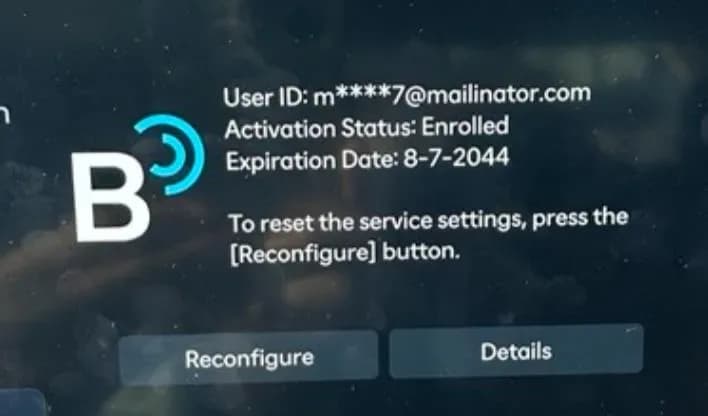
- Select "Activate" or "Reconfigure" to initiate the Bluelink activation process. A loading screen will appear during this time.
- Once activation is complete, verify success by selecting "OK." If Bluelink does not show as activated, the technician must contact Techline for further assistance.
Warranty Information
This service campaign is designated with Operation Code 50D058R1. The estimated operation time for the "Enrollment Status Check and AVN Pinhole Reset" is 0.2 man-hours. The causal part is identified as NTF00-00000. Dealers are instructed to submit claims as "Campaign" type. If any part requires replacement during this procedure, a separate claim should be submitted, adhering to warranty guidelines for in-warranty parts or requesting prior approval for goodwill consideration for out-of-warranty parts.
Owner Action
If you are experiencing issues with your Hyundai Bluelink connectivity, such as a loss of service or interruptions, you should contact your authorized Hyundai dealer. This Service Campaign 9C1 (TSB 25-01-024H-1) is to be performed on all affected vehicles prior to customer retail delivery and whenever an affected vehicle is in the shop for any maintenance or repair. Dealers can check your vehicle's eligibility using the VIN Search on Hyundai Tech Info.
Source: NHTSA ID: 11018575
Galería
8 imágenes
Frequently Asked Questions
- What is Service Campaign 9C1 for Hyundai vehicles?
- Service Campaign 9C1, detailed in TSB 25-01-024H-1, is a Hyundai initiative to address loss of connectivity or interruptions in Bluelink services for various 2016-2025 models. It involves an AVN pinhole reset to restore the connection.
- What are the common symptoms of the Hyundai Bluelink connectivity issue?
- Owners may notice a complete loss of Bluelink service functions or frequent interruptions while using them. These issues are often linked to irregular disconnections from the Verizon communication network.
- How is the Hyundai Bluelink connectivity problem resolved according to TSB 25-01-024H-1?
- The resolution involves an AVN (Audio Video Navigation) pinhole reset procedure. This process reestablishes the connection to the Verizon network, restoring full Bluelink functionality.
- Are there any special requirements for IONIQ vehicles regarding this Bluelink repair?
- Yes, for IONIQ vehicles, the repair procedure must be performed exclusively at IONIQ certified dealers to prevent potential damage, as stated in the service bulletin.
- What should I do if my Hyundai Bluelink is not working?
- If you are experiencing issues with your Hyundai Bluelink connectivity, you should schedule an appointment with an authorized Hyundai dealer. They will perform the necessary diagnostic checks and apply the AVN pinhole reset procedure as part of Service Campaign 9C1.
What Hyundai Tucson owners report
Counted from the records in our database across 22 model years.
- 6,738
- Owner complaints
- 37
- Recalls
- 564
- Service bulletins
- 276
- Crashes reported
- 145
- Fires reported
- 256
- Injuries reported
The 2021 model year
80 complaints, the 18th most of 22 model years on file. Owners reported 2 crashes, 3 fires and 7 injuries for this year, which also has 1 recall on file.
Electrical System, the system this article covers, accounts for 849 of 6,738 complaints (13%), including 12 for 2021.
Complaints by model year
| 2012 | 255 | |
|---|---|---|
| 2013 | 266 | |
| 2015 | 229 | |
| 2016 | 1,626 | |
| 2017 | 1,095 | |
| 2018 | 399 | |
| 2019 | 385 | |
| 2021 | 80 | |
| 2022 | 509 | |
| 2025 | 451 |
Most-reported systems
- Engine — 2,451
- Power Train — 1,273
- Electrical System — 849
- Service Brakes — 761
- Forward Collision Avoidance — 432
Latest recalls for the 2021 model year
- 20V543000 — Service Brakes, Hydraulic (Sep 2020) — Park outside
Recent owner reports about electrical system
loss of info system loss of all dash lights when I turn the engine off most of the time I loose all electrical systems (will not start for at least 15 minutes) if doors lock I can only unlock the drivers door with the auxiliary key.
Read owner complaints →In October 2025, while the vehicle was still under Hyundai’s 5-year warranty, an authorized Hyundai dealership diagnosed a significant electrical failure affecting the ABS/ESC system on my 2021 Hyundai Tucson.
Complaints are owner reports filed with NHTSA. They are unverified, and counts depend on how many vehicles were sold, so they are not a failure rate.
Related Articles
2021 Hyundai Tucson Health Check: Service Bulletins and Issues
The 2021 Hyundai Tucson has no recalls or owner complaints, but several service bulletins address engine emissions, engine bearing wear, and paint peeling. Hyundai has issued software updates and warranty extensions to resolve these concerns.
2021 Hyundai Tucson Emissions Logic Update (9C2)
Hyundai Service Campaign 9C2 addresses elevated engine-out emissions in certain 2021 Hyundai Tucson models by updating the Engine Control Module (ECM) software. This update helps ensure compliance with emissions standards and prevents failed inspections.
2015 Hyundai Sonata GDS Event 1383 Campaign Suspended
Hyundai Motor America has temporarily suspended Service Campaign 9C2, related to software GDS event #1383, for the 2015 Hyundai Sonata (LFA) 2.4L. Vehicles will not show this campaign as open in WebDCS during the suspension period.
2021 Hyundai Tucson GDS Event #1383 Engine Investigation
Hyundai is actively investigating a software-related engine issue, identified as GDS event #1383. While primarily concerning 2015 Sonata 2.4L vehicles, this manufacturer communication is linked by NHTSA to the 2021 Hyundai Tucson, indicating an ongoing review for a resolution.
2010-2021 Hyundai Engine Bearing TSB 26-01-033H
Hyundai Technical Service Bulletin (TSB) 26-01-033H is a critical reference for Op codes and part numbers under Service Campaign T6G. This campaign addresses engine bearing inspection and replacement for various Hyundai models from 2010-2021, often triggered by DTC P1326 and "Abnormal Engine Noise."
Leave a comment
Comments are moderated and may take a moment to appear. Only your first name and the initial of your last name are shown publicly.
Comments
Be the first to comment.