2024-2025 Hyundai Bluelink Connectivity Loss TSB 25-01-018H
Hyundai has issued Service Campaign 9C0 (TSB 25-01-018H) to address instances of Bluelink connectivity loss or interruptions in 2024-2025 models. This bulletin outlines procedures for inspecting and resetting the Data Communication Unit (DCU) network.
 Marcus Weber2025 Hyundai Tucson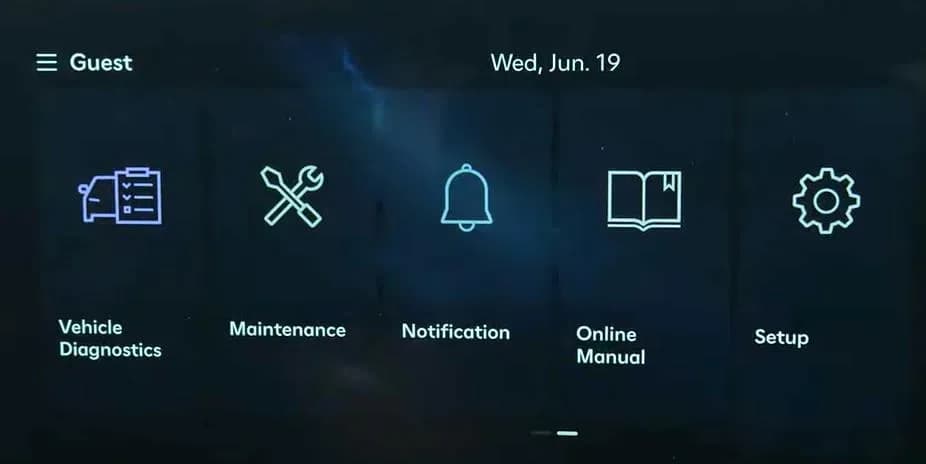
Also applies to
- Hyundai Ioniq 5
- 2025
- Hyundai Kona
- 2024–2025
- Hyundai Santa Cruz
- 2025
- Hyundai Santa Fe
- 2024–2025
- Hyundai Sonata
- 2024–2025
Important Warnings for Owners
Hyundai Service Campaign 9C0 (TSB 25-01-018H) is a critical update for affected vehicles. Dealers are required to perform this service campaign on all impacted vehicles before customer retail delivery and whenever an affected vehicle is brought in for any maintenance or repair.
Owners of affected IONIQ vehicles should note that repairs must be performed at IONIQ certified dealers to prevent any potential damage.
Symptoms of Bluelink Connectivity Loss
Owners of certain 2024-2025 Hyundai models may notice a Hyundai Bluelink connectivity loss or interruptions in the middle of using Bluelink functions. This can manifest as a complete loss of connection or intermittent service disruptions, impacting features that rely on the Bluelink system.
Why This Happens
The primary cause for this Hyundai Bluelink connectivity loss is identified as an occasional disconnection on Verizon's communication network, which affects the vehicle's Bluelink Data Communication Unit (DCU). This service campaign aims to address this by verifying the DCU network connection and, if necessary, resetting the DCU in Dealer Mode.
Repair Procedure Summary
The repair procedure involves two main stages: an initial verification of the Bluelink connection and, if needed, a reset of the DCU network. The process begins by turning on the ignition and navigating through the infotainment system to the Bluelink settings. Technicians will attempt to activate or reconfigure Bluelink. If the message "Bluelink has been activated" appears, the initial verification is complete.
If Bluelink does not activate, the technician proceeds to reset the DCU network. This involves entering a special "Dealer Mode" within the infotainment system. Once in Dealer Mode, the technician selects "Connected Car Service" and then initiates a "Reset Network" command. After the reset, the system is re-verified to ensure Bluelink activation. If the DCU does not reset and Bluelink does not show as activated, technicians are instructed to contact Hyundai Techline.
Required Information for Repair
To access the necessary diagnostic and reset functions, technicians must enter a password to activate "Dealer Mode" in the vehicle's infotainment system. The password required for this procedure is 2400, which applies to all models.
Warranty Information
This service is covered under warranty as a campaign. Dealers should submit claims using the “Campaign” type on the Claim Entry Screen. The specific operation codes and associated details are:
- Initial Verification of Connection
- Op. Code: 50D052R0
- Op. Time: 0.2 M/H
- Causal Part: NTF00-00000
- Nature Code: M73
- Cause Code: ZZ3
- Resetting the DCU Network in Dealer Mode + Verification of Connection After Resetting DCU
- Op. Code: 50D052R1
- Op. Time: 0.3 M/H
- Causal Part: NTF00-00000
- Nature Code: M73
- Cause Code: ZZ3
If any part requires replacement during this campaign and is still under warranty, a separate claim should be submitted. For out-of-warranty parts, a Prior Approval request for goodwill consideration is required before performing the work.
What Owners Should Do
If you own a 2024-2025 Hyundai model listed as affected and are experiencing a Hyundai Bluelink connectivity loss, you should contact your authorized Hyundai dealer. They can check for open campaigns on your vehicle using the "Vehicle Information" screen via WebDCS. Since this is a service campaign, the necessary inspection and reset procedure will be performed free of charge.
Source: NHTSA ID: 11014928
Gallery
11 images
Frequently Asked Questions
- What is Hyundai Service Campaign 9C0 (TSB 25-01-018H) about?
- Hyundai Service Campaign 9C0, also known as TSB 25-01-018H, addresses instances of Bluelink connectivity loss or interruptions in certain 2024-2025 Hyundai vehicles. It provides procedures for inspecting and resetting the Data Communication Unit (DCU) network to restore Bluelink functionality.
- What causes the Hyundai Bluelink connectivity loss?
- The primary cause for the Bluelink connectivity loss is an occasional disconnection on Verizon's communication network, which impacts the vehicle's Bluelink Data Communication Unit (DCU) modem. The service campaign aims to resolve this by resetting the DCU's network connection.
- How can I tell if my Hyundai is affected by this Bluelink issue?
- If you own a 2024-2025 Hyundai model and experience a loss of connectivity or interruptions with your Bluelink services, your vehicle may be affected. You should contact your local Hyundai dealer, who can check for open campaigns on your specific vehicle using its VIN.
- Will I be charged for the Bluelink network inspection and reset?
- No, as this is a service campaign (9C0), the inspection and reset procedure for the Bluelink Data Communication Unit (DCU) network will be performed free of charge by an authorized Hyundai dealer.
- What is the significance of the message "Bluelink has been activated"?
- The message "Bluelink has been activated" indicates that the initial verification of the Bluelink connection was successful, or that the DCU network reset procedure has successfully restored Bluelink functionality. If this message does not appear after the procedure, further diagnosis may be required.
Related Articles
Should 2025 Hyundai Tucson Owners Worry? Recall & TSB Roundup
The 2025 Hyundai Tucson has faced 4 recalls, addressing critical issues like potential engine damage and roll-away risks. Owners should also be aware of 20 service bulletins, many related to software updates for telematics and infotainment systems.
2024-2025 Hyundai Sonata, Tucson DTC P2B59F0 TSB
Hyundai Technical Service Bulletin 26-EM-009H addresses a warning lamp and Diagnostic Trouble Code (DTC) P2B59F0 in 2024-2025 Sonata and Tucson models. This issue, related to the Integrated Thermal Management Module, requires an Engine Control Module (ECM) software update.
2021-2026 Hyundai Front View Camera Warning and Calibration
Hyundai Technical Service Bulletin (TSB) 26-AD-001H details issues with the front view camera in 2021-2026 Hyundai models, leading to warning lights and diagnostic trouble code C272246. This TSB outlines diagnosis and repair procedures for calibration problems.
2025 Hyundai Tucson Inoperative Horn TSB 26-BE-002H
Hyundai has issued Technical Service Bulletin (TSB) 26-BE-002H for 2025 Hyundai Tucson models experiencing an inoperative horn. This TSB outlines a procedure to replace both high and low-pitch horn assemblies due to internal oxidation, ensuring proper vehicle safety.
2025-2026 Hyundai Tucson DCU Software Update TDFC
Hyundai has re-launched Service Campaign TDFC for 2025-2026 Tucson (NX4A) vehicles to correct a Data Communication Unit (DCU) software error. This issue can cause telematics services to shut down after one year. The fix involves a software update, available via OTA for Bluelink subscribers or at a…
Leave a comment
Comments are moderated and may take a moment to appear. Only your first name and the initial of your last name are shown publicly.
Comments
Be the first to comment.