2023 Hyundai AVN Radio App Crash and Warning TSB
Hyundai TSB 24-BE-002H resolves radio app crashes and 'Uneven Road Ahead' warnings in 2023 Elantra, Santa Fe, and Tucson vehicles equipped with the AVN 5th Gen Wide system through a software update.
 Ahmet Topcu2023 Hyundai Tucson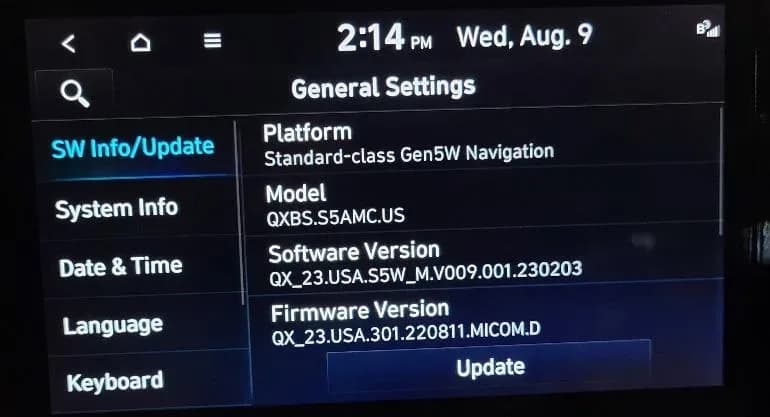
Also applies to
- Hyundai Elantra
- 2023
- Hyundai Santa Fe
- 2023
Hyundai has released Technical Service Bulletin (TSB) 24-BE-002H, dated January 2024, to address a software issue affecting the AVN 5th Gen Wide infotainment system in certain 2023 Hyundai Elantra, Santa Fe, and Tucson models. This bulletin provides a software update to resolve instances of the radio application crashing and an "Uneven Road Ahead, Drive carefully" warning appearing on the instrument cluster. Owners experiencing a Hyundai AVN radio app crash or this specific warning should have their vehicle's software updated.
Applicable Vehicles
| Year | Make | Model |
|---|---|---|
| 2023 | Hyundai | Tucson |
| 2023 | Hyundai | Santa Fe |
| 2023 | Hyundai | Elantra |
This TSB specifically applies to 2023 Hyundai Elantra (CN7a) vehicles produced between December 6, 2022, and May 26, 2023, 2023 Hyundai Santa Fe (TMa) vehicles produced from November 17, 2022, to August 9, 2023, and 2023 Hyundai Tucson (NX4a) vehicles produced from November 29, 2022, to July 18, 2023.
Symptoms
Owners of affected vehicles may observe the following symptoms related to the AVN 5th Gen Wide system:
- The radio application frequently crashes when the system is in radio mode.
- A message stating "Uneven Road Ahead, Drive carefully" appears on the instrument cluster.
- A warning sound accompanies the "Uneven Road Ahead, Drive carefully" message.
These symptoms indicate a potential software malfunction that can be resolved with the update outlined in TSB 24-BE-002H.
Important Warnings for Owners
It is crucial to be aware of specific conditions during the software update process to prevent damage or incomplete installation:
- Do not remove the USB drive, or turn off the ignition switch during the update. Interrupting the update can prevent its completion and potentially lead to data loss or system failure.
- During the update, the Hyundai logo may appear multiple times, or the display may temporarily go black. This is considered normal behavior.
- The update will continue even if the vehicle is turned off. However, during the update, certain features, including the rear camera and audio, will be restricted.
Repair Procedure Summary
The resolution for the Hyundai AVN radio app crash and warning message involves updating the AVN system software using a USB drive. The procedure, performed by a qualified technician, includes these general steps:
- Ensure the vehicle's battery is sufficiently charged and the ignition switch is turned to the 'ON' position.
- Access the AVN system's 'Setup' menu and navigate to 'General' settings.
- Check the current software version. If the version is 221011, 221025, 221115, 221220, or 221228, the update is required.
- Insert the appropriate USB drive containing the software update into the USB slot.
- Select 'Update' from the system menu and then 'Start' to begin the software installation.
- After the update is complete, verify that the software version has been successfully updated to 230203.
This process, identified by Operation Code 30DA22R0, takes approximately 0.3 hours to complete.
Required Parts
Dealers will use specific USB drives for the software update:
- RADIOSWUPDATEA: For Elantra (CN7a) and Santa Fe (TMa) models.
- RADIOSWUPDATEB: For Tucson (NX4a) models.
Each dealer has received one free USB stick for each part number, which can be used for multiple vehicles. In cases where a part replacement is needed and is under warranty, a separate claim should be submitted. If the part is out of warranty, a Prior Approval request for goodwill consideration is required.
Owner Action
If you own a 2023 Hyundai Elantra, Santa Fe, or Tucson and are experiencing a Hyundai AVN radio app crash or the "Uneven Road Ahead, Drive carefully" warning, you should contact your authorized Hyundai dealer. Inform them about the symptoms and reference TSB 24-BE-002H. The software update will be performed under warranty as a campaign-type claim.
Source: NHTSA ID: 10251278
Gallery
10 images
Frequently Asked Questions
- What is Hyundai TSB 24-BE-002H about?
- Hyundai TSB 24-BE-002H addresses a software issue in the AVN 5th Gen Wide infotainment system that causes the radio app to crash and triggers an "Uneven Road Ahead, Drive carefully" warning message in certain 2023 Hyundai Elantra, Santa Fe, and Tucson vehicles.
- What are the common symptoms of the AVN software issue?
- Owners may experience the radio application crashing frequently when in radio mode, and see a message that reads "Uneven Road Ahead, Drive carefully" on the cluster, often accompanied by a warning sound. This is the Hyundai AVN radio app crash symptom.
- How is the Hyundai AVN radio app crash and warning message fixed?
- The issue is resolved by performing a software update on the AVN 5th Gen Wide system using a specific USB drive. This update brings the software version to 230203 and is typically performed by a Hyundai dealer.
- Which Hyundai models are affected by TSB 24-BE-002H?
- This TSB applies to specific production ranges of the 2023 Hyundai Elantra (CN7a), 2023 Hyundai Santa Fe (TMa), and 2023 Hyundai Tucson (NX4a) equipped with the AVN 5th Gen Wide system.
- Are there any precautions to take during the AVN software update?
- Yes, it is critical not to remove the USB drive or turn off the ignition switch while the update is in progress, as this can lead to data loss or system failure. The vehicle's battery should also be sufficiently charged before starting the update.
Related Articles
Should 2023 Hyundai Tucson Owners Worry? Fire Risk & TSBs
The 2023 Hyundai Tucson faces a significant fire risk recall (NHTSA ID 23V526000) related to its Idle Stop & Go oil pump. Additionally, owners may encounter various issues addressed by service bulletins, including engine misfires, Check Engine Light warnings, Bluelink connectivity problems, and…
2022-2023 Hyundai Tucson Check Engine Light DTC P218100
Hyundai has issued Technical Service Bulletin 26-EM-004H for 2022-2023 Tucson (NX4, NX4A) vehicles experiencing a Check Engine Light due to DTCs P218100, P2181F0, or P2181F1. The fix involves replacing the Integrated Thermal Management (ITM) module and updating the Engine Control Module (ECM) and…
2021-2023 Hyundai Misfire DTCs TSB 26-FL-001H
Hyundai Technical Service Bulletin 26-FL-001H addresses engine misfire diagnostic trouble codes (DTCs) P0300, P0301, P0302, P0303, and P0304 in certain 2021-2023 Hyundai Santa Fe, Santa Cruz, Sonata, and Tucson vehicles. The issue stems from internally leaking GDI fuel injectors.
2022-2024 Hyundai Santa Cruz / Tucson Manual Speed Limit Assist
This communication explains the Manual Speed Limit Assist (MSLA) feature in 2022-2024 Hyundai Santa Cruz and Tucson vehicles, detailing its function, activation, and how it helps drivers maintain speed limits.
2021-2025 Hyundai Bluelink Connectivity AVN Pinhole Reset
Hyundai has issued Service Campaign 25-01-024H to address a loss of Bluelink connectivity or interruptions in service functions. This issue, often linked to Verizon's network, is resolved by performing an AVN pinhole reset.
Leave a comment
Comments are moderated and may take a moment to appear. Only your first name and the initial of your last name are shown publicly.
Comments
Be the first to comment.