2021 Hyundai Wireless CarPlay Disconnection TSB
Hyundai has released Technical Service Bulletin 21-BE-002H to address intermittent Wireless CarPlay disconnections in certain 2021 Elantra, Sonata, Palisade, and Venue models. This update helps reduce instances of the "Phone Not Responding" message.
 Sarah Mitchell2021 Hyundai Elantra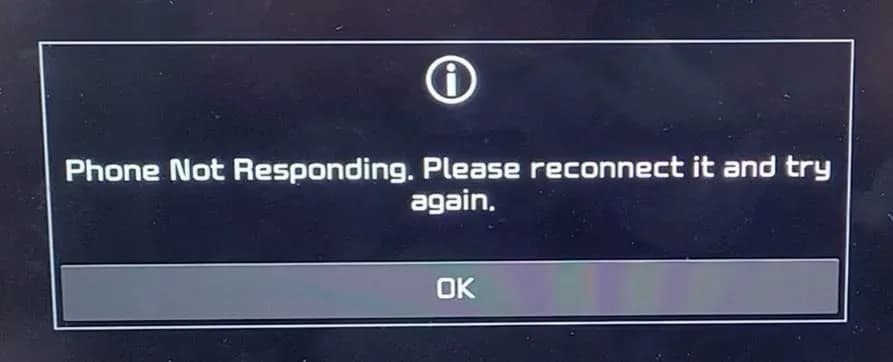
Si applica anche a
- Hyundai Palisade
- 2021
- Hyundai Sonata
- 2021
- Hyundai Venue
- 2021
Owners of certain 2021 Hyundai Elantra, Sonata, Palisade, and Venue models equipped with display audio may experience intermittent Wireless CarPlay disconnections. This issue is detailed in Hyundai Technical Service Bulletin (TSB) 21-BE-002H, which outlines a software update designed to reduce these occurrences.
Symptoms
When using Wireless CarPlay, the system may unexpectedly disconnect. This disconnection is typically accompanied by a pop-up message on the radio screen stating, "Phone Not Responding. Please reconnect it and try again". This can interrupt navigation, music playback, and communication features.
Diagnosis / Trigger Conditions
The TSB indicates that the disconnection phenomenon is primarily caused by Apple iOS software intermittently pausing data transmission. This interruption leads to communication issues between the vehicle's radio and the CarPlay system. The software update provided by Hyundai aims to mitigate these disconnections until Apple releases its own software update to fully correct the condition.
Repair Procedure Summary
The repair involves updating the radio software using a specific USB stick. The general steps are:
- Turn the engine ON and wait for the radio to fully load.
- Access the system information screen by pressing and holding the SETUP button, then selecting "SW Info/Update" if prompted.
- Verify the current software version matches an older version listed in the TSB's software table. If it does not match, the update should not be performed.
- Insert the correct Software Update USB stick, specific to the vehicle model, into the USB port.
- Press the 'Update' button on the screen to begin the process.
- Confirm the last six digits of the new software version on the screen match the new version listed in the TSB's table and select 'YES' to start.
- The update will take approximately 15 minutes. Once completed, the system will restart, and the radio mode screen will display.
- After the update, confirm the new software version matches the table. If not, ensure the correct USB was used and repeat the process.
- Remove the Software Update USB from the port.
Software Versions
The update brings the radio software to the following new versions:
| Model | Before Update (Old Version Examples) | After Update (New Version) |
|---|---|---|
| Palisade (LX2) | LX2.USA.D2V.001.001.200507, LX2.USA.D2V.001.002.200611, LX2.USA.D2V.002.100.200724 | LX2.USA.D2V.002.100.201016 |
| Venue (QX) | QX.USA.D2V.002.100.200624, QX.USA.D2V.002.100.200805, QX.USA.D2V.002.100.200907 | QX.USA.D2V.002.100.201113 |
| Sonata (DN8) | DN8.USA.D2V.002.001.200514, DN8.USA.D2V.002.101.200805 | DN8.USA.D2V.002.101.201119 |
| Sonata Hybrid (DN8 HEV) | DN8_HEV.USA.D2V.002.001.200514, DN8_HEV.USA.D2V.002.100.200723 | DN8_HEV.USA.D2V.002.100.201119 |
| Elantra (CN7/CN7a) | CN7.USA.D2V.001.001.200803 | CN7.USA.D2V.001.002.201019 |
Required Tools or Parts
The software update requires a specific USB stick for each model. One of each software update USB stick has been shipped to Hyundai dealerships. Additional sticks can be purchased through the normal parts ordering process.
- Elantra (CN7a, CN7): 96300-CN7IOS
- Sonata (DN8/DN8 HEV): 96300-DN8IOS
- Palisade (LX2): 96300-LX2IOS
- Venue (QX): 96300-QXIOS
Important Warnings
During the software update process, it is crucial to follow these guidelines:
- Do not press buttons on the center console.
- Do not remove the USB stick from the port.
- Do not turn the vehicle OFF while the update is running.
It is normal for the screen to turn black, display the Hyundai logo, and show various messages throughout the updating process. Interrupting the update by turning off power or ejecting the USB device can lead to data loss.
Troubleshooting
If the update process is interrupted, specific steps should be followed:
- If the engine/ignition is turned OFF during the update: Do not remove the USB. Turn the ignition ON. The system will reboot, recognize the USB, and restart the update automatically.
- If the USB is removed during the update: An error message will display. Reinsert the USB into the vehicle's USB port, select 'OK', and the system will reboot and restart the update from the beginning.
Owner Action
If you are experiencing a Hyundai Wireless CarPlay disconnection in your 2021 Elantra, Sonata, Palisade, or Venue, you should contact your authorized Hyundai dealer. They will be able to perform the radio software update under warranty using operation code 96160Q0A, which is listed as a D-AUDIO 2.0V SOFTWARE UPDATE with an estimated time of 0.3 hours.
Source: NHTSA ID: 10188242
Galleria
6 immagini
Frequently Asked Questions
- What is the primary cause of the Hyundai Wireless CarPlay disconnection issue?
- The intermittent Wireless CarPlay disconnection issue in 2021 Hyundai models is primarily caused by Apple iOS software intermittently pausing data transmission, which interrupts communication between the radio and CarPlay.
- What message will I see if my Hyundai Wireless CarPlay disconnects?
- If your Wireless CarPlay disconnects, you will typically see a pop-up message on your radio screen that says, "Phone Not Responding. Please reconnect it and try again".
- How can I fix the Hyundai Wireless CarPlay disconnection problem?
- The problem can be addressed by a radio software update, as detailed in Hyundai TSB 21-BE-002H. You should visit your authorized Hyundai dealer to have this update performed. The operation code for this update is 96160Q0A.
- What should I avoid doing during the software update for Wireless CarPlay?
- During the software update, it is crucial not to press any buttons on the center console, remove the USB stick, or turn the vehicle off. Doing so can interrupt the update and potentially lead to data loss.
Related Articles
2021-2025 Hyundai P218100 Cooling System Performance TSB
Hyundai has issued Technical Service Bulletin 25-EM-007H for 2021-2025 Elantra, Kona, and Sonata Hybrid models with 2.0L engines. This bulletin addresses a P218100 cooling fault related to the Integrated Thermal-Management Module (ITM), requiring a thermostat spring installation and an ECU…
2021-2025 Hyundai Elantra Inoperable Horn Warranty Extension
Hyundai has issued a warranty extension for certain 2021-2025 Elantra, Elantra N, and Elantra Hybrid vehicles experiencing an inoperable horn. The coverage is now 10 years or 120,000 miles, and repairs will be performed free of charge under TSB 25-BE-005H-2.
2021-2025 Hyundai Elantra Inoperable Horn Warranty Extension
Hyundai has issued a warranty extension (TSB 25-BE-005H-1) for 2021-2025 Hyundai Elantra vehicles that may experience an inoperable horn. This extension covers horn assembly replacement for up to 10 years or 120,000 miles at no cost to owners.
2021-2025 Hyundai Elantra Inoperable Horn TSB
Hyundai Technical Service Bulletin 25-BE-005H-1 addresses an inoperable horn condition in 2021-2025 Hyundai Elantra, Elantra N, and Elantra Hybrid vehicles. The manufacturer is extending the warranty for horn replacement to 10 years or 120,000 miles.
2021 Hyundai Elantra Engine Stall TSB
Hyundai has released Technical Service Bulletin 23-01-006H for 2021 Elantra vehicles equipped with the 2.0L MPI IVT. This bulletin addresses a potential engine stall condition that may occur after Forward Collision Avoidance (FCA) activation by updating the Transmission Control Unit (TCU) software.
Leave a comment
Comments are moderated and may take a moment to appear. Only your first name and the initial of your last name are shown publicly.
Comments
Be the first to comment.