2023-2025 Honda CR-V Rear Camera Black and White Image TSB
Honda Service Bulletin 25-071 describes a condition where the rear camera in 2023-2025 Honda CR-V models may intermittently display a black and white image. This issue is resolved by updating the audio unit software.
 Ahmet Topcu2025 Honda CR-V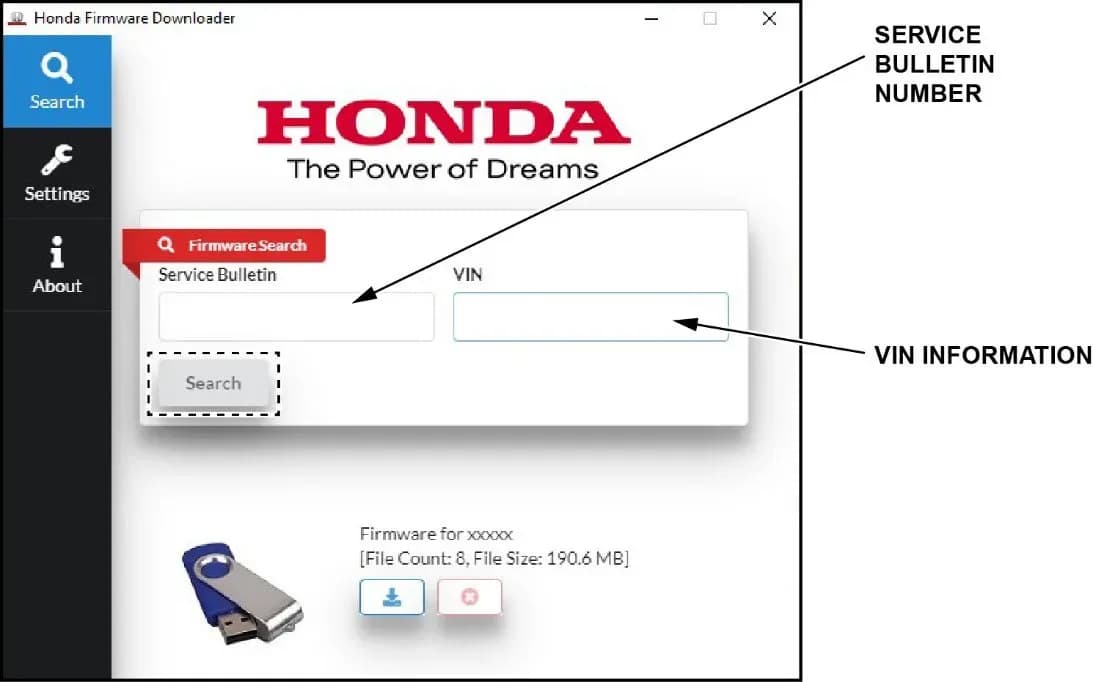
Si applica anche a
- Honda CR-V
- 2023–2024
Owners of 2023-2025 Honda CR-V and CR-V Hybrid vehicles may experience an issue where the rear camera intermittently displays a black and white image instead of color. This condition, described in Honda Service Bulletin 25-071, can switch between color and black and white displays while the vehicle is in reverse.
This bulletin, identified as 25-071 Version 2 and superseding Version 1 dated August 13, 2025, provides a software update to correct the problem. If you are experiencing a Honda CR-V rear camera black and white display, a software update is likely the solution.
Symptoms
The primary symptom is the rear camera displaying a black and white image when the vehicle is shifted into reverse. This display issue may occur intermittently, with the image sometimes reverting to color and then back to black and white.
Possible Cause
Honda has identified the cause as an incorrect software threshold setting within the audio unit for the rear camera. When the color burst signal from the camera is low, this misconfigured software threshold processes the image as black and white, leading to the Honda CR-V rear camera black and white display.
Important Warnings for Owners and Technicians
Several critical warnings are highlighted in Service Bulletin 25-071 to ensure a successful and safe software update:
- Loss of power during the update can cause irreparable damage to the audio unit. It is crucial to maintain constant voltage throughout the entire update procedure, typically by connecting a battery charger like the Midtronics DCA-8000 or Associated Equipment Corporation ESS6100.
- Do NOT disconnect the USB flash drive until the software update is complete. Interrupting the update can corrupt the audio unit software.
- If a "TIMEOUT err" or "UNDEF err" message appears during the download process, check the USB flash drive for damage or try a new one.
- Only proceed with the audio unit software update if the software information on the screen matches the information table provided in the bulletin. Updating with incorrect software will damage the audio unit and require unit replacement.
- The update process can take approximately 32 minutes, including software checking and updating.
Repair Procedure Summary
The corrective action involves updating the audio unit software using a USB flash drive. The general steps are:
- Preparation: Ensure no devices are connected to the vehicle's USB ports. Connect a suitable battery charger to maintain constant voltage and apply the parking brake to keep headlights off.
- Access Diagnostic Menu: With the audio unit off, simultaneously press and hold the PHONE and CONNECT buttons, then press the VOL/AUDIO knob five times to enter the diagnostic menu.
- Check Current Software: Navigate to System and then Version to check the current SW Version and Video Processor versions. The target versions are 01.10.030 and 01.01.058, respectively.
- Download Firmware: Use the Honda Firmware Downloader on a computer to download the latest software (H1P2Z047.kwi for bulletin 25-071) onto a FAT32-formatted USB-A flash drive. Enter the service bulletin number and the vehicle's VIN (in CAPS) into the downloader.
- Update Audio Unit: Insert the prepared USB flash drive into the vehicle's USB data port (not a charging port). In the diagnostic menu, select System, then Software Update. Confirm the update when prompted. The update process will take about 32 minutes.
- Confirmation: After the update, the unit will reboot. Re-enter the diagnostic menu to confirm the software versions have been updated to 01.10.030 and 01.01.058.
Required Tools or Parts
To perform this software update, technicians will need:
- A commercially available USB-A Flash Drive, formatted to FAT32.
- A battery charger capable of maintaining constant voltage, such as the Midtronics DCA-8000 Dynamic Diagnostics Charging System (in Reflash Mode) or the Associated Equipment Corporation ESS6100 100A Smart Charger (in Power Supply Mode | DIAG+).
Warranty Information
This software update is covered under warranty using the following details:
- Operation Number: 0100A1
- Description: Update the audio unit software
- Flat Rate Time: 0.3 hours
- Defect Code: 03265
- Symptom Code: 03273
- Template ID: A25071A
- Failed Part Number: 8A100-3A0-A02
Software Versions
To resolve the Honda CR-V rear camera black and white issue, the audio unit's software must be updated. The original software versions that may exhibit this issue are SW Version 01.10.030 and Video Processor 01.01.058. The update file for Service Bulletin 25-071 is H1P2Z047.kwi, which will bring the software to the corrected versions.
NHTSA ID: 11023132
FAQs
Q1: What is Honda Service Bulletin 25-071 about?
A1: Honda Service Bulletin 25-071 addresses an issue in 2023-2025 Honda CR-V and CR-V Hybrid vehicles where the rear camera may intermittently display a black and white image when in reverse, instead of a color image.
Q2: What causes the rear camera to display a black and white image in my Honda CR-V?
A2: The black and white display is caused by an incorrect software threshold setting in the audio unit. When the color burst signal from the rear camera is low, this software processes the image in black and white.
Q3: How is the black and white rear camera display fixed according to TSB 25-071?
A3: The issue is resolved by updating the audio unit software using a USB flash drive. This procedure involves downloading a specific firmware file (H1P2Z047.kwi) and installing it through the vehicle's diagnostic menu.
Q4: Are there any specific warnings I should be aware of regarding this software update?
A4: Yes, it is critical to maintain constant power to the vehicle during the update to prevent irreparable damage to the audio unit. Also, ensure the correct software is used, and do not disconnect the USB drive prematurely. The bulletin also warns against updating with incorrect software, which would require unit replacement.
Q5: What are the relevant codes for this repair?
A5: The warranty claim information for this repair includes Defect Code 03265, Symptom Code 03273, and Template ID A25071A. The failed part number is 8A100-3A0-A02, and the bulletin itself is 25-071.
Galleria
26 immagini
Frequently Asked Questions
- What is Honda Service Bulletin 25-071 about?
- Honda Service Bulletin 25-071 addresses an issue in 2023-2025 Honda CR-V and CR-V Hybrid vehicles where the rear camera may intermittently display a black and white image when in reverse, instead of a color image.
- What causes the rear camera to display a black and white image in my Honda CR-V?
- The black and white display is caused by an incorrect software threshold setting in the audio unit. When the color burst signal from the rear camera is low, this software processes the image in black and white.
- How is the black and white rear camera display fixed according to TSB 25-071?
- The issue is resolved by updating the audio unit software using a USB flash drive. This procedure involves downloading a specific firmware file (H1P2Z047.kwi) and installing it through the vehicle's diagnostic menu.
- Are there any specific warnings I should be aware of regarding this software update?
- Yes, it is critical to maintain constant power to the vehicle during the update to prevent irreparable damage to the audio unit. Also, ensure the correct software is used, and do not disconnect the USB drive prematurely. The bulletin also warns against updating with incorrect software, which would require unit replacement.
- What are the relevant codes for this repair?
- The warranty claim information for this repair includes Defect Code 03265, Symptom Code 03273, and Template ID A25071A. The failed part number is 8A100-3A0-A02, and the bulletin itself is 25-071.
Related Articles
2025 Honda CR-V Health Check: Recalls and Bulletins
The 2025 Honda CR-V currently has no recalls or owner complaints. However, Honda has issued numerous service bulletins, primarily addressing an active investigation into A/C compressor seizure, as well as issues with the LKAS warning light, rear cameras, and fuel fill door clips.
2024-2026 Honda Civic, CR-V, HR-V A/C Compressor Seizure
American Honda Motor Co., Inc. (AHM) is actively seeking specific 2024-2026 Honda Civic, CR-V, and HR-V vehicles that exhibit an A/C compressor seizure and fail to blow cold air. This initiative, identified as a 'Request for visit: 2024-2026 Civic, CR-V & HR-V A/C Compressor Seizure (ACTION…
2023-2026 Honda CR-V LKAS Warning Light in Reverse TSB 23-021
Honda Service Bulletin 23-021 details a software update to fix the "LKAS warning light is on when driving in reverse" issue in 2023-2026 CR-V and CR-V Hybrid vehicles. This resolves false detection logic in the camera system.
2024-2026 Honda Civic, CR-V, HR-V A/C Compressor Seizure
Honda is seeking specific 2024-2026 Civic, CR-V, and HR-V vehicles with A/C compressor seizure for inspection. If your A/C is not blowing cold air and a technician confirms a seized compressor, your vehicle may qualify for a special program.
2024-2026 Honda Civic, CR-V, HR-V A/C Compressor Seizure
American Honda Motor Co., Inc. (AHM) is actively seeking specific 2024-2026 Honda Civic, CR-V, and HR-V vehicles experiencing A/C compressor seizure, leading to a lack of cold air. This initiative aims to understand the root cause of the issue before any repairs are attempted.
Leave a comment
Comments are moderated and may take a moment to appear. Only your first name and the initial of your last name are shown publicly.
Comments
Be the first to comment.