2022-2023 Audi e-tron GT / RS e-tron GT Software Update & AC Sensor TSB 91VT
Audi Technical Service Bulletin 91VT UPDATE addresses multiple issues in 2022-2023 e-tron GT and RS e-tron GT vehicles, including air conditioning sensor failures, gearbox lock malfunctions, and high-voltage charging problems. This customer satisfaction package involves software updates and, in…

S'applique également à
- Audi e-tron GT
- 2022–2023
- Audi RS e-tron GT
- 2022
Audi has issued Technical Service Bulletin (TSB) 91VT UPDATE, a Customer Satisfaction Package (NVLW), to address several potential issues in 2022-2023 Audi e-tron GT and RS e-tron GT vehicles. This proactive update aims to prevent various conditions related to the air conditioning system, gearbox locking mechanism, and high-voltage charging functionality. Owners of affected vehicles should have this Audi e-tron GT software update 91VT performed by an authorized Audi dealer.
Symptoms
This 91VT UPDATE addresses the following potential conditions that owners might experience:
- Air Conditioning Malfunction (Criteria K1): Air conditioning pressure/temperature sensors (G395, G826, G827) may fail, leading to a non-functional air conditioning system. This issue affects Audi vehicles from a certain production period.
- Gearbox Lock Error (Criteria 01): After turning off the engine by pushing the start/stop button, the gearbox lock could possibly not be in the end position. This can result in the lock no longer releasing and a warning message on the instrument cluster stating, "gearbox error, max 120km/h, go to workshop."
- High-Voltage Charging Issues (Criteria 02): Vehicles may display an unauthorized "Turtle LED" for a short time when the KL15 (ignition) is off, indicating the high-voltage (HV) system is in the state "not ready to drive." This can also result in charging duration loops at less than 100% or charging aborts (indicated by a red LED), making fast charging no longer possible.
- Combined Issues (Criteria 03): This applies to vehicles experiencing both the gearbox lock error (Criteria 01) and the high-voltage charging issues (Criteria 02).
Important Warnings and Advisories
Audi has provided several critical warnings and instructions for technicians and owners regarding this update:
- Vehicle Eligibility Verification: The ELSA Campaign/Action Information screen is the only valid source for verifying vehicle eligibility for this update. Other systems are not valid and may result in non-payment of a claim. The status in ELSA must show "open" on the day of repair.
- Refrigerant Handling During Inspection: During the inspection of AC sensors, technicians are advised, "Do not recover the refrigerant charge during the inspection section." The refrigerant pressure/temperature sensors do not require removal for inspection.
- Refrigerant Handling During Replacement: If replacement is necessary, there is a "Danger of frostbite due to refrigerant coming out under pressure. Frostbite on the skin and other parts of the body is possible." Technicians must wear safety gloves and protective eyewear. It is critical to evacuate or drain refrigerant and open the refrigerant circuit immediately. If more than 10 minutes elapse after extracting or draining the refrigerant and the refrigerant circuit has not been opened, the refrigerant must be extracted or drained again due to pressure developing from evaporation.
- Software Update Connection: The VAS Diagnostics Interface "MUST ONLY be connected to the tester with a USB cable." Performing a software update using a Bluetooth or Wi-Fi connection significantly increases the risk of losing connection, which could result in damage to the control module. Audi will deny requests for additional time or parts if the GFF log shows the update was performed via Bluetooth or WiFi.
- Radiator Fan Safety: "WARNING Radiator Fan(s) may cycle ON high speed during the Update Process! There is a serious risk that personal injury may result if contact is made with spinning fan blades. Keep hands and all objects away from Radiator Fan(s) during Update Process!"
- Battery Charger Use: Technicians must use a battery charger (such as the VAS5908) set to a charging voltage of 14.8V during the software update. It is crucial, "DO NOT change any settings that will damage the charger or the vehicle." An insufficient charging voltage can damage one or more control units. After the software update has been performed, the battery charger must be restored to the original voltage value.
- High-Voltage System Error During Update: If the "High-voltage charging active - precondition not met" error message appears after performing the software update, the high-voltage system must be deactivated, the update performed again, and then reactivated.
- Software Update Failure: If the software update fails for any reason, ODIS feedback must be sent prior to further diagnosis. This ensures the failure/error is reported. Failure to do so may result in non-payment of consequential requests for additional time or parts.
- TAC Case: If the error message "Configuration on control unit 0046 – convenience system central module could not be performed" is displayed during the flashing process, technicians are instructed, "DO NOT create a TAC case as this is not required." They should select option #1 to cancel the configuration and continue with the software update.
- Customer Notification: Dealers are required to "Inform your customer in writing by recording on the Repair Order any and all work that was conducted on the vehicle, including any and all updates completed under this Update."
- Dealer Inventory: The procedure must be performed on applicable vehicles in dealer inventory prior to sale.
Technical Background
This customer satisfaction package, identified as 91VT UPDATE, has been proactively released to address specific conditions identified in certain production periods of Audi e-tron GT and RS e-tron GT vehicles. The issues stem from potential failures in air conditioning pressure/temperature sensors (G395, G826, G827), a gearbox lock mechanism that may not reach its correct end position, and various anomalies within the high-voltage system affecting charging capabilities. The remedies involve either hardware replacement for sensors or software updates for relevant control modules to ensure proper vehicle function and prevent these conditions from manifesting.
Repair Procedure Summary
The repair procedure for the Audi e-tron GT software update 91VT varies based on the specific criteria applicable to the vehicle. All procedures require checking vehicle eligibility in ELSA and ensuring all open campaigns are performed, starting with the oldest first.
AC Sensor Inspection and Replacement (Criteria K1)
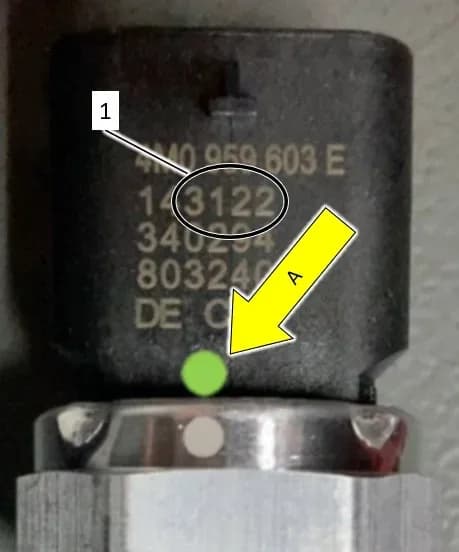
For vehicles exhibiting air conditioning issues, the procedure involves inspecting the G395, G826, and G827 refrigerant pressure/temperature sensors. These sensors are located in various positions, as shown in the document's figures (e.g., sensor 1 near the top left, sensor 2 below it, sensor 3 on the right side of the engine bay). Technicians will look for a green dot on all three sensors. If a green dot is present on all sensors, no replacement is needed. If a green dot is NOT present, the production date of the sensor is checked (e.g., as shown in the document's figure of a sensor labeled with a production date like '340204' indicating week 34 of 2020). Sensors produced on or before calendar week 31 of 2021 require replacement. The replacement process involves evacuating the refrigerant, replacing the affected sensor(s) (part number 4M0-959-603-E), and recharging the A/C system with R1234yf refrigerant. Reassembly involves specific torque specifications: wheel bolts to 160 Nm, luggage compartment light bracket bolt to 3 Nm, luggage compartment bolts to 8 Nm, and wiper arm nuts to 30 Nm.
Software Update Preparation
Before any software update, several critical steps must be followed:
- Diagnostic Scan: Perform a full diagnostic scan using GFF (Guided Fault Finding) and send the diagnostic protocol online. The diagnostic session should be saved so it can be restored later if needed.
- Bus Sleep: After the diagnostic scan, perform a bus sleep for at least five minutes. This involves disconnecting the 12V charger and diagnostic interface, closing all doors, the hood, and the rear lid, locking the vehicle, and waiting for all interior lighting to turn off.
- Power Management: Switch off all vehicle consumers (air conditioning, heater blower motor, lights, heated seats, etc.). Reconnect the battery charger (e.g., VAS5908) and ensure the voltage is above 14V, as displayed on the ODIS tester (e.g., a screen capture shows '14.29 V').
- ODIS and Tester Setup: Ensure the ODIS software is completely up to date. The screen saver and power saving settings on the tester must be off. The VAS Diagnostic Tester must be plugged in using the supplied power adapters, and the diagnostic head must be connected to the ODIS tester via a USB cable. The selector lever must be moved to 'P'.
- Battery Charger Pre-programming: For the VAS5908 battery charger, switch it off and back on. Ensure its display has switched off before restarting. Operate it in charging mode and set it to a charging voltage of 14.8 Volt (access code 6161 may be necessary or activate DIAG+ mode). Do not change any other settings. Customer presets should be documented as a best practice before any update.
- Service Action 93P9: Service Action 93P9 must be performed before completing this software update.
Software Update Process
The software update is performed using the "FLASH" operating mode with a CAN communication path. Technicians select "SVM – Code Input" and enter the appropriate SVM code:
- Criteria 01 and 02: Use SVM code SWVGTA001.
- Criteria 03: Use SVM code 91VTA396.
Follow the on-screen prompts. If a "High-voltage charging active - precondition not met" error message appears after performing the software update, the high-voltage system must be deactivated, the update performed again, and then reactivated. If a "Configuration on control unit 0046 – convenience system central module could not be performed" error occurs during flashing, technicians should select option #1 to cancel the configuration and continue the update without creating a TAC case.
Post-Update Checks
After the software update is complete:
- Instrument Cluster: Check the displays in the instrument cluster; there must not be any fault messages or warning lamps.
- Bus Sleep: Perform another bus sleep for at least five minutes with the 12V charger disconnected.
- Parking Brake Calibration: If warnings or messages in relation to the position of the parking brake are present, perform the test plan "0003 – calibrate parking brake" via guided functions (diagnostic address 0003, as shown in a screen capture of the Guided Functions menu). Confirm that the parking brake position warning/message is no longer present.
- Battery Charger Reset: Restore the battery charger to its original voltage value.
- Diagnostic Log: Ensure the diagnostic log is sent to GFF Paperless after completion.
Required Tools and Parts
Performing the 91VT UPDATE may require the following special tools and parts:
Special Tools
- Battery Tester/Charger: VAS5908 (or equivalent charger with a current rating of at least 90A)
- Diagnostic Tester: VAS6150X/VAS6160X (or equivalent)
- Socket - 24mm: T40284 (or equivalent)
- Engine Bung Set: VAS6122 (or equivalent)
- R1234yf Air Conditioning Service Unit: ROB1234YFX or VAS581005
- Removal Wedge: T40233 (or equivalent)
- Scraper Set: VAS6845
- Omega Clip Tool: T40280 (or equivalent)
- Puller - Windshield Wiper: T40394
Parts
- AC Pressure Sensor: Part Number 4M0-959-603-E (up to 3 units)
- Oil Refrigerant: Part Number G-052-535-M2 (up to 1.6 ml)
- R1234yf Refrigerant: (up to 98g, locally sourced)
Warranty Information
This is a customer satisfaction package, and the work performed under TSB 91VT UPDATE is covered under the New Vehicle Limited Warranty. The Service Number for this action is 91VT, with Damage Code 0099 and Parts Vendor Code 002. The Claim Type is 7 10 for sold vehicles and 7 90 for unsold vehicles. Causal indicators include "Mark labor as causal" (for vehicles not assigned K1), "Mark labor as causal if all SENSORS are OK," or "Mark any SENSOR* as causal if any sensors are NOT OK." Dealers must ensure the SVM Process is completed entirely for the database to receive update confirmation, as warranty claims may be denied without this confirmation. Owners should note that "Do not claim wash/loaner under this action."
Labor operations and time units vary by criteria:
| Labor Op | Time Units | Description |
|---|---|---|
| 2706 89 50 | SEE ELSA | Battery charge |
| 0151 00 40 | 100 | Software update (includes preliminary and follow-up work) |
| 9310 83 00 | SEE ELSA | Disable HV system voltage deactivate and activate |
| 0150 00 60 | Time stated on diagnostic protocol | GFF/Guided functions |
| 4405 19 51 | SEE ELSA | 1 Wheel remove+reinstall |
| 6644 19 50 | SEE ELSA | Cowl panel trim remove+reinstall |
| 7007 19 50 | SEE ELSA | Storage compartment remove+reinstall |
| 8709 01 99 | 15 | Check 3 pressure sensors |
| 8703 17 00 | SEE ELSA | Refrigerant drain+fill |
| 8709 20 50 | SEE ELSA | 3 Pressure switch remove+reinstall (use if all sensors replaced) |
| 8709 19 50 | SEE ELSA | Pressure switch remove+reinstall (if G395 replaced) |
| 8709 19 51 | SEE ELSA | Pressure switch remove+reinstall (if G826 replaced) |
| 8709 19 52 | SEE ELSA | Pressure switch remove+reinstall (if G827 replaced) |
Source: NHTSA ID: 11009268
Galerie
14 images
Frequently Asked Questions
- What is Audi TSB 91VT UPDATE?
- Audi TSB 91VT UPDATE is a Customer Satisfaction Package (NVLW) issued for 2022-2023 Audi e-tron GT and RS e-tron GT vehicles. It addresses potential issues with air conditioning sensors, gearbox lock mechanisms, and high-voltage charging systems through software updates and, if necessary, sensor replacement.
- What are the symptoms addressed by the Audi e-tron GT software update 91VT?
- The TSB addresses several symptoms, including a non-functional air conditioning system due to sensor failure, a gearbox lock that doesn't release accompanied by a "gearbox error, max 120km/h, go to workshop" warning, and high-voltage charging problems such as a "not ready to drive" state, charging loops, or inability to fast charge.
- Will I receive a notification for this 91VT UPDATE?
- This is a customer satisfaction package. While not a recall, Audi dealers are instructed to inform customers in writing about any work performed under this update. It's advisable to contact your authorized Audi dealer to check if your vehicle is affected and if the update has been applied.
- Are there any risks during the software update process?
- Yes, there are several risks if proper procedures are not followed. These include potential damage to control units from insufficient battery voltage or using Bluetooth/Wi-Fi connections instead of a wired USB connection for the diagnostic tester. Additionally, radiator fans may cycle at high speed, posing a personal injury risk if hands or objects are near them.
- What parts might be replaced under this TSB?
- If your vehicle experiences air conditioning issues related to Criteria K1, the G395, G826, or G827 AC pressure sensors (part number 4M0-959-603-E) may need to be replaced. Refrigerant oil (G-052-535-M2) and R1234yf refrigerant would also be used during this repair.
What Audi RS e-tron GT owners report
Counted from the records in our database across 3 model years.
- 7
- Owner complaints
- 8
- Recalls
- 1,057
- Service bulletins
- 1
- Crashes reported
- 0
- Fires reported
- 0
- Injuries reported
The 2023 model year
2 complaints, the 2nd most of 3 model years on file. Owners reported 0 crashes, 0 fires and 0 injuries for this year, which also has 8 recalls on file.
Complaints by model year
| 2022 | 4 | |
|---|---|---|
| 2023 | 2 | |
| 2024 | 1 |
Most-reported systems
- Back Over Prevention — 2
- Power Train — 2
- Electrical System — 1
- Forward Collision Avoidance — 1
- Fuel/Propulsion System — 1
Latest recalls for the 2023 model year
- 25V900000 — Back Over Prevention (Dec 2025)
- 25V227000 — Air Bags (Apr 2025)
- 24V726000 — Electrical System (Sep 2024)
Recent owner reports
I had owned my car as the first owner. Within the first year of ownership, I experienced my first suspension failure. It happened when I drove my car during an off day to run some errands, driving locally at daytime with normal speeds.
Read owner complaints →I have had multiple instances of brake failure while driving this car and it is to a point where I've been directed by my attorney to not drive the vehicle anymore.
Complaints are owner reports filed with NHTSA. They are unverified, and counts depend on how many vehicles were sold, so they are not a failure rate.
Related Articles
2022-2024 Audi e-tron GT / RS e-tron GT Door Paint Damage TSB
If your 2022-2024 Audi e-tron GT or RS e-tron GT has paint damage on the front door, it may be due to the door colliding with the wing panel trim. Technical Service Bulletin 2072290/2 describes the cause and repair procedure for this issue.
2022-2024 Audi e-tron GT Radiator Fan Stuck DTC P2B3000
Audi Technical Service Bulletin 2073599/4 details issues with radiator fans getting stuck (DTCs P2B3000, P2B3200) in 2022-2024 Audi e-tron GT and RS e-tron GT vehicles. This can lead to reduced heating, cooling, drive power, and charging capacity due to foreign objects.
2023 Audi e-tron GT Charging Port Door Not Opening TSB
Audi Technical Service Bulletin (TSB) 2070578/3 provides diagnostic and repair information for 2023 Audi e-tron GT and RS e-tron GT vehicles where the charging port door fails to open or close, or displays incorrect status messages. The issue is typically linked to a faulty charging port door…
2022-2024 Audi e-tron GT High-Voltage Charger Conversion TSB
Audi has issued Technical Service Bulletin (TSB) 11022683 for 2022-2024 e-tron GT and RS e-tron GT models. This bulletin provides information on converting the high-voltage battery charger from a 22kW to an 11kW configuration.
2023-2024 Audi e-tron GT High-Voltage Battery Software Update
Audi has released Technical Service Bulletin 931D, an update for the high-voltage battery diagnostic software in 2023-2024 e-tron GT and RS e-tron GT models. This update addresses potential irregularities indicated by a warning lamp in the instrument cluster.
Leave a comment
Comments are moderated and may take a moment to appear. Only your first name and the initial of your last name are shown publicly.
Comments
Be the first to comment.