2026 Audi MMI and Emergency Call Software Update TSB
Audi has released Technical Service Bulletin (TSB) 2081193/1 to address various MMI functions issues and an "Emergency call fault" message in 2026 Audi A6, RS 6, RS 7, A8, S8, Q7, SQ7, Q8, SQ8, and RS Q8 models. The fix involves a software update for the MMI, AED2, and connectivity box control…
 Sarah Mitchell2026 Audi Q8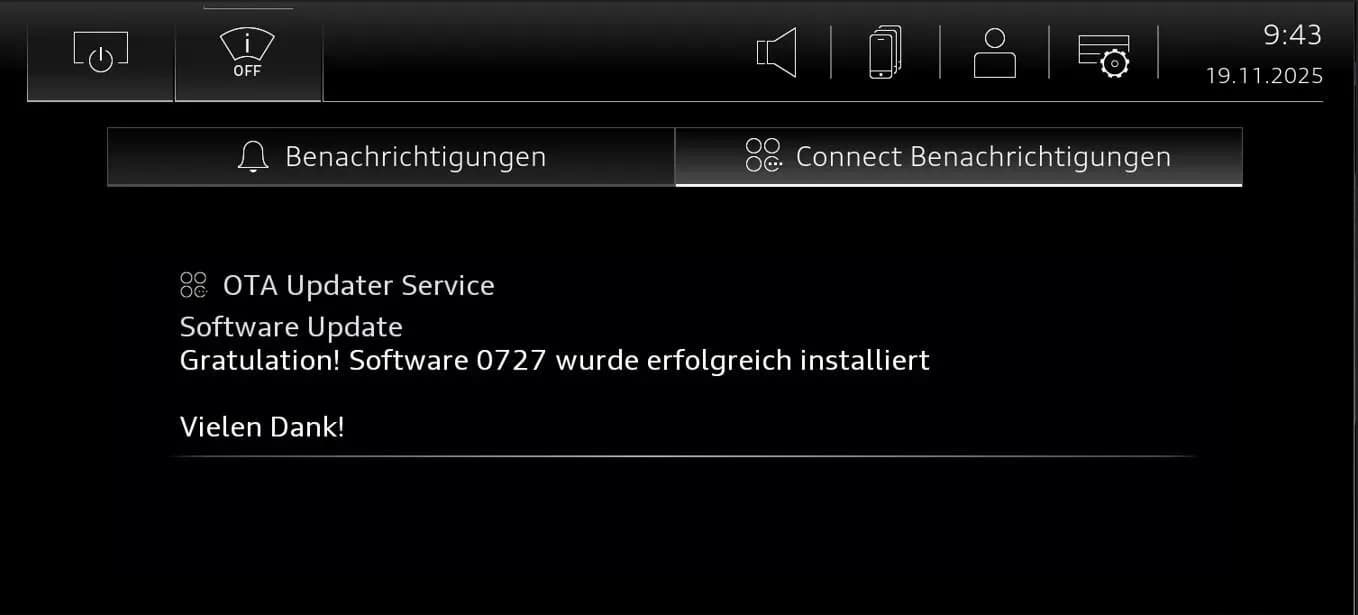
S'applique également à
- Audi A6 allroad
- 2026
- Audi Q7
- 2026
- Audi RS 6 Avant
- 2026
- Audi RS 7
- 2026
- Audi RS Q8
- 2026
- Audi S8
- 2026
- Audi SQ7
- 2026
- Audi SQ8
- 2026
▸ Afficher 2 de plus▾ Afficher moins
Owners of certain 2026 Audi models may experience issues with various MMI functions or see an "Emergency call fault" message displayed in the instrument cluster. Audi has released Technical Service Bulletin (TSB) 2081193/1 to provide a software update solution for these problems.
This TSB applies to 2026 Audi A6 allroad, RS 6, RS 7, A8, S8, Q7, SQ7, Q8, SQ8, and RS Q8 vehicles equipped with PR Number IU4 and specific software versions (Address word 005F, 4572 or Address word 078E, 0718).
Symptoms and Warning Messages
If you own a 2026 Audi Q8 MMI Emergency Call Fault may be displayed, or you might encounter various problems with the MMI (Multi Media Interface) system's functions. These issues are typically software-related and affect the vehicle's infotainment and communication systems.
Affected Control Units
The software update detailed in TSB 2081193/1 targets several key control units within your Audi's electrical system:
- Android Embedded Device 2 (AED2): Identified by the control unit address DA 078E.
- Emergency Call Module Control Unit and Communication Unit (Connectivity Box): Identified by the control unit address DA 0075.
- Control Unit for Information Electronics (MIB3): Identified by the control unit address DA 005F.
Important Warnings for Owners and Technicians
Audi has provided specific instructions and warnings regarding this software update:
- Do Not Invoice Diagnostic Tests: Guided Fault Finding test plans should not be performed or invoiced if the issue is resolved by this TSB. Similarly, the USB-C stick and the process of loading the software onto it cannot be invoiced.
- Extended Update Time: A significant period of inactive time is expected during the software update. Technicians are advised that they can work on another vehicle during this process.
- Warranty Billing: Time stamps are not required for billing under warranty when performing this TSB.
- ODIS Update Required: A new test program for inputting the SVM code is used. Ensure the diagnostic tester has the latest ODIS software.
- USB Stick Handling: The vehicle uses acoustic signals and flashing lights to indicate when user input is required during and at the end of the test program, specifically for "SVM Authorized Multiple Code Entry." It is crucial to leave the USB stick inserted until instructed to remove it. The procedure will only work if the USB stick remains inserted throughout the download and update process.
- Update Sequence: Do not proceed to the second step of the update until the Android embedded device (DA 078E) update from step one has been completed.
- Media Type: You must not use an SD card with an adapter USB stick for this update.
Software Update Procedure Summary
The repair involves a multi-step software update using the ODIS-S diagnostic system and specific USB-C sticks. The process is divided into two main parts:
1. Manual Software Update for AED Control Unit (DA 078E)
This initial update is performed via the MMI's red menu. If a previous update attempt was aborted, technicians must verify the AED control unit (DA 078E) software version. The update process involves:
- Using ODIS-S in "Flash" mode.
- Selecting "SVM - special functions" to activate the update menu.
- Following ODIS instructions, including inserting a USB-C stick.
- The control unit will enter update mode, perform multiple resets, and the display image will change.
- After the update, the MMI will restart, and the home screen must fully initialize. Technicians then check the notification center for confirmation of the update's success.
2. SVM Code Entry for Other Control Units
Once the AED control unit update is complete, the SVM code FLIGHTON0075MLB,ZGDOIP,CL3DA002,TGU1MDMVB,CL3DA001,FLIGHTOFF0075MLB is entered using the "SVM - Authorized Multiple Code Entry" function in ODIS-S "Flash" mode. This code facilitates the software update for the emergency call module (DA 0075) and information electronics (DA 005F).
After the software updates, the vehicle is put into bus sleep mode for at least 30 minutes to prevent functional impairments. Finally, the emergency call LED in the roof module is checked to ensure it lights up green, and the diagnostic session is concluded.
Required Parts and Tools
To perform this software update, two specific USB-C sticks are required. The software for the respective control units must be downloaded onto these sticks:
- For AED Control Unit (DA 078E): Part number 8W0906961GS
- For Control Unit 1 for Information Electronics (DA 005F) MIB3: Part number 8W0906961GK
Technicians should ensure they are using the latest ODIS software for the diagnostic tester.
Warranty Information
For vehicles outside of warranty, this Technical Service Bulletin is informational only. For warranty claims, the following service numbers and damage codes apply:
- Complaints about emergency call function or online services: Service number/damage code 9145
- Complaints about MMI functions: Service number/damage code 9196
- Complaints about MMI app functions: Service number/damage code 9123
The damage code for the repair is 0041. Labor operations include preparing the repair (0151 0010, 20 TU) and the AED update (0151 0040, 130 TU). All warranty claims must adhere to the Audi Warranty Policies and Procedures Manual, and claims are subject to review by Audi Warranty.
Related Bulletins
This TSB references other important documents for additional information:
- TSB 2060523 91 MIB3: Software Update Instructions: Provides general information on USB-C sticks for software updates and MIB3 software updates.
- TSB 2079652 Emergency call LED in roof module not lit up in green: Referenced if the emergency call LED does not turn green after the update.
Source: NHTSA ID: 11031038, TSB 2081193/1
Galerie
5 images
Frequently Asked Questions
- What is TSB 2081193/1 about?
- TSB 2081193/1 addresses software issues in certain 2026 Audi models that can cause various MMI function problems or display an "Emergency call fault" message. It provides a software update for the MMI, AED2, and connectivity box control units.
- Which Audi models are affected by the "Emergency call fault" and MMI issues?
- This TSB applies to 2026 Audi A6 allroad, RS 6, RS 7, A8, S8, Q7, SQ7, Q8, SQ8, and RS Q8 vehicles with specific equipment and software versions.
- What is the repair for the Audi Q8 MMI Emergency Call Fault?
- The repair involves a two-step software update procedure performed by an authorized Audi technician using the ODIS-S diagnostic system and specific USB-C sticks. This updates the Android embedded device 2 (DA 078E), emergency call module (DA 0075), and MIB3 information electronics (DA 005F).
- Are there any special instructions for the software update?
- Yes, technicians must use specific USB-C sticks with part numbers 8W0906961GS and 8W0906961GK, ensure the ODIS software is updated, and follow a precise sequence for the update. Owners should be aware that the process can take a lengthy period.
- Will I be charged for this software update?
- If your vehicle is within warranty, the software update should be covered. Audi states that time stamps are not required for billing under warranty for this TSB. If your vehicle is outside of warranty, the TSB is informational, and charges may apply.
Related Articles
2026 Audi Q8 MMI and Emergency Call Fault TSB 2081197/1
Audi has released Technical Service Bulletin (TSB) 2081197/1 to address various MMI functions and "Emergency call fault" messages in 2026 Audi models. This TSB provides a software update for the MIB3 infotainment system and connectivity box.
2024-2026 Audi 48V Starter Generator DTCs P0A1A00 P19F800
Audi has released Technical Service Bulletin 2076994/6 for 2024-2026 A6, A7, A8, Q7, and Q8 models equipped with the 48V belt starter generator. This TSB addresses various Diagnostic Trouble Codes (DTCs) such as P0A1A00 and P19F800, often indicated by an illuminated engine warning lamp (MIL). The…
2026 Audi iPhone 17 Wireless CarPlay / Wi-Fi Hotspot Issue
Owners of certain 2026 Audi models with MIB3 infotainment may find their iPhone 17 or newer unable to connect to wireless Apple CarPlay or the vehicle's Wi-Fi hotspot. Audi Technical Service Bulletin 2080171/1 details a WPA3 compatibility issue and offers a straightforward solution by adjusting…
2026 Audi Q8 Rear Seat Backrest Heating Not Working TSB
Audi has released Technical Service Bulletin (TSB) 2079319/1 for 2026 Audi Q8, SQ8, and RS Q8 models. This TSB addresses a software issue where the rear seat heating only warms the seat surface, not the backrest, requiring a control unit update.
2025-2026 Audi SVM Update Instructions TSB 2078548/1
Audi Technical Service Bulletin 2078548/1 provides comprehensive instructions for combined baseline updates and software version management (SVM) for 2025-2026 Audi vehicles. This TSB addresses common issues like SVM code failures, lost vehicle functions, and specific diagnostic trouble codes…
Leave a comment
Comments are moderated and may take a moment to appear. Only your first name and the initial of your last name are shown publicly.
Comments
Be the first to comment.