2025-2026 Audi SVM Update Instructions TSB 2078548/1
Audi Technical Service Bulletin 2078548/1 provides comprehensive instructions for combined baseline updates and software version management (SVM) for 2025-2026 Audi vehicles. This TSB addresses common issues like SVM code failures, lost vehicle functions, and specific diagnostic trouble codes…
 Marcus Weber2026 Audi Q8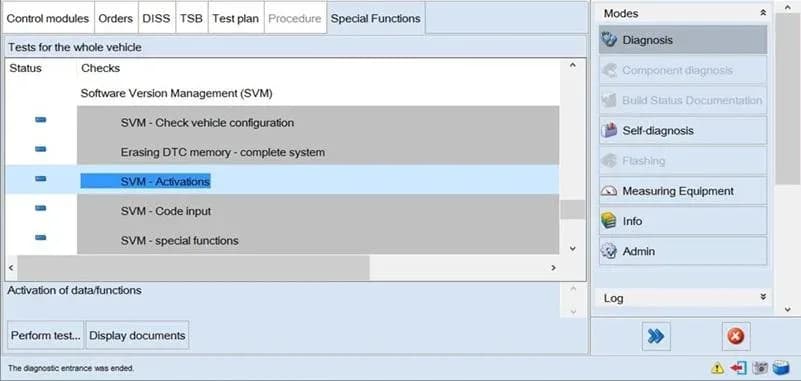
Também se aplica a
- Audi A3
- 2025–2026
- Audi A4
- 2025
- Audi A4 allroad
- 2025
- Audi A6
- 2025
- Audi A6 allroad
- 2025–2026
- Audi A7
- 2025
- Audi e-tron GT
- 2025–2026
- Audi Q3
- 2025
- Audi Q5
- 2025
- Audi Q5 e
- 2025
- Audi Q7
- 2025–2026
- Audi Q8
- 2025
- Audi RS 3
- 2026
- Audi RS 6 Avant
- 2025–2026
- Audi RS 7
- 2025–2026
- Audi RS e-tron GT
- 2026
- Audi RS Q8
- 2025–2026
- Audi S e-tron GT
- 2026
- Audi S3
- 2025–2026
- Audi S4
- 2025
- Audi S6
- 2025
- Audi S7
- 2025
- Audi S8
- 2025–2026
- Audi SQ5
- 2025
- Audi SQ7
- 2025–2026
- Audi SQ8
- 2025–2026
▸ Mostrar mais 20▾ Mostrar menos
Audi Technical Service Bulletin (TSB) 2078548/1 provides essential guidelines for performing combined baseline updates and managing software versions (SVM) on various 2025-2026 Audi models. This document is crucial for technicians to ensure correct software installation and address potential issues that may arise during or after an update. The Audi SVM update instructions cover a wide range of scenarios, from initial setup to troubleshooting complex failures.
The TSB highlights common problems encountered during the software update process, including situations where the SVM code cannot be used, the update fails before, during, or after execution, feedback documentation cannot be transmitted, control units cannot be activated for the first time, or vehicle functions have been lost. Adhering to these Audi SVM update instructions helps prevent errors and ensures the vehicle's electronic systems operate as intended.
Symptoms and Conditions
Owners might notice various issues if software updates are not performed correctly or if control units malfunction. These can manifest as:
- General Functionality Problems: Issues with power output control, TV operation, voice operation, brake regulation, transmission control, infotainment, navigation, or lighting.
- Assistance System Malfunctions: Problems with open/close garage door, exit warning system, cross-traffic assist, emergency braking, lane change assistance, night vision function, or parking aid systems.
- Control Module Errors: Instances where control modules or services exhibit incorrect coding, hardware faults, data errors, or missing/incorrect software versions.
- Lost Vehicle Functions: After an update or control unit replacement, functions such as cruise control, drive select, rest recommendation, or navigation may cease to work.
Fault Codes and OEM Fault Labels
Technicians may encounter specific diagnostic trouble codes (DTCs) or error messages related to SVM updates and control unit issues. These include:
- U201900: "Time master Function restriction" – This DTC indicates a restriction in the time master function, which might require manual setting in the HMI if the date and time are incorrect.
- DA0003: An ABS control unit reporting "speed signal = 158 MPH although the vehicle is stationary" is an example of a diagnostic address issue that must be resolved before an update.
- ODIS Tester Messages: Technicians might see messages like "Pre-condition not fulfilled" or "Unknown failure - programming aborted 4" if update requirements are not met.
- Workshop Codes: Specific error types for control modules include "control modules, services -> code incorrect", "control modules, services -> hardware faulty", "control modules, services -> write adaptation channel - not OK", "control modules, services -> data incorrect", "control modules, services -> software missing", "control modules, services -> software version incorrect", "control modules, services -> coding missing", and "control modules, services -> basic setting missing".
Important Warnings for Owners
- Launch Phase Vehicles: "For vehicles still in the launch phase, the workshop must create a case with the Technical Assistance Center (TAC) per the repair authorization. Reference this TSB number in the first line of the TAC case."
- Update Sequence Critical: "Caution! Processing in the wrong sequence can alter the data version of the vehicle in such a way that a service campaign cannot be performed successfully anymore." This warning is repeated multiple times, emphasizing the importance of performing updates in the correct chronological order (oldest first).
- Retrofits May Be Lost: "Please note that retrofits which have been installed in the vehicle or coded manually which were NOT performed by AUDI AG and are therefore not stored in the systems of AUDI AG may be lost after: An update via TSB, An update via a service campaign, Target/actual comparison, Configuration check of control units." Audi AG cannot support restoring these lost retrofits.
- Control Unit Activation: "NEVER activate a control unit by simply opening the control unit configuration." Instead, the function test "Replace control module" must always be used.
- Bus Sleep Cycle: "Important: bus sleep cycle! A terminal 30 reset will NOT have the desired effect here." A proper bus sleep cycle (locking the vehicle for at least 20 minutes) is critical for certain procedures.
Repair Procedure Summary
To ensure successful software version management and baseline updates, technicians must follow a precise set of Audi SVM update instructions:
- Diagnostic Setup: Always use a VAS 6154A diagnostic interface for updates due to its superior protection against electrostatic discharge. Ensure ODIS firewall settings are current and correct.
- Electrostatic Discharge Prevention: Before starting an SVM code update, technicians must wear anti-static safety shoes, avoid placing the ODIS tester inside the vehicle, connect both the ODIS tester charger and the 12V battery charger to the same circuit, and keep doors/lids closed during the update.
- Pre-Update Checks: Verify that the vehicle's battery charge level (SOC) is above 80% and the system voltage is at least 12.5V. Ensure the 12V battery charger is connected and the high-voltage system is not charging. Place the ignition key on the reader coil (typically in the cupholder, as shown in Figure 2 of the TSB).
- DTC Resolution: It is essential to resolve all relevant diagnostic trouble codes (DTCs) in all diagnostic addresses that might affect update requirements before proceeding with the update.
- Service Campaign Sequencing: When multiple service campaigns are pending, always perform them in the order of their start date, beginning with the oldest unperformed campaign. Incorrect sequencing can prevent future campaigns from being completed.
- Troubleshooting Failed Updates: If an update fails, technicians should first perform a bus sleep cycle (lock the vehicle for 20 minutes), drive the vehicle, run test plans to rectify faults, and then check and erase event memory entries. If issues persist, the "Check and erase DTC memory" function in ODIS (e.g., for "0003 Brake electronics") should be used.
- Restoring Lost Functions: If vehicle functions are lost after an update or control unit replacement, technicians must use the ODIS tester's "Special functions" menu, selecting "SVM activations" and then choosing "-2- Restore already existing activations" (as shown in Figure 4 of the TSB). This process restores previously acquired data and functions.
- Control Unit Replacement: When replacing control units, always use the function test "Replace control module" in Guided Fault Finding. This ensures the correct test plan is selected and the control unit is properly activated, coded, and parameterized.
Required Tools or Parts
- VAS 6154A: This diagnostic interface is recommended for updating control units due to its protection against electrostatic discharge.
- 12V Battery Charger: Essential for maintaining battery charge during the update process.
- Anti-static Safety Shoes/Heel Straps: Required to prevent electrostatic discharge during handling of electronic components.
Owner Action
If you experience any of the symptoms described, such as lost vehicle functions or error messages, particularly after a recent service or software update, it is recommended to contact an authorized Audi service center. Provide them with a clear description of the issue and mention that you are aware of Technical Service Bulletin 2078548/1, which provides Audi SVM update instructions for technicians.
Source: NHTSA ID 11021470
Galeria
4 imagens
Frequently Asked Questions
- What does Audi TSB 2078548/1 address?
- Audi TSB 2078548/1 provides comprehensive Audi SVM update instructions for technicians on how to perform combined baseline updates and manage software versions (SVM) for 2025-2026 Audi vehicles. It also outlines procedures for troubleshooting common issues like SVM code failures, lost functions, and specific diagnostic trouble codes.
- What are common issues addressed by these Audi SVM update instructions?
- The TSB addresses issues such as SVM code failures before, during, or after an update, feedback documentation not transmitting, control units not activating, and vehicle functions being lost. It also covers specific DTCs like U201900 ("Time master Function restriction") and ODIS tester messages like "Pre-condition not fulfilled".
- Can I lose vehicle functions after a software update?
- Yes, the TSB notes that vehicle functions (e.g., cruise control, navigation) can be lost after an update or control unit replacement. Technicians are instructed to use the "SVM activations" feature in ODIS to restore these functions by selecting "-2- Restore already existing activations" as part of the Audi SVM update instructions.
- Are there any risks to manually coded retrofits during an update?
- Yes, the TSB explicitly warns that retrofits installed or manually coded by owners or unauthorized parties, which are not stored in Audi AG's systems, may be lost after a TSB update, service campaign, or configuration check. Audi AG cannot assist in restoring these lost retrofits.
- What is the importance of the correct update sequence?
- The TSB stresses that processing updates in the wrong sequence can alter the vehicle's data version, potentially preventing future service campaigns from being performed successfully. Technicians must always perform service campaigns in the order of their start date, starting with the oldest one.
Related Articles
2026 Audi Q8 MMI and Emergency Call Fault TSB 2081197/1
Audi has released Technical Service Bulletin (TSB) 2081197/1 to address various MMI functions and "Emergency call fault" messages in 2026 Audi models. This TSB provides a software update for the MIB3 infotainment system and connectivity box.
2026 Audi MMI and Emergency Call Software Update TSB
Audi has released Technical Service Bulletin (TSB) 2081193/1 to address various MMI functions issues and an "Emergency call fault" message in 2026 Audi A6, RS 6, RS 7, A8, S8, Q7, SQ7, Q8, SQ8, and RS Q8 models. The fix involves a software update for the MMI, AED2, and connectivity box control…
2024-2026 Audi 48V Starter Generator DTCs P0A1A00 P19F800
Audi has released Technical Service Bulletin 2076994/6 for 2024-2026 A6, A7, A8, Q7, and Q8 models equipped with the 48V belt starter generator. This TSB addresses various Diagnostic Trouble Codes (DTCs) such as P0A1A00 and P19F800, often indicated by an illuminated engine warning lamp (MIL). The…
2026 Audi iPhone 17 Wireless CarPlay / Wi-Fi Hotspot Issue
Owners of certain 2026 Audi models with MIB3 infotainment may find their iPhone 17 or newer unable to connect to wireless Apple CarPlay or the vehicle's Wi-Fi hotspot. Audi Technical Service Bulletin 2080171/1 details a WPA3 compatibility issue and offers a straightforward solution by adjusting…
2026 Audi Q8 Rear Seat Backrest Heating Not Working TSB
Audi has released Technical Service Bulletin (TSB) 2079319/1 for 2026 Audi Q8, SQ8, and RS Q8 models. This TSB addresses a software issue where the rear seat heating only warms the seat surface, not the backrest, requiring a control unit update.
Leave a comment
Comments are moderated and may take a moment to appear. Only your first name and the initial of your last name are shown publicly.
Comments
Be the first to comment.