2021 Audi Q5 Instrument Cluster Image Software Update
Audi has released Technical Service Bulletin 90Q1 UPDATE to correct a software issue in the 2021 Audi Q5 instrument cluster. This update resolves an incorrect vehicle image display, where an A4 Avant is shown instead of a Q5. The update ensures the correct vehicle image is displayed on the driver…

Symptoms
Owners of affected 2021 Audi Q5 vehicles may notice an incorrect vehicle image displayed on the driver information system tab of the instrument cluster. Specifically, the image shown is an "A4 Avant instead of a Q5". This visual discrepancy does not affect vehicle operation but is a cosmetic error in the digital display. This issue, related to the 2021 Audi Q5 instrument cluster image, is addressed by Audi's proactive software update.
Diagnosis and Trigger Conditions
To determine if a vehicle requires this update, technicians must check the software version of the installed instrument cluster, identified as -J285- (diagnostic address 0017). This can be done via OBD (On-Board Diagnostics) by navigating to '0017 – Instrument Cluster > Identification'.
If the instrument cluster has part number 8W5.920.790.L and a software version of 0157 or 0159, or part number 8W5.920.790.K with software version 0159, the update is necessary. However, if the software in the vehicle is already at version 0161 or greater, the update is not needed, and no further action is required for the 2021 Audi Q5 instrument cluster image issue.
Important Warnings for Technicians and Owners
Audi has issued several critical warnings regarding the software update process to ensure proper execution and prevent damage. These warnings are crucial for both technicians performing the 90Q1 UPDATE and owners to understand:
- Prohibited Diagnostic Methods: Technicians are explicitly instructed: "DO NOT USE Guided Fault Finding (GFF) to perform this flash. Using GFF will cause the flash to take longer. Requests for additional time will not be considered." Performing the update using "Diagnosis" (Guided Fault Finding) mode could also result in non-payment of the warranty claim.
- Wireless Connection Prohibition: "Using Bluetooth or WiFi for this action is PROHIBITED! Damage caused to electronic components (e.g. ECM, TCM, etc.) during the SVM flash process is not covered." Performing a software update via Bluetooth or WiFi significantly increases the risk of losing connection, which can damage the control module. Claims for additional time or parts will be denied if the GFF log indicates a wireless connection was used.
- Radiator Fan Safety: "Radiator Fan(s) may cycle ON high speed during the Update Process! There is a serious risk that personal injury may result if contact is made with spinning fan blades. Keep hands and all objects away from Radiator Fan(s) during Update Process!"
- Battery Voltage: Battery voltage must remain above 12.5 volts throughout the software update. Failure to maintain adequate voltage can cause the update to fail and potentially damage the control module. "Control modules damaged by insufficient voltage will not be covered." Additionally, the diagnostic tester must be plugged in using supplied power adapters; "Under no circumstances should the tester be used on battery power alone during the software update."
- Dealer Inventory: The procedure must be performed on applicable vehicles in dealer inventory prior to sale.
- Warranty Coverage: The procedure is valid only for vehicles that show the 90Q1 code in the Elsa Campaign/Action Information screen on the day of repair and must be within the New Vehicle Limited Warranty.
- Screen Saver and Power Saving: The screen saver and power saving settings on the diagnostic tester must be turned off. "Failure to do so may result in the tester entering power save mode during the software update, which could result in damage to the control module."
- Hazard Warning Lights: The vehicle's hazard warning lights must be switched on during the update. "The procedure may cancel itself if the hazard warning lights are not switched on. The hazard warning lights prevent the system from switching to bus sleep mode during the update."
- Multiple Campaigns: If multiple software update campaigns or actions are open, they must be performed in order of their Start date, with the oldest being performed first. "All Safety Recalls must be completed prior to completing this campaign."
Required Tools and Parts
Performing the 90Q1 UPDATE requires specific tools and a USB flash drive with the correct software:
- Battery Tester/Charger: A GRX3000VAS- (or equivalent) battery tester/charger is required to maintain stable voltage during the update.
- Diagnostic Tester: A VAS6150X/VAS6160X (or equivalent) diagnostic tester is necessary to interface with the vehicle.
- USB Flash Drive: A USB flash drive, part number 8W6.906.961.J, must be created using the SD Creator program. Technicians should refer to the latest version of TSB 2047812 for additional information on using the SD Creator program.
Repair Procedure Summary
This software update, identified as 90Q1 UPDATE, involves a multi-step process performed by an authorized Audi technician. The general workflow to correct the 2021 Audi Q5 instrument cluster image issue is as follows:
- Vehicle Eligibility Verification: The technician first verifies the vehicle's eligibility for the 90Q1 UPDATE by checking the Elsa Campaign/Action Information screen. The status for the 90Q1 code must be "open". An Elsa printout showing the "open" status must be attached to the repair order. Elsa is the only valid source for verification.
- Pre-Update Preparation: The vehicle's hood and battery cover must be opened. The GRX3000VAS Tester/Charger (or equivalent) is connected in power supply mode to the vehicle battery or underhood charging posts. When connecting directly to the battery, the positive cable goes to the positive terminal, and the negative cable connects to the grounding lug on the chassis. Technicians are warned: "DO NOT connect the ground cable directly to negative terminal of the battery." The vehicle's hazard warning lights must be switched on.
- Diagnostic Tester Setup: The VAS6150X/VAS6160X Diagnostic Tester is connected to the vehicle, and the ODIS program is started. Communication between the scan tool and diagnostic head must be confirmed via USB cable. If a Bluetooth or WiFi symbol is displayed, the diagnostic head must be disconnected and reconnected using the USB cable.
- Software Update Initiation: From the ODIS home screen, the technician highlights "Flash" and follows the on-screen prompts. It is critical to use the "Flash" operating mode, not "Diagnosis" (Guided Fault Finding).
- SVM Code Input: The process involves selecting "Starting Flashing" and then "No RO". The technician then highlights "SVM – Code Input" and selects "Perform test". The corrective action code FPKWW0161 is entered, and "Accept" is selected, following on-screen prompts.
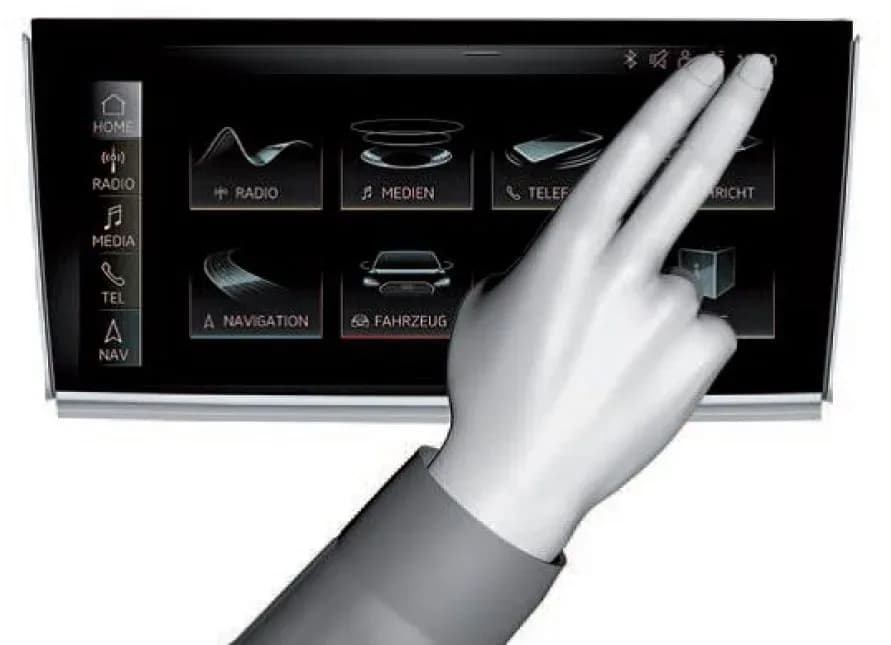
- Update Execution: The USB flash drive is inserted. The update is performed via the Red Engineering Menu (REM), accessed by touching the screen with two fingers in the top right corner. The volume control is used to navigate the REM (left/right for scrolling, push to select). "Update" is selected, with the source specified as "USB". All control units to be updated are shown; the technician scrolls down and starts the update via the REM.
- Post-Update Procedures: After the flash completes, "Send" is selected to transmit the diagnostic protocol online. The technician then clicks "Flash" to exit the flash session. To clear any event memory entries, the vehicle is put into bus sleep mode by disconnecting the diagnostic tester, removing the key, and locking the vehicle with the remote for 5 minutes. Finally, the clock is reset to local time if necessary.
Warranty Information
This 90Q1 UPDATE is covered under warranty, provided the vehicle meets specific criteria. Dealers are instructed to enter claims as soon as possible after the update is completed, attaching an Elsa screen print showing the action as "open" on the day of repair.
- Service Number: 90Q1
- Damage Code: 0099
- Parts Vendor Code: 002
- Claim Type: Sold vehicle: 7 10; Unsold vehicle: 7 90
- Causal Indicator: Mark labor as causal
- Vehicle Wash/Loaner: "Do not claim wash/loaner under this action."
Labor Operations:
| Criteria I.D. | Labor Op | Time Units | Description |
|---|---|---|---|
| FY | 0183 00 99 | 10 | Check instrument cluster software version |
| FY | 2706 89 50 | 10 | Connect battery charger |
| 9025 25 99 | 40 | Update instrument cluster software | |
| 0150 00 00 | Time stated on diagnostic protocol | Perform GFF documentation SVM |
For customers who refuse the campaign work or whose vehicle is outside the specified warranty parameters, U.S. dealers must submit requests through Audi Warranty Online under the Campaigns/Update option. Canadian dealers must upload the repair order to Audi WIN/Operations/Campaign Closure.
Owner Action
If you own a 2021 Audi Q5 and suspect your instrument cluster displays the incorrect vehicle image, or if you receive notification from Audi, you should contact an authorized Audi dealer. The dealer will verify if your vehicle requires the 90Q1 UPDATE and perform the necessary software update free of charge under the New Vehicle Limited Warranty. It is important to note that Audi will inform customers in writing by recording on the Repair Order any and all work conducted on the vehicle, including any updates completed under this campaign.
Source: NHTSA ID 10182071
Galería
15 imágenes
What Audi Q5 owners report
Counted from the records in our database across 18 model years.
- 1,386
- Owner complaints
- 35
- Recalls
- 4,663
- Service bulletins
- 68
- Crashes reported
- 13
- Fires reported
- 63
- Injuries reported
The 2021 model year
74 complaints, the 9th most of 18 model years on file. Owners reported 2 crashes, 0 fires and 2 injuries for this year, which also has 8 recalls on file.
Electrical System, the system this article covers, accounts for 230 of 1,386 complaints (17%), including 27 for 2021.
Complaints by model year
| 2010 | 100 | |
|---|---|---|
| 2011 | 143 | |
| 2012 | 168 | |
| 2013 | 92 | |
| 2014 | 106 | |
| 2015 | 100 | |
| 2016 | 78 | |
| 2018 | 209 | |
| 2019 | 53 | |
| 2021 | 74 |
Most-reported systems
- Engine — 338
- Air Bags — 259
- Electrical System — 230
- Fuel/Propulsion System — 140
- Steering — 99
Latest recalls for the 2021 model year
- 25V080000 — Electrical System (Feb 2025)
- 23V842000 — Electrical System (Dec 2023)
- 22V753000 — Engine And Engine Cooling (Oct 2022)
Recent owner reports about electrical system
Vehicle Information: 2021 Audi Q5 Component Affected: Electrical System / Electronic Control Unit (Body Control Module / BCM2) Description of Safety Defect: The vehicle suffered a catastrophic failure of the Body Control Module (BCM / BCM2) caused by water…
Read owner complaints →On 8/3/26, my 2021 Audi Q5 began throwing numerous different malfunction/error alerts and the engine turned off while driving after a bottle of water had partially spilled onto our backseat behind the drivers side.
Complaints are owner reports filed with NHTSA. They are unverified, and counts depend on how many vehicles were sold, so they are not a failure rate.
Related Articles
2021 Audi Q5 Health Check: Recalls and Bulletins
The 2021 Audi Q5 has no reported recalls or federal investigations, and zero owner complaints. However, Audi has issued 20 service bulletins addressing various issues such as slow window operation, cylinder head oil leaks, airbag warning lights, and gearbox malfunctions. This guide summarizes…
2021-2024 Audi Q5 Door Window Moves Slowly TSB
Audi has released Technical Service Bulletin (TSB) 2071472/3 to address customer complaints regarding door windows that move slowly, are not smooth, or cannot be closed properly in certain 2021-2024 Audi Q5, Q5 e, and SQ5 models. The TSB indicates that the root cause is often an incorrectly…
2021-2024 Audi Q5 Cylinder Head Oil Leak TSB 2072716/6
Audi has issued Technical Service Bulletin (TSB) 2072716/6 for 2021-2024 Audi Q5 vehicles equipped with the 2.0L TFSI engine. This TSB addresses instances of oil residue and leaks found around the cylinder head cover, often due to loose bolts. The repair involves checking and re-tightening or…
2021-2025 Audi Q5 Front Seat Squeaking Noise TSB
Audi has issued manufacturer communication 11013724 to address a squeaking noise originating from the front seat height adjuster in 2021-2025 Audi Q5, Q5 e, and SQ5 models. This technical service bulletin provides guidance for technicians to diagnose and resolve the issue.
2021-2023 Audi Q5/SQ5 Panoramic Sunroof Water Leak TSB
Audi TSB 2075969/2 details how water can enter the cabin of 2021-2023 Audi Q5 and SQ5 vehicles through the panoramic sliding sunroof. This issue, often resulting in soaked carpets, is typically caused by kinked or blocked water drain hoses. The bulletin outlines inspection and repair procedures…
Leave a comment
Comments are moderated and may take a moment to appear. Only your first name and the initial of your last name are shown publicly.
Comments
Be the first to comment.