2024-2025 Audi Q5 e Battery Charger Software Update
Audi's Service Action 93SG addresses an erroneous warning message and a high-voltage battery charging fault in 2024-2025 Q5 e vehicles. A software update resolves the issue, preventing charging limitations with 110V cables.

Gilt auch für
- Audi Q5 e
- 2024
Document History
This Service Action, identified as 93SG, was originally published on October 29, 2024. A revision was issued on December 18, 2024, which updated claiming instructions and included Appendix A with revised fault clearing instructions for DTC B200000.
Symptoms
Owners of 2024-2025 Audi Q5 e (also referred to as Q5 HYBRID in some documentation) vehicles may experience an "erroneous warning message" appearing in the instrument cluster. This message is triggered by overly sensitive diagnostic software within the vehicle's charging system. The issue is also accompanied by a fault stored in the control unit for high-voltage battery charging, which specifically prevents the vehicle from achieving a full 100% charge when using a 110V charging cable. This condition indicates an Audi Q5 e battery charger fault.
Fault Codes / DTCs
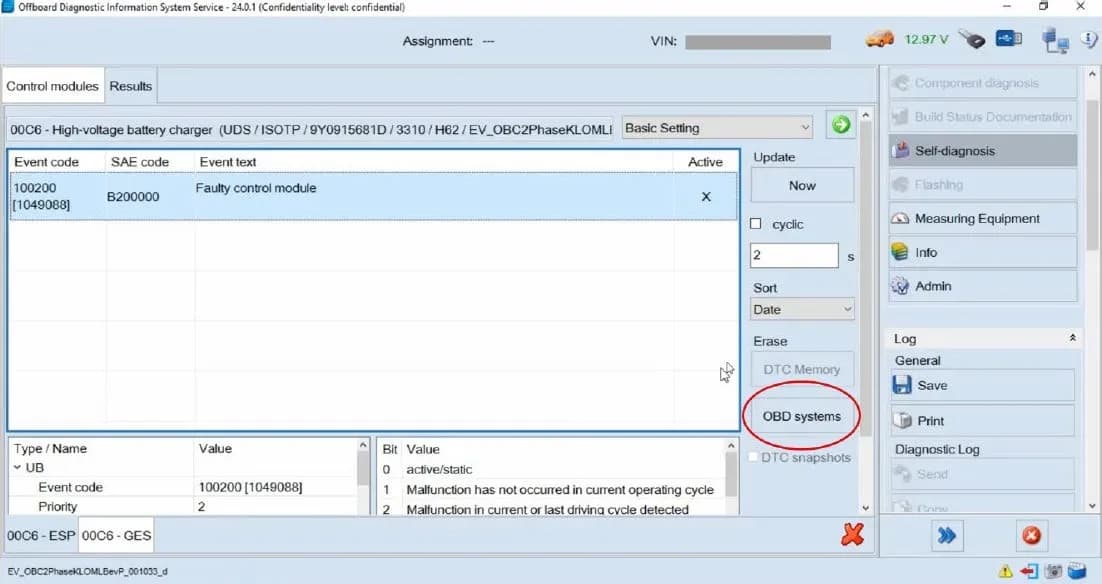
The primary diagnostic trouble code (DTC) associated with this Audi Q5 e battery charger fault is B200000, identified as "Control module faulty". This DTC is typically accompanied by symptom code 1049088 and is stored in diagnostic address 00C6, which corresponds to the High-Voltage Battery Charging Control Module.
Diagnosis / Trigger Conditions
The root cause of the erroneous warning message and charging limitation is overly sensitive diagnostic software within the High-Voltage Battery Charging Control Module. This software incorrectly flags a fault, leading to the DTC B200000 and restricting the vehicle's ability to charge completely with a 110V power source. The issue does not indicate a physical defect with the battery charger hardware itself but rather a software misinterpretation.
Important Warnings
Audi has issued several critical warnings regarding this service action:
- Dealer Inventory Vehicles: Dealers must ensure that every affected inventory vehicle has this campaign completed before delivery to consumers.
- Software Update Method: Do NOT USE Guided Fault Finding (GFF) to perform this flash. Using GFF will cause the flash to take longer, and requests for additional time will not be considered.
- Connection Method: Performing a software update using a Bluetooth or Wi-Fi connection increases the risk of losing connection during the update, which could result in damage to the control module. It also greatly increases the time required. Requests for additional time or parts will be denied if the GFF log shows the update was performed using Bluetooth or WiFi.
- High-Voltage Battery Protection: To prevent charging of the high-voltage battery during the software update, the high-voltage cable is to be removed BEFORE entry of the SVM code on vehicles with high-voltage components. Charging the high-voltage battery during a software update can damage the high-voltage components.
- Battery Voltage: Control modules damaged by insufficient voltage (below 12.5 volts) during the software update will not be covered under warranty.
- Software Update Failure: If the software update fails for any reason, ODIS feedback must be sent prior to further diagnosis. This ensures the failure/error is reported. Failure to do so may result in non-payment of consequential requests for additional time or parts.
- Technician Responsibility: Damages resulting from improper repair or failure to follow these work instructions are the dealer's responsibility and are not eligible for reimbursement under this action. Diagnosis and repair of pre-existing conditions in the vehicle are not covered under this action.
- Radiator Fan Safety: Radiator Fan(s) may cycle ON at high speed during the Update Process! There is a serious risk of personal injury if contact is made with spinning fan blades. Keep hands and all objects away from Radiator Fan(s) during the Update Process!
Required Tools
To perform this service action, specific tools are required:
- Battery Tester/Charger: VAS5908 (or equivalent charger with a current rating of at least 90A).
- Diagnostic Tester: VAS6150X/VAS6160X (or equivalent).
Repair Procedure Summary
Audi Service Action 93SG involves performing a software update to the High-Voltage Battery Charging Control Module to correct the diagnostic sensitivity. This update is carried out using the Audi diagnostic system (ODIS) and SVM code 93SGA591. The process typically takes about one hour to complete.
Pre-Repair Check
Before initiating the repair, technicians must check the Campaigns/Actions screen in Elsa on the day of repair to verify that a VIN qualifies for this service action. Elsa is the only valid source for campaign inquiry and verification. The campaign status must show "open." If other open actions are present, the customer should be informed so all work can be completed concurrently.
Software Update Procedure
- Preparation: Ensure the ODIS software is completely up to date. Connect the battery charger to the vehicle battery and maintain a voltage above 12.5 volts throughout the update. Turn off the screen saver and power-saving settings on the diagnostic tester. The VAS Diagnostic Tester must be plugged in using its supplied power adapters and connected to the vehicle via a USB cable (Bluetooth or Wi-Fi connections are not recommended).
- SVM Process: Review and follow the instructions in Technical Bulletin 2011732: Software Version Management (SVM) Operating Instructions for the US, or 2037026: Working with the Software Version Management (SVM) for Canada. The SVM process must be completed entirely for warranty reimbursement.
- Vehicle Configuration: Switch off all consumers (air conditioning, heater blower motor, lights, heated seats, etc.). Move the selector lever to the Park (P) position.
- Software Flash: Use the operating mode "FLASH" with the communication path set to "DoIP". Select "SVM – Code Input" and enter the SVM code 93SGA591. Follow the on-screen prompts.
- Diagnostic Log: Ensure the diagnostic log is sent to GFF Paperless after completion.
The new software part number for the High-Voltage Battery Charging Control Module (diagnostic address 00C6) is 9Y0915681Q, with a new software version of 3323.
Fault Clearing Procedure (Appendix A)
If the fault B200000 (Control module faulty, symptom 1049088) is still present after the software flash, follow these steps:
- Access ODIS: Open ODIS and enter Self-diagnosis. Select diagnostic address 00C6 (High-voltage battery charger).
- Basic Setting: In the drop-down box next to "Control module OBD", select "Basic Setting". Click the green arrow to proceed.
- Reset Status: Find and select the basic setting routine "Reset Status". Click the right arrow to continue.
- Parameters: Under "Parameters", select the value "Reset". Click the right arrow to continue.
- Measured Value: On the next screen, select the only available measured value and ensure it is moved to the right list-box. Click the right arrow to continue.
- Start Process: On the next screen, click "Start" (on the bottom left side of the ODIS window).
- Access Authorization: An access authorization dialog box should pop up. In the drop-down box next to "Use case", select "Online activation" and click "Implement". If the dialog does not appear, manually navigate to "Access Authorization" in ODIS, select "Online activation", click "Implement", then switch back to "Basic Setting" and click the green arrow.
- DTC Memory Clearing: Start basic settings. The "Status" of Function not available is acceptable. Click the green arrow to run "DTC Memory". You should see DTCs stored as Active/Static, specifically B200000 with symptom code 1049088.
- Erase Faults: Select "Erase OBD systems" to clear the DTC. The DTC should now be clear. Then, select "Vehicle OBD" Total DTC Memory and choose "Erase Complete system" and "Run".
- Verification: Cycle the ignition and shift the vehicle to drive and reverse twice. Ensure the Malfunction Indicator Lamp (MIL) is no longer illuminated.
Warranty and Claiming Instructions
This service action is covered under warranty. The Service Number is 93SG, with Damage Code 0099 and Parts Vendor Code 002. For sold vehicles, the Claim Type is 7 10, and for unsold vehicles, it's 7 90. The Causal Indicator should be marked as causal.
Labor operations include:
- 0151 00 10: Software update (setup + battery charger) - Time Units: SEE ELSA
- 0151 00 60: Software update (GFF Operations) - Time Units: stated on diagnostic protocol
- 0151 00 99: Manually clear fault B200000 (if MIL was illuminated and/or fault remained in DA 00C6 after flash) - Time Units: 20
Do not claim for vehicle wash/loaner under this action. After the campaign is completed, claims should be entered as soon as possible to prevent duplicate work.
Owner Action
If your 2024-2025 Audi Q5 e is experiencing this Audi Q5 e battery charger fault, contact your authorized Audi dealer as soon as possible to schedule this work. The software update will be performed free of charge. This service action is available free of charge only until October 29, 2029. If the service is performed after this date, normal costs will apply. Owners can visit www.audiusa.com (or www.audi.ca for Canada) to locate a dealer or check their vehicle's eligibility using their VIN.
NHTSA ID: 10255554
Galerie
13 Bilder
Weitere Revisionen dieses TSB
- 2021-2025 Audi Emergency Call System Fault TSBB200000
- 2022-2025 Audi e-tron Emergency Call System Fault TSBB200000
- 2023-2026 Audi Emergency Call System Fault B200000 TSBB200000
- 2022-2026 Audi Emergency Call System Fault TSBB200000
- 2020-2026 Audi Emergency Call Fault B200000B200000
- 2021-2026 Audi Emergency Call System Fault TSB 2059528/14B200000
- 2021-2026 Audi Emergency Call System Fault B200000B200000
- 2024-2025 Audi A5 Steering Warning Lamp TSBB200000
What Audi Q5 e owners report
Counted from the records in our database across 6 model years.
- 64
- Owner complaints
- 851
- Service bulletins
- 1
- Crashes reported
- 1
- Fires reported
- 3
- Injuries reported
The 2025 model year
1 complaint, the 5th most of 6 model years on file. Owners reported 0 crashes, 0 fires and 0 injuries for this year.
Complaints by model year
| 2020 | 12 | |
|---|---|---|
| 2021 | 29 | |
| 2022 | 1 | |
| 2023 | 7 | |
| 2024 | 14 | |
| 2025 | 1 |
Most-reported systems
- Electrical System — 25
- Engine — 12
- Power Train — 9
- Forward Collision Avoidance — 8
- Service Brakes — 8
Recent owner reports
Read owner complaints →While driving at about 60 mph on highway, several systems in the car failed without prior warning. The message on dashboard said Catastrophic Electric System Failure. Brakes would not work for a moment and then started working.
Complaints are owner reports filed with NHTSA. They are unverified, and counts depend on how many vehicles were sold, so they are not a failure rate.
Related Articles
2021-2025 Audi Q5 e Electrical System Malfunction TSB 2081028/2
Audi Q5 e owners might encounter an 'electrical system malfunction' warning light and the vehicle failing to go into drive. This TSB, 2081028/2, is an informational bulletin for technicians to report specific DTCs like P0AF800 and U01A000 to Audi's Technical Assistance Center.
2024-2025 Audi Q5 e Check Engine Light After Charging TSB
If your 2024-2025 Audi Q5 e displays a check engine light after charging, a technical service bulletin (TSB) addresses this concern. The issue is often linked to Diagnostic Trouble Code POE5E00, indicating a problem with the battery charger control module processor.
2024-2025 Audi Q5 e Gateway Software Update TSB 2079116/1
Audi Technical Service Bulletin 2079116/1 addresses a software issue in the diagnostic interface control unit (DA0019) of 2024-2025 Audi Q5 e PHEV vehicles. This update resolves problems with reading hybrid battery information and scan tool communication with the gateway, ensuring proper vehicle…
2024-2025 Audi Q5 e 12V Battery Discharge TSB 2074126/3
Audi has issued Technical Service Bulletin 2074126/3 for 2024-2025 Q5 e PHEV vehicles regarding a 12V battery discharge issue caused by bus wake-ups from the high-voltage charging unit. A software solution is under development, with a workaround available.
2021-2025 Audi Q5 e / A7 e Electrical System Fault TSB
Audi has released Technical Service Bulletin 2076748/2 for 2021-2025 Audi Q5 e and A7 e models. This TSB addresses a red electrical system fault, often accompanied by the message "Electrical system: fault. Safely stop vehicle," and diagnostic trouble code P0AC000.
Leave a comment
Comments are moderated and may take a moment to appear. Only your first name and the initial of your last name are shown publicly.
Comments
Be the first to comment.