2016-2026 Audi eCall LED Not Green TSB 2079652/1
Audi Technical Service Bulletin 2079652/1 details diagnostic and repair procedures for the emergency call LED in the roof module not lighting up green across various 2016-2026 Audi models. Learn about potential causes and service actions.

Si applica anche a
- Audi A3
- 2022–2026
- Audi A4
- 2021–2025
- Audi A4 allroad
- 2021–2025
- Audi A5
- 2021–2024
- Audi A6
- 2021–2025
- Audi A6 allroad
- 2021–2026
- Audi A7
- 2021–2025
- Audi A7 e
- 2021–2022
- Audi A8 L e
- 2021
- Audi e-tron
- 2021, 2023
- Audi e-tron GT
- 2022–2026
- Audi e-tron Sportback
- 2021–2022
- Audi Q3
- 2021–2025
- Audi Q5
- 2021–2025
- Audi Q5 e
- 2021, 2023, 2024, 2025
- Audi Q7
- 2021–2026
- Audi Q8
- 2021–2026
- Audi R8
- 2021–2023
- Audi RS 3
- 2022–2026
- Audi RS 5
- 2021–2024
- Audi RS 6 Avant
- 2021–2026
- Audi RS 7
- 2021–2026
- Audi RS e-tron GT
- 2022, 2023, 2024, 2026
- Audi RS Q8
- 2021–2026
- Audi S e-tron GT
- 2026
- Audi S3
- 2022–2026
- Audi S4
- 2021–2025
- Audi S5
- 2021–2024
- Audi S6
- 2021–2025
- Audi S7
- 2021–2025
- Audi S8
- 2021–2026
- Audi SQ5
- 2021–2025
- Audi SQ7
- 2021–2026
- Audi SQ8
- 2021–2026
- Audi TT
- 2021–2023
- Audi TT RS
- 2021–2022
- Audi TTS
- 2021–2023
▸ Mostra altri 31▾ Mostra meno
Owners of 2016-2026 Audi vehicles may encounter a situation where the emergency call LED in the roof module fails to illuminate green. This indicates a potential malfunction within the eCall system, which is crucial for automatic and manual emergency assistance. This technical service bulletin, TSB 2079652/1, outlines the diagnostic and repair process for technicians to resolve the "Audi e-tron emergency call LED not green" issue. This bulletin was released on October 14, 2025.
The problem can manifest in several ways, including the manual emergency call function being inoperative, interference display symbols for the emergency call service, or the automatic online roadside assistance call not functioning. This document provides comprehensive guidance for addressing these concerns.
Symptoms: When Your Audi's eCall LED Isn't Green
The primary symptom addressed by TSB 2079652/1 is the "emergency call LED in roof module not lit up in green." This visual indicator is designed to confirm the operational status of your vehicle's eCall system. When it's not green, it suggests a problem with the system's ability to perform its core functions. This can include:
- The manual online emergency call functionality being unavailable, reported as "information, navigation, communication, entertainment -> Online Services -> manual emergency call -> manual online emergency call" with a complaint type of "functionality -> no function."
- Malfunction display symbols appearing, indicating "interference display for emergency call service" with a complaint type of "functionality -> activates."
- The automatic online roadside assistance call functionality failing to activate, reported as "information, navigation, communication, entertainment -> Online Services -> automatic emergency call -> automatic online roadside assistance call" with a complaint type of "functionality -> no function."
- The manual online roadside assistance call functionality also being unavailable, reported as "information, navigation, communication, entertainment -> Online Services -> manual emergency call -> manual online roadside assistance call" with a complaint type of "functionality -> no function."
- The automatic online emergency call functionality being unavailable, reported as "information, navigation, communication, entertainment -> Online Services -> automatic emergency call -> automatic online emergency call" with a complaint type of "functionality -> no function."
- Issues with online services automatic configuration, reported as "information, navigation, communication, entertainment -> Online Services -> Online Services configuration -> Online Services automatic configuration" with a complaint type of "functionality -> not set."
These symptoms collectively point to a potential failure of the eCall system to provide critical safety and assistance features, impacting the "Audi e-tron emergency call LED not green" status.
Initial Diagnosis: eCall Status Scenarios
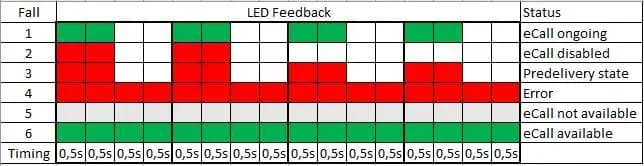
Initial diagnosis for the "Audi e-tron emergency call LED not green" problem begins with ensuring optimal conditions for the eCall system. Technicians should move the vehicle to an open-air location to ensure adequate GPS and mobile phone reception. The ignition must then be switched on, and the vehicle allowed to sit for at least 30 seconds before evaluating the eCall LED feedback. The TSB details specific LED flash patterns and their corresponding eCall statuses:
- Scenario 1 (eCall ongoing): The eCall LED shows a continuous green light (G-G-G-G-G-G). This indicates that eCall is active and an emergency call is currently being made.
- Scenario 2 (eCall disabled): The eCall LED shows a continuous red light (R-R-R-R-R-R). This means eCall is deactivated. Technicians should perform general test steps. If the LED remains flashing red, Product Support must be contacted via reporting obligation 2063936.
- Scenario 3 (Predelivery state): The eCall LED shows a continuous red light (R-R-R-R-R-R). This indicates the vehicle is in transport mode. A pre-delivery inspection (PDI) is required. If the LED still flashes red after the "Establish readiness for sending and receiving information" routine, general test steps should be performed. If it persists, contact TAC.
- Scenario 4 (Error): The eCall LED shows an alternating red and green light (R-G-R-G-R-G). This signifies that eCall is not available due to a control unit communication interruption or the LED not activating. A relevant event memory entry will be found in the data bus diagnostic interface J533 or the emergency call module J949. Technicians should work through this entry using Guided Fault Finding.
- Scenario 5 (eCall not available): The eCall LED shows a continuous red light (R-R-R-R-R-R). Similar to Scenario 4, eCall is not available due to a control unit communication interruption or the LED not activating. A relevant event memory entry will be present in the data bus diagnostic interface J533 or the emergency call module J949.
- Scenario 6 (eCall available): The eCall LED shows a continuous green light (G-G-G-G-G-G). This is the target status, indicating eCall is fully functional.
General Test Steps and Further Diagnostics
If the eCall LED still does not light up green after the initial assessment, technicians should proceed with further diagnostic steps:
- Check for IT Errors: Look for any IT errors or disturbances under the "Breaking News" tab in the service portlet. If an IT error is present, consult the Customer Information Portal (CIP) for outage information. If multiple vehicles are affected without an IT error, contact Audi Digital Business Support (DBS).
- Review Other TSBs: If no IT error is found, check for other relevant TSBs, product information, or software updates related to online services, the data bus diagnostic interface J533, or the emergency call module J949. Any software updates for J533, J949, or information electronics J794 should be performed.
- Privacy Settings: Verify if the vehicle's privacy settings are active. If they are, deactivate them and then put the vehicle into bus sleep mode. Re-check the LED status after switching on the ignition.
- Emergency Call Module Restart: If the LED is still not green, perform a restart of the emergency call module using the "Control module restart" routine. Instructions for this are found under "Emergency call module restart" in the workshop manual.
- Refer to Related Service Information: Technicians should also consult service information TSB 2061028, titled "91 Audi connect GEN3/GEN4: No Services in MMI and SOS LED does not turn green after PDI," for additional guidance.
Critical Warning: Emergency Call Module Restart
Repair Procedure Summary
To restart the emergency call module, technicians should follow these steps:
- ODIS Control Unit Restart: First, restart the control unit via ODIS. Navigate in the test plan to: "Select own tests > Diagnostic capable system > 0075 – Emergency call module – J949 > 0075 - Emergency call module, functions > 0075 – Control module restart." After performing the restart, reassess the complaint.
- Terminal 30 Reset: If the complaint persists after the ODIS restart, reset terminal 30 by disconnecting the 12V vehicle battery. Detailed instructions for this procedure can be found in the Workshop Manual.
- New Vehicle Registration in Backend: If the terminal 30 reset does not resolve the issue, a new vehicle registration can be initiated in the backend. This is done through the service portlet by pressing the "Reset control unit in backend" button under the "Vehicle communication" tab. After this, switch the ignition on and check the LED.
- Vehicle Data Synchronization: If the control unit has already been replaced, technicians should press the "Vehicle data synchronization for backend" button under the "Vehicle data" tab in the service portlet.
If the problem remains unresolved despite these steps, technicians should read out all measured values from the emergency call module (diagnostic address 0075) and contact Technical Assistance Center (TAC) for further support.
Affected Components and Control Units
Several control units and components are involved in the eCall system and may be implicated in the "Audi e-tron emergency call LED not green" issue:
- Data bus diagnostic interface J533
- Emergency call module J949 (Diagnostic address 0075)
- Information electronics J794
- Aerial module 8107
- Diagnostic address 0019 (System designation: Gateway)
Specific components are also identified for service billing:
| Service number | Component ```
Technical Background and Production Solution
This TSB indicates that there is no specific technical background or production solution applicable to this issue. This suggests that the problem is not due to a manufacturing defect or known design flaw but rather a potential configuration or software issue that can be resolved through diagnostic and service procedures.
Critical Warnings for Owners
While the TSB is primarily for technicians, owners should be aware of the following:
- Warranty: If your vehicle is outside of any warranty, this Technical Service Bulletin is informational only, meaning repairs may not be covered by the manufacturer.
- Parts and Service References: All part and service references provided in this TSB (2079652/1) are subject to change and/or removal. Always check with your Parts Department and/or ETKA for the latest information and parts bulletins.
Warranty and Service Billing
When billing for work performed under this TSB, the correct service number and damage code must be selected according to the specific situation. The following guidelines apply:
- Service Number 9107: This service number is reserved for technical causes outside the vehicle (e.g., mobile network or backend issues) and may not be used to invoice replacement of parts. It is also used for work performed on the vehicle due to an issue not caused by vehicle technology, such as a terminal 30 reset based on repair queries.
- Service Numbers 9145, 9170, or 9035: These numbers should be used for invoicing if a component was determined to be the cause of the complaint. This is confirmed by a relevant event memory entry in the data bus diagnostic interface J533 or emergency call module J949, or if J949 or J533 had to be replaced.
Damage Code
A new damage code, A039 = emergency call LED not green, has been created specifically for this complaint. This code does not apply to service number 9035.
Service Number / Damage Code Combinations for Invoicing
| Service number / damage code | Explanation ```
Technical Background and Production Solution
This TSB indicates that there is no specific technical background or production solution applicable to this issue. This suggests that the problem is not due to a manufacturing defect or known design flaw but rather a potential configuration or software issue that can be resolved through diagnostic and service procedures.
Critical Warnings for Owners
While the TSB is primarily for technicians, owners should be aware of the following:
- Warranty: If your vehicle is outside of any warranty, this Technical Service Bulletin is informational only, meaning repairs may not be covered by the manufacturer.
- Parts and Service References: All part and service references provided in this TSB (2079652/1) are subject to change and/or removal. Always check with your Parts Department and/or ETKA for the latest information and parts bulletins.
Warranty and Service Billing
When billing for work performed under this TSB, the correct service number and damage code must be selected according to the specific situation. The following guidelines apply:
- Service Number 9107: This service number is reserved for technical causes outside the vehicle (e.g., mobile network or backend issues) and may not be used to invoice replacement of parts. It is also used for work performed on the vehicle due to an issue not caused by vehicle technology, such as a terminal 30 reset based on repair queries.
- Service Numbers 9145, 9170, or 9035: These numbers should be used for invoicing if a component was determined to be the cause of the complaint. This is confirmed by a relevant event memory entry in the data bus diagnostic interface J533 or emergency call module J949, or if J949 or J533 had to be replaced.
Damage Code
A new damage code, A039 = emergency call LED not green, has been created specifically for this complaint. This code does not apply to service number 9035.
Service Number / Damage Code Combinations for Invoicing
| Service number / damage code | Explanation ```
Technical Background and Production Solution
This TSB indicates that there is not a specific technical background or production solution applicable to this issue. This suggests that the problem is not due to a manufacturing defect or known design flaw but rather a potential configuration or software issue that can be resolved through diagnostic and service procedures.
Critical Warnings for Owners
While the TSB is primarily for technicians, owners should be aware of the following:
- Warranty: If your vehicle is outside of any warranty, this Technical Service Bulletin is informational only, meaning repairs may not be covered by the manufacturer.
- Parts and Service References: All part and service references provided in this TSB (2079652/1) are subject to change and/or removal. Always check with your Parts Department and/or ETKA for the latest information and parts bulletins.
Warranty and Service Billing
When billing for work performed under this TSB, the correct service number and damage code must be selected according to the specific situation. The following guidelines apply:
- Service Number 9107: This service number is reserved for technical causes outside the vehicle (e.g., mobile network or backend issues) and may not be used to invoice replacement of parts. It is also used for work performed on the vehicle due to an issue not caused by vehicle technology, such as a terminal 30 reset based on repair queries.
- Service Numbers 9145, 9170, or 9035: These numbers should be used for invoicing if a component was determined to be the cause of the complaint. This is confirmed by a relevant event memory entry in the data bus diagnostic interface J533 or emergency call module J949, or if J949 or J533 had to be replaced.
Damage Code
A new damage code, A039 = emergency call LED not green, has been created specifically for this complaint. This code does not apply to service number 9035.
Service Number / Damage Code Combinations for Invoicing
| Service number / damage code | Explanation ```
Technical Background and Production Solution
This TSB indicates that there is not a specific technical background or production solution applicable to this issue. This suggests that the problem is not due to a manufacturing defect or known design flaw but rather a potential configuration or software issue that can be resolved through diagnostic and service procedures.
Critical Warnings for Owners
While the TSB is primarily for technicians, owners should be aware of the following:
- Warranty: If your vehicle is outside of any warranty, this Technical Service Bulletin is informational only, meaning repairs may not be covered by the manufacturer.
- Parts and Service References: All part and service references provided in this TSB (2079652/1) are subject to change and/or removal. Always check with your Parts Department and/or ETKA for the latest information and parts bulletins.
Warranty and Service Billing
When billing for work performed under this TSB, the correct service number and damage code must be selected according to the specific situation. The following guidelines apply:
- Service Number 9107: This service number is reserved for technical causes outside the vehicle (e.g., mobile network or backend issues) and may not be used to invoice replacement of parts. It is also used for work performed on the vehicle due to an issue not caused by vehicle technology, such as a terminal 30 reset based on repair queries.
- Service Numbers 9145, 9170, or 9035: These numbers should be used for invoicing if a component was determined to be the cause of the complaint. This is confirmed by a relevant event memory entry in the data bus diagnostic interface J533 or emergency call module J949, or if J949 or J533 had to be replaced.
Damage Code
A new damage code, A039 = emergency call LED not green, has been created specifically for this complaint. This code does not apply to service number 9035.
Service Number / Damage Code Combinations for Invoicing
| Service number / damage code | Explanation |
|---|---|
| 9113/0040 | When an event memory entry on the GPS aerial was logged in emergency call module J949 or data bus diagnostic interface J533 |
| 9138/0040 | When an event memory entry on the aerial was logged in emergency call module J949 or data bus diagnostic interface J533 or aerial module 8107 |
| 9156/0040 | When an event memory entry on the loudspeaker for telephone was logged in emergency call module J949 |
| 9157/0040 | When an event memory entry for the microphone is logged in emergency call module J949 or information electronics J794 |
| 9178/0040 | When an event memory entry for the emergency battery for telematics is logged in emergency call module J949 |
| 9107/A039 | For work performed on vehicle due to issue not caused by vehicle technology |
| 9145/A039 | When an event memory entry was logged in emergency call module J949 or emergency call module has been replaced, and system designation is "ConBox" or "CB_H_" |
| 9170/A039 | When an event memory entry was logged in emergency call module J949 or emergency call module has been replaced, and system designation includes "OCU" |
| 9035/0039 | When an event memory entry was logged in data bus diagnostic interface J533 or data bus diagnostic interface J533 was replaced |
Labor Operations
Specific labor operations and time units are defined for various scenarios:
| Labor Operations | Operation Code | Time Units (TU) | Billing Instruction |
|---|---|---|---|
| Scenario 2 | |||
| Check online services | 9170 0199 | Please bill according to the time required | |
| Check vehicle (bus sleep mode) | 0689 0199 | 10 TU | |
| Pre-delivery inspection | 0101 00xx | See SRT with associated operations | |
| Scenario 3 | |||
| Check online services | 9170 0199 | Please bill according to the time required | |
| Check vehicle (bus sleep mode) | 0689 0199 | 10 TU | |
| Scenario 3a | |||
| Check online services | 9170 0199 | Please bill according to the time required | |
| GFF / Guided Functions | 0150 0060 | Labor according to the diagnostic log | |
| Scenario 3b | |||
| Remove and install/replace telematics control unit | 9170 19xx / 9170 55xx | See SRT with associated operations | |
| Check vehicle (bus sleep mode) | 0689 0199 | 10 TU |
All warranty claims must adhere to the Audi Warranty Policies and Procedures Manual.
Important Considerations
It is important to note that information regarding predecessors and items included or excluded in repair operations, as well as any associated tasks, should be carefully reviewed. All part and service references provided in this TSB (2079652/1) are subject to change or removal. Technicians should always verify the latest information and part bulletins with the Parts Department and/or ETKA.
Source: NHTSA ID: 10248232
Frequently Asked Questions
- What does it mean if my Audi's emergency call LED is not green?
- If your Audi's emergency call LED in the roof module is not green, it indicates a potential malfunction with the eCall system. This could mean that manual or automatic emergency calls, or roadside assistance calls, may not function correctly. Audi TSB 2079652/1 provides diagnostic and repair procedures for this specific issue.
- Which Audi models are affected by the 'emergency call LED not green' issue?
- This issue, as addressed by TSB 2079652/1, affects a wide range of Audi models from model years 2016 through 2026 that are equipped with eCall functionality. This includes models like the Audi e-tron, A3, A4, A6, A7, A8, Q3, Q5, Q7, Q8, and their S and RS variants, as well as e-tron GT models.
- What are the first steps a technician takes to diagnose the 'Audi e-tron emergency call LED not green' problem?
- Initially, a technician will ensure the vehicle is in an open area with good GPS and mobile reception. After turning on the ignition for at least 30 seconds, they will observe the eCall LED's behavior. The TSB outlines six different scenarios based on the LED's flash pattern, guiding the technician to determine if the system is ongoing, disabled, in predelivery state, or experiencing an error.
- Is there a specific warning about restarting the eCall module?
- Yes, Audi TSB 2079652/1 includes a critical NOTICE: 'Please observe the following instructions for restarting the emergency call module. Failure to observe these instructions may result in irreparable damage to the emergency call system!' This emphasizes the importance of following the repair procedure precisely.
- What are some of the control units involved in the eCall system that might cause the 'emergency call LED not green' fault?
- The eCall system involves several key control units and components. These include the data bus diagnostic interface J533, the emergency call module J949, and the information electronics J794. Other components like the aerial module 8107, OCU3, OCU4, Connectivity box (Low or High), and the Gateway (diagnostic address 0019) can also be implicated in the 'Audi e-tron emergency call LED not green' issue, as detailed in TSB 2079652/1.
What Audi e-tron owners report
Counted from the records in our database across 5 model years.
- 158
- Owner complaints
- 14
- Recalls
- 1,706
- Service bulletins
- 7
- Crashes reported
- 6
- Fires reported
- 3
- Injuries reported
The 2022 model year
31 complaints, the 3rd most of 5 model years on file. Owners reported 1 crash, 2 fires and 2 injuries for this year, which also has 6 recalls on file.
Electrical System, the system this article covers, accounts for 81 of 158 complaints (51%), including 17 for 2022.
Complaints by model year
| 2019 | 84 | |
|---|---|---|
| 2020 | 1 | |
| 2021 | 36 | |
| 2022 | 31 | |
| 2023 | 6 |
Most-reported systems
- Electrical System — 81
- Power Train — 24
- Engine — 23
- Fuel/Propulsion System — 18
- Service Brakes — 18
Latest recalls for the 2022 model year
- 26V240000 — Service Brakes, Hydraulic (Apr 2026)
- 25V900000 — Back Over Prevention (Dec 2025)
- 23V867000 — Electrical System (Dec 2023)
Recent owner reports about electrical system
While driving, the vehicle displayed three simultaneous warnings — “Drive system malfunction, safely stop vehicle,” “Electrical system malfunction, restart not possible, contact service,” and “All-wheel drive malfunction, limited stability” — and lost…
Read owner complaints →The vehicle is experiencing an intermittent but active 'Electrical system: malfunction!' safety alert on the dashboard and myAudi app, caused by an internal high-voltage battery cell circuit fault (Diagnostic Trouble Code P0DB400 / U04A300) and a failure in…
Complaints are owner reports filed with NHTSA. They are unverified, and counts depend on how many vehicles were sold, so they are not a failure rate.
Related Articles
2022 Audi e-tron Electrical System Problems: Complaints & TSBs
Owners of the 2022 Audi e-tron frequently report significant electrical system malfunctions, ranging from sudden power loss and charging hazards to software crashes. Braking issues and unexpected automatic emergency braking are also common concerns, alongside numerous technical service bulletins…
2022-2026 Audi Guided Fault Finding Reporting Obligation
Audi has issued Technical Service Bulletin TPI 2033392, also known as Transaction No. 2081531/1, regarding a reporting obligation for technicians when Guided Fault Finding produces an unexpected result. This TSB outlines the process for contacting Audi Product Support for diagnostic assistance.
2022-2026 Audi Infotainment System Complaints
Audi has released Technical Service Bulletin (TSB) 2081405/1 to address various customer complaints regarding infotainment systems in 2022-2026 Audi vehicles. This TSB helps technicians diagnose issues often caused by external media or mobile devices, rather than vehicle technology.
2018-2026 Audi Models Cracking Noise TSB 2061464/11
Audi Technical Service Bulletin 2061464/11 describes a cracking noise from the front or rear axle when changing direction in various 2018-2026 Audi models. The issue is due to stub axle movement and is resolved by bonding the stub axle to the wheel bearing with locking fluid.
2022-2026 Audi Parking Aid False Warnings TSB 2024323/13
Audi has released Technical Service Bulletin 2024323/13 to address customer complaints of false parking aid warnings. This bulletin details various environmental and vehicle-specific conditions that can cause the parking aid system to issue alerts even when no obstacles are present. It provides…
Leave a comment
Comments are moderated and may take a moment to appear. Only your first name and the initial of your last name are shown publicly.
Comments
Be the first to comment.