2020-2026 Audi MIB3 Navigation Database Reinstallation TSB
This Technical Service Bulletin (TSB) 2062115/13 addresses issues with the navigation database in 2020-2026 Audi vehicles equipped with MIB3 MMI systems, such as an "error message" or "no function" for the navigation system. It outlines the procedure for reinstalling the navigation database using…
 David Chen2023 Audi e-tron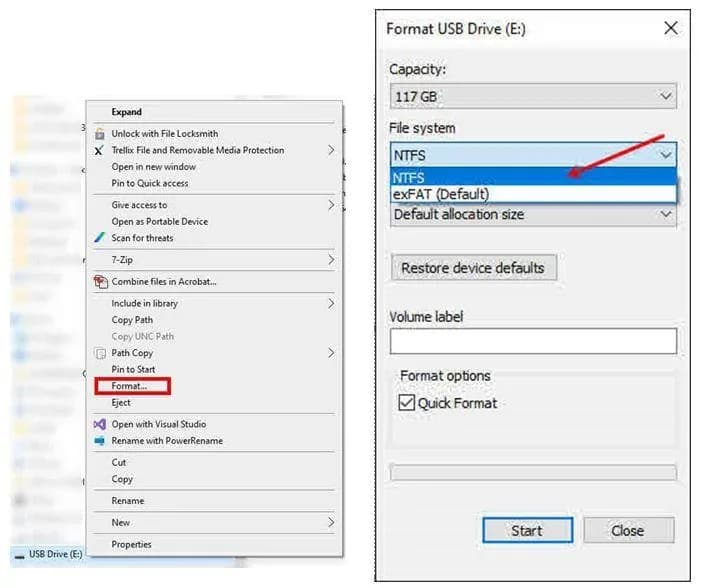
Şu araçlar için de geçerli
- Audi A3
- 2022–2025
- Audi A4
- 2021–2025
- Audi A4 allroad
- 2021–2025
- Audi A5
- 2021–2024
- Audi A6
- 2021–2025
- Audi A6 allroad
- 2021–2025
- Audi A7
- 2021–2025
- Audi A7 e
- 2021–2022
- Audi A8 L e
- 2021
- Audi e-tron
- 2021–2022
- Audi e-tron GT
- 2022–2025
- Audi e-tron Sportback
- 2021–2022
- Audi Q3
- 2022–2025
- Audi Q5
- 2021–2025
- Audi Q5 e
- 2021, 2023, 2024, 2025
- Audi Q7
- 2021–2025
- Audi Q8
- 2021–2025
- Audi RS 3
- 2022–2024
- Audi RS 5
- 2021–2024
- Audi RS 6 Avant
- 2021–2025
- Audi RS 7
- 2021–2025
- Audi RS e-tron GT
- 2022–2024
- Audi RS Q8
- 2021–2025
- Audi S e-tron GT
- 2026
- Audi S3
- 2022–2025
- Audi S4
- 2021, 2022, 2024, 2025
- Audi S5
- 2021–2024
- Audi S6
- 2022, 2025
- Audi S7
- 2021–2025
- Audi S8
- 2021–2025
- Audi SQ5
- 2021–2025
- Audi SQ7
- 2021–2025
- Audi SQ8
- 2021–2025
▸ 27 tane daha göster▾ Daha az göster
Symptoms of Navigation Database Issues
Owners of 2020-2026 Audi vehicles equipped with the MIB3 MMI system may encounter problems with their navigation system. These issues typically manifest as a technical "error message" related to control modules and services, or the navigation mode may display "no function" when selected. The root cause is identified as a software issue affecting the navigation database.
Important Warnings and Considerations
Audi has issued TSB 2062115/13 to address the navigation database reinstallation. There are several critical points for owners and technicians to note:
- Recall 91DZ: If this TSB procedure is performed in conjunction with recall 91DZ, the standard warranty instructions for this TSB will not apply, as reimbursement falls under the scope of that specific recall.
- Database Deletion: The navigation database should only be deleted if explicitly instructed by another TSB or if advised by the Technical Assistance Center (TAC).
- Software Download: When downloading the necessary files for this procedure, do not use Internet Explorer. It is recommended to use modern browsers such as Edge, Firefox, Chrome, or Safari.
Diagnosis and Trigger Conditions
The primary diagnosis for an "Audi MIB3 navigation database error" is a software issue within the MIB3 MMI system. The problem occurs when the navigation database becomes corrupted or is not properly installed, leading to the system's inability to function correctly or display an "error message."
Repair Procedure Summary
This TSB, 2062115/13, outlines a detailed procedure for reinstalling the navigation database. The process involves preparing a USB-C drive, deleting the existing navigation data from the vehicle, and then installing the new database.
- Download Navigation Database: Obtain the latest MIB3 Navigation database from the provided Audi link.
- Prepare USB-C Drive: Use a 64GB or larger USB-C drive. Format the drive to NTFS file system. Formatting will erase all existing files.
- Extract Files: Download both navigation files and extract them using 7-zip (or similar software). The extracted files, including folders named "Data" and "Meta," must be copied directly to the root directory of the formatted USB-C drive, not into any subfolders.
- Eject USB-C Drive: Safely eject the USB-C drive from the computer.
- Delete Existing Nav Data (ODIS): In the vehicle, use the ODIS diagnostic system. Navigate to Guided Fault Finding/Guided Functions, then perform a self-test on the 005F - Information Electronics Control Module 1 -J794- (MIB2+ or MIB3). Select the function "Erase navigation databank or Partitions of internal memory" and choose the "Navigation data bank value." This process typically takes less than 3 seconds.
- Vehicle Sleep Cycle: End the diagnostic session and allow the vehicle to enter a sleep cycle. After turning the ignition back on, wait a few minutes for all MMI functions to initialize.
- Install New Database: Insert the prepared USB-C drive into the vehicle. The MMI system should automatically detect the new navigation database and prompt for installation. Alternatively, the update can be initiated manually via MMI Settings > system maintenance > software update.
- MMI Reset: Once the update is complete, perform an MMI reset by pressing and holding the on/off button for approximately 10 seconds.
- Unplug USB-C Drive: Remove the USB-C drive.
After these steps, the navigation map should be displayed, and the navigation feature should be fully functional. If the MMI does not detect the USB-C drive, try re-inserting it multiple times or using a different USB-C drive.
Required Tools or Parts
To perform the navigation database reinstallation, the only specific tool required is a USB-C Flash Drive, 64GB or larger. This drive should be locally sourced.
Warranty Information
For warranty claims related to this procedure, the following details apply:
- Claim Type: If the vehicle is outside of its warranty period, this Technical Service Bulletin is for informational purposes only.
- Service Number: 9196
- Damage Code: 0039
- Labor Operations:
- Program display and operating control unit: 9196 2599 (20 Time Units)
- Check and adjust display and operating control unit: 9196 0599 (10 Time Units)
All warranty claims must adhere to the Audi Warranty Policies and Procedures Manual. Claims are subject to review by Audi Warranty.
Additional Information
This TSB references another bulletin, TSB 2037809, titled "91 MIB: MMI navigation map update 'How-to guide' - potential customer concerns," which may provide further context or related information.
NHTSA ID: 11015735
Frequently Asked Questions
- What does TSB 2062115/13 address?
- TSB 2062115/13 provides instructions for reinstalling the navigation database in 2020-2026 Audi vehicles equipped with the MIB3 MMI system, resolving issues like an "error message" or "no function" for the navigation system.
- What should I do if my Audi MIB3 navigation system shows an "error message"?
- If your Audi MIB3 navigation system displays an "error message" or has "no function," it indicates a potential software issue with the navigation database. This TSB outlines a procedure for reinstalling the database, which typically requires a visit to an authorized Audi service center.
- Can I perform the navigation database reinstallation myself?
- The procedure detailed in TSB 2062115/13 involves using the ODIS diagnostic system and specific steps that are typically performed by trained technicians at an authorized Audi service center. It is recommended to have this service performed by professionals to ensure proper reinstallation.
- What tools are needed for this repair?
- The primary tool required for this repair is a USB-C Flash Drive, 64GB or larger, which needs to be formatted to NTFS and loaded with the correct navigation database files. The ODIS diagnostic system is also used for deleting the old database.
Related Articles
2023 Audi e-tron Problems: Recalls, Complaints & TSBs
The 2023 Audi e-tron has faced several significant safety concerns, including recalls for potential charging cable overheating and brake pedal detachment. Owners have also reported serious issues like sudden unintended acceleration and electrical system malfunctions. This profile details these…
2023 Audi e-tron Brake Pedal Recall
Audi has issued a recall (NHTSA ID: 26V240000, Audi Recall 46P7) for certain 2019-2024 E-Tron and 2020-2024 E-Tron Sportback vehicles, including the 2023 Audi e-tron. The recall addresses a potential issue where the brake pedal may detach from the brake booster, leading to a loss of brake function.
2015-2027 Audi Noise Diagnosis with Frequency Analysis App TSB
Audi has released Technical Service Bulletin 2051095/11 detailing the Audi Frequency Analysis app. This app helps technicians diagnose noise complaints more precisely across 2015-2027 Audi models. Learn how the app works, where to download it, and its features for effective vehicle noise analysis.
2023 Audi e-tron AC/DC Charging Not Possible TSB
This manufacturer communication (NHTSA ID 11031035) provides critical information for 2023 Audi e-tron owners facing issues with AC/DC charging. It specifically highlights problems linked to software version 00C6: 0093/3119, which can prevent the vehicle from charging.
2023-2025 Audi Rear Seat Reminder Message TSB 2074943/2
Audi Technical Service Bulletin 2074943/2 explains the instrument cluster message 'Please check rear seats and be aware of door safelock' in various 2023-2025 Audi models. This informational TSB details the rear occupant detection system designed to prevent children and pets from being left in…
Yorum bırakın
Yorumlar moderasyondan geçer ve görünmesi biraz zaman alabilir. Sadece adınız ve soyadınızın baş harfi herkese açık olarak gösterilir.
Yorumlar
İlk yorum sizden olsun.