2020-2026 Audi MIB3 Navigation Database Reinstallation TSB
Audi TSB 91 25 01 2062115/12 provides instructions for dealers to reinstall the navigation database in MIB3 MMI systems for various 2020-2026 Audi models. This addresses software issues and ensures proper navigation functionality.
 Marcus Weber2021 Audi e-tron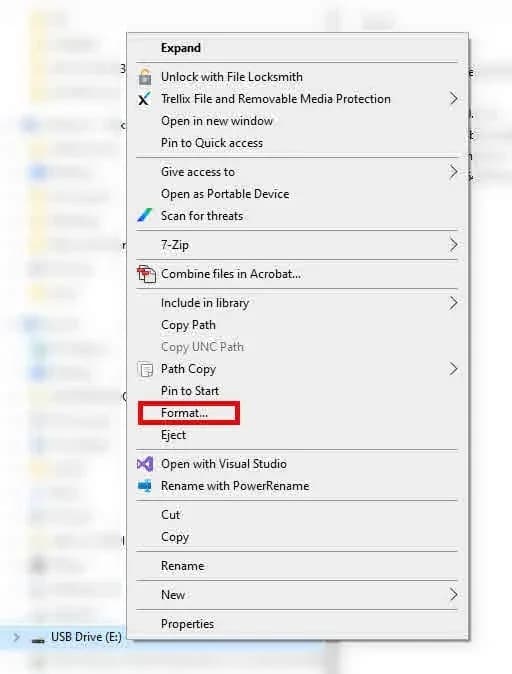
Also applies to
- Audi A3
- 2022–2025
- Audi A4
- 2021–2025
- Audi A4 allroad
- 2021–2025
- Audi A5
- 2021–2024
- Audi A6
- 2021–2025
- Audi A6 allroad
- 2021–2025
- Audi A7
- 2021–2025
- Audi A7 e
- 2021–2022
- Audi A8 L e
- 2021
- Audi e-tron
- 2022–2023
- Audi e-tron GT
- 2022–2025
- Audi e-tron Sportback
- 2021–2022
- Audi Q3
- 2022–2025
- Audi Q5
- 2021–2025
- Audi Q5 e
- 2021, 2023, 2024, 2025
- Audi Q7
- 2021–2025
- Audi Q8
- 2021–2025
- Audi RS 3
- 2022–2024
- Audi RS 5
- 2021–2024
- Audi RS 6 Avant
- 2021–2025
- Audi RS 7
- 2021–2025
- Audi RS e-tron GT
- 2022–2024
- Audi RS Q8
- 2021–2025
- Audi S e-tron GT
- 2026
- Audi S3
- 2022–2025
- Audi S4
- 2021–2025
- Audi S5
- 2021–2024
- Audi S6
- 2021–2025
- Audi S7
- 2021–2025
- Audi S8
- 2021–2025
- Audi SQ5
- 2021–2025
- Audi SQ7
- 2021–2025
- Audi SQ8
- 2021–2025
▸ Show 27 more▾ Show fewer
Why This Matters
Audi has issued Technical Service Bulletin (TSB) 91 25 01 2062115/12 to address software-related issues with the MIB3 MMI navigation database. This TSB outlines the procedure for dealerships to properly delete and reinstall the navigation database, ensuring accurate and functional navigation for affected vehicles. This update is crucial for maintaining the performance of your Audi's infotainment system.
Symptoms
This Technical Service Bulletin addresses a general "Software issue" that may affect the navigation database in the MIB3 MMI system. While no specific customer-facing symptoms are detailed, the procedure is intended for situations where reinstallation of the navigation database is required, as specified by another TSB or by Audi's Technical Assistance Center (TAC). Owners might experience issues such as incorrect map data, navigation system malfunctions, or other related MMI anomalies that necessitate a database refresh.
Diagnosis and Trigger Conditions
The reinstallation of the navigation database should only be performed if explicitly recommended by another Technical Service Bulletin or upon instruction from Audi's Technical Assistance Center (TAC). This ensures that the procedure is applied correctly to resolve specific software issues within the MIB3 MMI system. Technicians are instructed to use the ODIS diagnostic system to perform a "Self test" on the "005F - Information Electronics Control Module 1 - J794" (MIB2+ or MIB3) and then access the "005F - Information Electronics 1, functions / 005F - Basic Setting" to initiate the database deletion.
Repair Procedure Summary
The repair involves a multi-step process to prepare a USB drive with the latest navigation data, delete the existing database from the vehicle's MIB3 MMI system, and then install the new data.
- Download Navigation Database: Technicians must download the current Audi MIB3 navigation database files from a specified Audi link to a PC.
- Prepare USB Drive: A 64GB or larger USB flash drive is required. This drive must be formatted to "NTFS" file system. Formatting the USB drive will erase all existing files.
- Transfer Files to USB: The downloaded navigation files (including "Data" and "Meta" folders) are extracted using 7-zip and copied directly to the root directory of the NTFS-formatted USB drive. The files must not be placed in a subfolder.
- Delete Existing Nav Data:
- Using the ODIS diagnostic system, technicians select the test plan: "Self test >> Diagnostic capable system >> 005F - Information Electronics Control Module 1 - J794 - (MIB2+ or MIB3) >> 005F - Information Electronics 1, functions / 005F - Basic Setting".
- Within the basic settings program, the function "Erase navigation databank" or "Partitions of internal memory" is selected, and the "Navigation data bank" value is erased. This process typically takes less than 3 seconds.
- The diagnostic session is ended, and the vehicle is allowed to enter a sleep cycle.
- After restarting the ignition and waiting for MMI functions to initialize, the vehicle is ready for the update.
- Install New Nav Data:
- The prepared USB drive is inserted into the vehicle.
- From the MMI settings, navigate to "MMI Settings >> select system maintenance >> software update".
- The software update should become available.
- Once the update is complete, an MMI reset is performed by pressing and holding the on/off button for approximately 10 seconds.
- The USB drive is then unplugged.
After these steps, the navigation map should be displayed and functional. If the MMI does not detect the USB drive, re-inserting it or trying a different USB drive is recommended.
Required Tools or Parts
To perform this procedure, a specific tool is required:
- USB Flash Drive, 64GB or larger: This USB drive must be formatted to "NTFS".
Important Warnings
Owners and technicians should be aware of the following critical information:
- Recall 91DZ: "If this TSB is performed in combination with recall 91DZ, the warranty instructions below do not apply as reimbursement is within the scope of that recall."
- Browser Compatibility: "Do not use Internet Explorer to download the files in this TSB. Edge, Firefox, Chrome or Safari should be used."
- Workshop Tool: "Please keep the USB flash drive with the navigation data as a workshop tool. It is not required to call into TAC or re-download the navigation data if the USB flash drive has already been created and is available."
- Online Updates: "If an updated NavDB is available, it will automatically be installed via an online update after the initial NavDB is installed. It is not required to keep the vehicle in a service bay or to supervise the update after it has been started."
Warranty Information
For vehicles outside of warranty, this Technical Service Bulletin is for informational purposes only. For vehicles under warranty, claims must adhere to the Audi Warranty Policies and Procedures Manual.
- Claim Type: If the vehicle is outside of any warranty, this TSB is informational only.
- Service Number: 9196
- Damage Code: 0039
- Labor Operations:
- Program display and operating control unit: 9196 2599 (20 TU)
- Check and adjust display and operating control unit: 9196 0599 (10 TU)
- Charge battery: 2706 8950 (See SRT with associated operations)
- GFF: 0150 0000 (Time stated on the diagnostic protocol)
- Claim Comment: As per TSB 2062115/12.
Owner Action
If you experience navigation issues with your 2020-2026 Audi MIB3 system, it is recommended to contact an authorized Audi dealership. They will be able to diagnose the specific problem and determine if the "Audi MIB3 navigation database" reinstallation procedure outlined in TSB 91 25 01 2062115/12 is necessary. This procedure ensures your navigation system functions correctly and is covered under warranty if applicable.
NHTSA ID: 11013711
Gallery
1 image
Frequently Asked Questions
- What is Audi TSB 91 25 01 2062115/12 about?
- This Technical Service Bulletin provides detailed instructions for Audi dealerships to reinstall the navigation database in the MIB3 MMI system of various 2020-2026 Audi models, addressing software-related issues.
- How do I know if my Audi MIB3 navigation database needs reinstallation?
- The reinstallation procedure should only be performed if specified by another TSB or if instructed by Audi's Technical Assistance Center (TAC). If you're experiencing navigation issues, an Audi dealer can diagnose the problem.
- What tools are required for the Audi MIB3 navigation database reinstallation?
- The primary tool required is a USB Flash Drive, 64GB or larger, which must be formatted with the "NTFS" file system to properly transfer the navigation data.
- Is the Audi MIB3 navigation database reinstallation covered under warranty?
- Yes, if your vehicle is under warranty, the procedure is generally covered. However, if this TSB is performed in conjunction with "recall 91DZ", reimbursement will be handled under that specific recall.
- What is the "Information Electronics Control Module 1 - J794"?
- The "Information Electronics Control Module 1 - J794" is a key component of the MIB3 MMI system, responsible for handling information electronics, including the navigation database. The TSB specifies diagnostic steps involving this module.
Related Articles
2021 Audi e-tron Electrical Malfunction and Power Loss
A 2021 Audi e-tron owner reported a severe 'Electrical Malfunction' resulting in complete loss of power on the highway. The issue has persisted despite dealer attempts to fix it over five months, posing significant safety risks.
2021-2026 Audi UTR Troubleshooting & FAQs TSB 2081409/1
This Audi Technical Service Bulletin (TSB 2081409/1) provides comprehensive answers to frequently asked questions and troubleshooting steps for the Audi Universal Traffic Recorder (UTR) accessory, covering topics like SD card compatibility, video playback, Wi-Fi issues, and more.
2021-2025 Audi Emergency Call System Fault TSB
Audi has released Technical Service Bulletin 2059528/18 to address an "Emergency call function: malfunction! Function unavailable. Please contact service" warning, often accompanied by a red SOS LED and DTC B200000. This issue affects various 2021-2025 Audi models and is due to a software problem…
2021-2026 Audi Adaptive Light System Fault C12B3FA TSB
Audi has released Technical Service Bulletin 2054202/7 to address an intermittent 'Audi adaptive light: system fault' message and DTC C12B3FA in various 2021-2026 models. This TSB outlines diagnosis and resolution for driver assistance system malfunctions.
2021-2026 Audi Parking Aid False Warnings TSB 2024323/12
This Technical Service Bulletin (TSB 2024323/12) details diagnostic and repair procedures for 2021-2026 Audi vehicles experiencing false parking aid warnings. Learn about environmental factors, sensor checks, and proper installation to resolve issues like 'Parking aid does not work / warning is…
Leave a comment
Comments are moderated and may take a moment to appear. Only your first name and the initial of your last name are shown publicly.
Comments
Be the first to comment.