2021 Audi FoD Functions Not Available TSB
A Technical Service Bulletin (TSB 2063290) has been issued for 2021 Audi models regarding Function on Demand (FoD) features not activating. This TSB provides troubleshooting steps for owners and technicians to resolve issues with purchased functions not being available in the vehicle.

Si applica anche a
- Audi A4
- 2021
- Audi A5
- 2021
- Audi A6
- 2021
- Audi A6 allroad
- 2021
- Audi A7
- 2021
- Audi A7 e
- 2021
- Audi A8 L e
- 2021
- Audi Q5
- 2021
- Audi Q7
- 2021
- Audi Q8
- 2021
- Audi RS 5
- 2021
- Audi RS 6 Avant
- 2021
- Audi RS 7
- 2021
- Audi RS Q8
- 2021
- Audi S4
- 2021
- Audi S5
- 2021
- Audi S6
- 2021
- Audi S7
- 2021
- Audi S8
- 2021
- Audi SQ5
- 2021
- Audi SQ7
- 2021
- Audi SQ8
- 2021
▸ Mostra altri 16▾ Mostra meno
Symptoms
Owners of 2021 Audi vehicles may notice that "One of the purchased functions does not work in the vehicle." This typically occurs when "The function was purchased in the myAudi marketplace via the myAudi app." The core problem is that the vehicle's systems are not properly receiving or activating the purchased Function on Demand (FoD) features.
Technical Background
Function on Demand (FoD) was introduced for the US market in May 2021, allowing owners to purchase and activate vehicle functions post-sale. The TSB highlights that the customer concern arises when the vehicle fails to receive the updated function from the Audi connect backend. The Gateway control unit (J533, address word 0019) is responsible for synchronizing data with the Audi connect backend for these functions to activate. In some cases, multiple ignition cycles may be needed for this synchronization to complete.
Specific Function on Demand packages mentioned include:
- Navigation Plus Package (PR Code 7UZ): Available for 2021+ A4, A5, and Q5 models without factory navigation. This package includes navigation, Audi connect PRIME & PLUS, and full-speed Wi-Fi.
- Light Function Package (PR Code 8G1): Available for 2021+ e-tron and e-tron Sportback models. This package includes cornering light, intersection light, and turn assist light.
Troubleshooting Steps
If your 2021 Audi FoD functions are not activating, follow these steps to help resolve the issue:
- eCall SOS LED Check: Ensure the eCall SOS LED is green. A green LED indicates that the embedded SIM is localized to the US market, which is mandatory for FoD functionality.
- Ignition Cycle: Turn the ignition off and back on up to seven times. For each cycle, leave the vehicle in the 'on' state for 30-60 seconds and then in the 'off' state for 30-60 seconds. Repeat this process.
- MMI Soft Reset: Perform a soft reset of the Multi Media Interface (MMI) system. Press and hold the volume control knob for at least 10 seconds or until the light around the knob turns off and the MMI displays "checking remote access rights".
- Restore MMI Factory Settings: Navigate to
Home >> Settings >> System Maintenance >> Restore factory settingsin the MMI. This action will reset key user pairing and all other saved customer settings. - myAudi App VIN Re-add: You may need to remove your vehicle's VIN from your myAudi app account and then add it back. This can help complete key user pairing and the myAudi login in the MMI.
Manual Activation Process
If the vehicle had no LTE connectivity during the initial purchase of the FoD function, and more than 72 hours have passed since the purchase (e.g., if the vehicle was in an underground parking garage), the activation may expire and will not be retried by the Audi connect backend. In such cases, the activation must be manually pushed to the car.
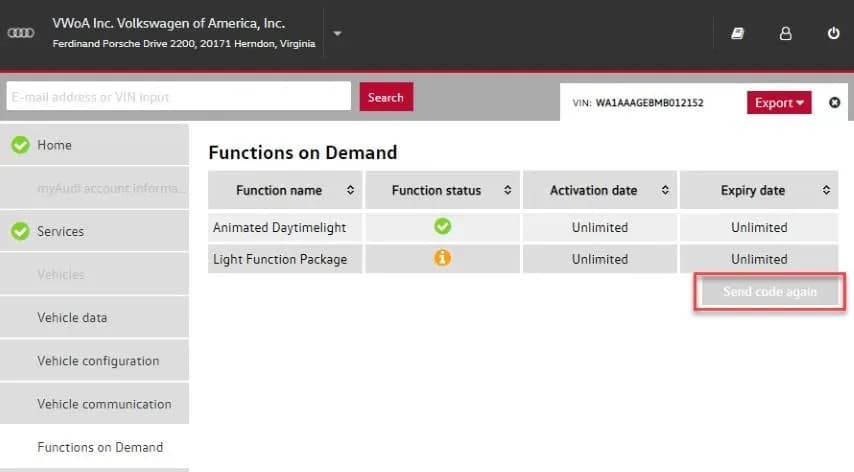
This manual push is performed by a technician using the Service Portlet via the Group Retail Portal (GRP). The process involves:
- Vehicle Location: The vehicle must be in a location with good GPS and LTE network signal.
- Service Portlet Use: The technician uses the Service Portlet to resend the activation to the vehicle.
- MMI Reset: After resending, perform an MMI reset by pressing and holding the volume control knob for more than 10 seconds.
If a technician does not have access to the Service Portlet via the Group Retail Portal, they should open a ticket with the Audi connect Technical Support Team via https://audi.zendesk.com/.
Important Notes
This Technical Service Bulletin (TSB 2063290) is for informational purposes only and is "not applicable to any Audi Warranty." Owners should be aware that any repairs or troubleshooting related to this issue may not be covered under standard warranty terms.
Source: NHTSA ID: 10198186
Frequently Asked Questions
- What does the Audi FoD functions issue mean for my 2021 Audi?
- If you own a 2021 Audi, you might find that Function on Demand (FoD) features you purchased through the myAudi app are not working. This is typically due to a synchronization problem between your vehicle and the Audi connect backend, preventing the features from activating.
- What steps can I take if my Audi FoD functions are not activating?
- You can try several troubleshooting steps, including ensuring your eCall SOS LED is green, cycling your ignition off and on multiple times, performing an MMI soft reset, restoring MMI factory settings, and re-adding your VIN in the myAudi app. These steps aim to help the vehicle synchronize with the Audi connect backend.
- What if my FoD activation has expired because it wasn't connected to LTE?
- If more than 72 hours have passed since the purchase without LTE connectivity, the activation might expire. In this scenario, a dealership technician can manually push the activation to your vehicle using the Service Portlet via the Group Retail Portal (GRP), provided the vehicle is in a location with good GPS and LTE signal.
- Is this Audi FoD functions issue covered under warranty?
- According to Technical Service Bulletin 2063290, this TSB is informational only and is not applicable to any Audi Warranty. This means that any diagnostic or repair costs associated with this issue may not be covered by your standard Audi warranty.
What Audi e-tron owners report
Counted from the records in our database across 5 model years.
- 158
- Owner complaints
- 14
- Recalls
- 1,706
- Service bulletins
- 7
- Crashes reported
- 6
- Fires reported
- 3
- Injuries reported
The 2021 model year
36 complaints, the 2nd most of 5 model years on file. Owners reported 0 crashes, 1 fire and 0 injuries for this year, which also has 10 recalls on file.
Electrical System and Equipment, the system this article covers, accounts for 81 of 158 complaints (51%), including 24 for 2021.
Complaints by model year
| 2019 | 84 | |
|---|---|---|
| 2020 | 1 | |
| 2021 | 36 | |
| 2022 | 31 | |
| 2023 | 6 |
Most-reported systems
- Electrical System — 81
- Power Train — 24
- Engine — 23
- Fuel/Propulsion System — 18
- Service Brakes — 18
Latest recalls for the 2021 model year
- 26V240000 — Service Brakes, Hydraulic (Apr 2026)
- 25V900000 — Back Over Prevention (Dec 2025)
- 23V867000 — Electrical System (Dec 2023)
Recent owner reports about electrical system and equipment
I own a 2021 Audi e-tron with approximately 58000 miles. Beginning in March 2026, the vehicle developed intermittent Virtual Cockpit/instrument-cluster problems with blank display. I reported the condition to Audi dealer of Princeton NJ.
Read owner complaints →What component or system failed or malfunctioned, and is it available for inspection upon request? - While on highway the vehicle loosed all Power indicating Electrical Malfunction How was your safety or the safety of others put at risk?
Complaints are owner reports filed with NHTSA. They are unverified, and counts depend on how many vehicles were sold, so they are not a failure rate.
Related Articles
2021 Audi e-tron Electrical Malfunction and Power Loss
A 2021 Audi e-tron owner reported a severe 'Electrical Malfunction' resulting in complete loss of power on the highway. The issue has persisted despite dealer attempts to fix it over five months, posing significant safety risks.
2021-2026 Audi UTR Troubleshooting & FAQs TSB 2081409/1
This Audi Technical Service Bulletin (TSB 2081409/1) provides comprehensive answers to frequently asked questions and troubleshooting steps for the Audi Universal Traffic Recorder (UTR) accessory, covering topics like SD card compatibility, video playback, Wi-Fi issues, and more.
2021-2025 Audi Emergency Call System Fault TSB
Audi has released Technical Service Bulletin 2059528/18 to address an "Emergency call function: malfunction! Function unavailable. Please contact service" warning, often accompanied by a red SOS LED and DTC B200000. This issue affects various 2021-2025 Audi models and is due to a software problem…
2021-2026 Audi Adaptive Light System Fault C12B3FA TSB
Audi has released Technical Service Bulletin 2054202/7 to address an intermittent 'Audi adaptive light: system fault' message and DTC C12B3FA in various 2021-2026 models. This TSB outlines diagnosis and resolution for driver assistance system malfunctions.
2021-2026 Audi Parking Aid False Warnings TSB 2024323/12
This Technical Service Bulletin (TSB 2024323/12) details diagnostic and repair procedures for 2021-2026 Audi vehicles experiencing false parking aid warnings. Learn about environmental factors, sensor checks, and proper installation to resolve issues like 'Parking aid does not work / warning is…
Leave a comment
Comments are moderated and may take a moment to appear. Only your first name and the initial of your last name are shown publicly.
Comments
Be the first to comment.