2024-2025 Audi MMI Emergency Call Fault TSB 2079671/4
Audi Technical Service Bulletin (TSB) 2079671/4 addresses issues with MMI functions and the "Emergency call fault" message in 2024-2025 Audi A4, A5, S4, S5, RS 5, Q5, and SQ5 models. A software update for the MMI and connectivity box is required to resolve these concerns.

Também se aplica a
- Audi A4
- 2024–2025
- Audi A4 allroad
- 2024–2025
- Audi Q5
- 2024–2025
- Audi Q5 e
- 2024–2025
- Audi RS 5
- 2024
- Audi S4
- 2024–2025
- Audi S5
- 2024
- Audi SQ5
- 2024–2025
▸ Mostrar mais 2▾ Mostrar menos
Owners of certain 2024-2025 Audi A4, A5, S4, S5, RS 5, Q5, and SQ5 models may experience problems with various MMI functions or see an "Emergency call fault" message displayed in the instrument cluster. This document, Audi Technical Service Bulletin (TSB) 2079671/4, outlines a software update procedure to correct these issues.
Symptoms
Drivers may notice a range of issues affecting the MMI system. The most prominent symptom is the display of an "Emergency call fault" message in the instrument cluster. Other general problems with various MMI functions can also occur, indicating a need for the software update.
Diagnostic Addresses and Software Versions
Technicians diagnosing this issue will find that affected vehicles typically have specific older software versions in diagnostic address 5F, which is related to the MIB3 infotainment system. These include software versions 4014, 4026, 4318, and 4404.
Additionally, the AED control unit (diagnostic address 078E) may have a software version below 0621. Diagnostic entries logged in diagnostic address 0075, related to the emergency call module, will also be resolved by this software update. The gateway (0019) and information electronics (005F) are also involved in the update process.
Important Warnings for Owners and Technicians
Audi has provided several critical warnings regarding this update:
- "The Guided Fault Finding test plans should not be carried out and cannot be invoiced." This means standard diagnostic tests should be skipped if the issue is confirmed to be covered by this TSB.
- "Please be certain to leave the USB stick inserted. The correct time to remove the USB stick is described further down." Removing the USB stick prematurely can interrupt the update process.
- "You must not use an SD card with an adapter USB stick." Only dedicated USB-C sticks are to be used for the update.
- "The USB-C stick and downloading the software via the FMC cannot be invoiced." The cost of the USB-C stick and software download is not billable under warranty.
- "When carrying out this TSB, time stamps are not required for billing under warranty." This provides flexibility for technicians during the update process.
- "You are therefore permitted to work on other vehicles at the same time." Technicians can multitask while the software update runs.
- "The update can also be performed by non-productive personnel." This indicates the procedure is straightforward enough for staff not directly involved in complex repairs.
- "Please do not use a USB-C stick with a larger storage capacity as this type of USB stick has a different formatting process." This specifies the correct type of USB-C stick (min. USB 2.0 with 32 GB) to prevent formatting issues.
Repair Procedure Summary
The repair involves a two-step software update process for the MMI and related control units. The vehicle will need to be parked, and the 12V battery charged before starting.
1. Manual Software Update for AED Control Unit (078E) via Red Menu:
- If the Android control unit (078E) already has software version 0621 or higher, this step can be skipped.
- Insert the prepared USB update medium into the USB connection.
- Access the MMI's red menu by pressing specific buttons (e.g., RADIO, MEDIA, TELEPHONE, NAVIGATION buttons simultaneously).
- Select "Update" and choose the USB connection as the source. All control units to be updated (including AED) will be shown.
- Scroll down and start the update. The MMI will restart, and the home screen must fully initialize, displaying all apps.
- Restart the system by pressing and holding the volume control for 10 seconds.
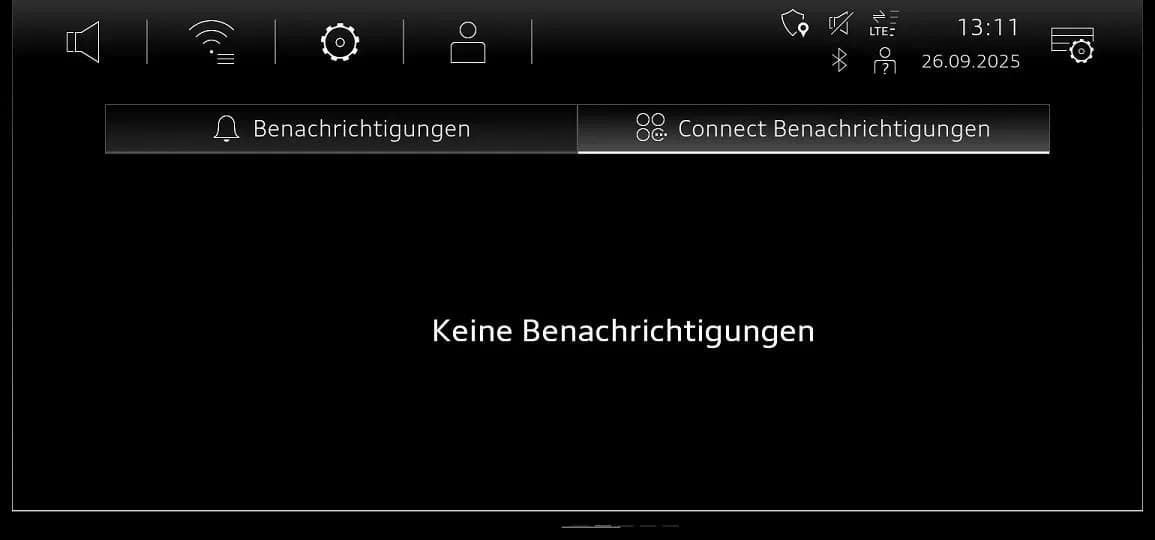
- Open the notification center and switch to the "Audi connect notifications" tab to confirm the update status. Messages like "Software Update 0621 (814MB) wird heruntergeladen" (Software Update 0621 (814MB) is being downloaded) and "Download des Software Update beendet. Ein Neustart ist erforderlich." (Software update download finished. A restart is required.) will appear. Finally, "Gratulation! Software 0621 wurde erfolgreich installiert" (Congratulations! Software 0621 successfully installed) confirms success.
- The USB stick should only be removed when prompted by the system.
2. SVM Code Update for Control Units:
- After the manual update, an SVM (Software Version Management) code update is performed for the AED control unit (0075), emergency call module (0075), gateway (0019), and information electronics (005F).
- This is done using the "SVM - Multiple authorized code inputs" function in "Flash" mode with the latest ODIS update.
- The appropriate SVM code chain must be entered exactly, which may vary based on the hardware version of the gateway (0019).
- For hardware version H08 in diagnostic address 0019, use:
DUCDTCPR0075MLB,078EA001,FLIGHTON0075MLB,ZGDOIP,CL3BPA001US,TGU1MDMVB,CL3BPA002US,FLIGHTOFF0075MLB - For all other hardware versions (e.g., H06) in diagnostic address 0019, use:
DUCDTCPR0075MLB,078EA001,FLIGHTON0075MLB,ZGDOIP,CL3BPA001US,19A027,19B027,TGU1MDMVB,CL3BPA002US,FLIGHTOFF0075MLB
- For hardware version H08 in diagnostic address 0019, use:
- After the software update, the vehicle should be put into bus sleep mode. Then, switch the ignition back on and start the MMI.
- Finally, check the emergency call LED to ensure it lights up green again. If not, refer to TSB 2079652.
Required Tools or Parts
To perform this software update, specific USB-C sticks are required. They must be a minimum of USB 2.0 with 32 GB capacity. It is crucial not to use an SD card with an adapter USB stick or a USB-C stick with a larger storage capacity, as this can cause formatting issues.
Specific part numbers for the update media include:
- All models: 8W0906961DQ
- Audi A4, A5, Q5 (SW 4014, 4026, 4404): 8W0906961GC
- Audi A4, A5, Q5 (SW 4318): 8W0906961GG
Owner Action
If your 2024-2025 Audi is experiencing an "Emergency call fault" or other MMI issues, it is recommended to contact your authorized Audi dealer. They can perform the necessary software update outlined in TSB 2079671/4 to resolve the problem. This update is typically covered under warranty.
Source: NHTSA ID: 11031013
Galeria
7 imagens
Frequently Asked Questions
- What is Audi TSB 2079671/4 about?
- Audi TSB 2079671/4 details a software update for the MMI (Multi Media Interface) and connectivity box in various 2024-2025 Audi models. It aims to fix issues with MMI functions and resolve the "Emergency call fault" message that may appear in the instrument cluster.
- What does the "Emergency call fault" message mean in my Audi?
- The "Emergency call fault" message indicates a problem with your vehicle's emergency call system, which is part of the connectivity features. This fault, along with other MMI function issues, is addressed by the software update described in TSB 2079671/4.
- How is the Audi MMI Emergency Call Fault fixed?
- The fix for the Audi MMI Emergency Call Fault involves a two-step software update. First, a manual update for the AED control unit (078E) is performed via a USB-C stick through the MMI's red menu. Second, an SVM (Software Version Management) code update is applied to multiple control units, including the emergency call module (0075) and MIB3 infotainment system (005F).
- Can I perform the software update myself?
- No, this software update requires specialized tools, specific USB-C update media, and access to Audi's diagnostic systems (ODIS) to correctly apply the SVM codes. It is strongly recommended to have this procedure performed by an authorized Audi dealer to ensure proper installation and avoid further issues.
- Which Audi models are affected by TSB 2079671/4?
- TSB 2079671/4 applies to several 2024-2025 Audi models, including the A4, A4 allroad, S4, A5, A5 Cabriolet, A5 Sportback, S5, S5 Cabriolet, S5 Sportback, RS 5, RS 5 Sportback, Q5, Q5 e quattro, Q5 Sportback, SQ5, and SQ5 Sportback.
What Audi A5 owners report
Counted from the records in our database across 19 model years.
- 377
- Owner complaints
- 22
- Recalls
- 4,447
- Service bulletins
- 9
- Crashes reported
- 3
- Fires reported
- 6
- Injuries reported
The 2024 model year
8 complaints, the 12th most of 19 model years on file. Owners reported 0 crashes, 0 fires and 0 injuries for this year.
Electrical System, the system this article covers, accounts for 82 of 377 complaints (22%), including 5 for 2024.
Complaints by model year
| 2009 | 11 | |
|---|---|---|
| 2010 | 50 | |
| 2011 | 39 | |
| 2012 | 36 | |
| 2013 | 38 | |
| 2014 | 29 | |
| 2018 | 38 | |
| 2019 | 12 | |
| 2020 | 60 | |
| 2024 | 8 |
Most-reported systems
- Air Bags — 91
- Electrical System — 82
- Engine — 68
- Steering — 27
- Back Over Prevention — 18
Recent owner reports about electrical system
The contact owns a 2024 Audi A5. The contact stated that while the vehicle was parked, and started, the vehicle unexpectedly surged forward. The contact stated that occasionally the vehicle started independently without driver input.
Read owner complaints →Audi’s wireless charging pad in 2021–2024 A4/A5/Q5 models: •Overheats the phone •Triggers a thermal radio throttle •iPhone temporarily disables Bluetooth hardware •Audi MMI sees that and throws: “Bluetooth function is currently unavailable.” •Wireless CarPlay…
Complaints are owner reports filed with NHTSA. They are unverified, and counts depend on how many vehicles were sold, so they are not a failure rate.
Related Articles
2024-2025 Audi MMI & Emergency Call Software Update TSB
Audi Technical Service Bulletin 2079904/2 details a software update for MMI and emergency call system issues in 2024-2025 Audi A4, A5, S4, S5, RS 5, and A4 allroad models. Owners may experience MMI malfunctions or an 'Emergency call fault' message. The update requires specific USB-C media and ODIS…
2024-2025 Audi MMI and Emergency Call System Software Update
Audi Technical Service Bulletin 2079813/3 provides a software update for MIB3 vehicles to resolve MMI connectivity problems and the 'Emergency call fault' message in 2024-2025 Audi A4, A5, Q5, and other models. This update addresses software issues in the emergency call module and infotainment…
2021-2026 Audi Cracking/Creaking Noises TSB 2062633/7
Audi Technical Service Bulletin 2062633/7 addresses cracking and creaking noises in 2021-2026 A4, A5, S4, S5, RS 5, Q5, and SQ5 models. These noises can occur during load changes or severe vehicle body torsion due to a loose bonded joint in the subframe area.
2021-2025 Audi Driver Assist Fault TSB 2061932/11
Audi Technical Service Bulletin 2061932/11 addresses issues where 2021-2025 Audi vehicles display 'Traffic Jam Assist: unavailable' or 'Active Lane Assist: fault' messages. This is often accompanied by DTC U112300, indicating a data bus error related to the adaptive cruise control or front camera.
2024-2025 Audi MMI Emergency Call Fault TSB 2079670/4
Audi has released Technical Service Bulletin (TSB) 2079670/4 to address various MMI function problems and an 'Emergency call fault' message in 2024-2025 Audi A4, A5, Q5, S4, S5, and RS 5 models. This TSB outlines a software update for the MIB3 infotainment system and related control units.
Leave a comment
Comments are moderated and may take a moment to appear. Only your first name and the initial of your last name are shown publicly.
Comments
Be the first to comment.