2024-2025 Audi MMI Emergency Call Fault TSB 2079670/4
Audi has released Technical Service Bulletin (TSB) 2079670/4 to address various MMI function problems and an 'Emergency call fault' message in 2024-2025 Audi A4, A5, Q5, S4, S5, and RS 5 models. This TSB outlines a software update for the MIB3 infotainment system and related control units.
 Sarah Mitchell2024 Audi A5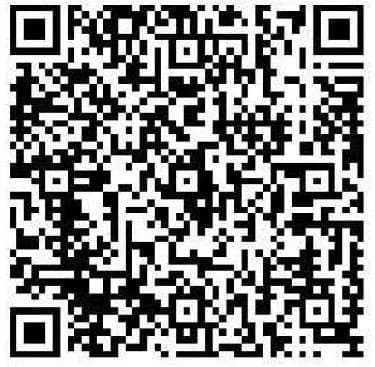
Also applies to
- Audi A4
- 2024–2025
- Audi A4 allroad
- 2024–2025
- Audi Q5
- 2024–2025
- Audi Q5 e
- 2024–2025
- Audi RS 5
- 2024
- Audi S4
- 2024–2025
- Audi S5
- 2024
- Audi SQ5
- 2024–2025
▸ Show 2 more▾ Show fewer
Symptoms
Owners of affected 2024-2025 Audi vehicles may experience a range of issues related to the MMI infotainment system. These can manifest as general "problems with various MMI functions" or a specific "Emergency call fault" message displayed prominently in the instrument cluster. The 2024 Audi A5 MMI emergency call fault is a common complaint.
These symptoms are typically observed in vehicles still operating with older software versions within diagnostic address 5F. Specifically, the affected software versions include 4014, 4026, 4318, and 4404. Addressing these software issues is crucial for restoring full functionality to the MMI system and ensuring the emergency call feature operates correctly.
Important Warnings and Owner Information
Audi has provided several critical advisories for technicians and owners regarding this software update:
- Diagnostic Entries: Diagnostic entries logged in diagnostic address 0075 will be resolved by the software update described in this TSB. Importantly, the Guided Fault Finding test plans for these entries should not be carried out and cannot be invoiced.
- Warranty Billing: When carrying out this TSB, time stamps are not required for billing under warranty. This allows technicians flexibility, and the update can even be performed by non-productive personnel.
- USB-C Stick Preparation: Technicians must prepare the required USB-C sticks before beginning the repair. These update media can be utilized for multiple vehicles, streamlining the process.
- SVM Code Entry: For the new software update program, the SVM code must be entered exactly as provided, including commas and without spaces. Audi recommends scanning the QR code with a hand-held scanner or copying and pasting the SVM code chain to ensure accuracy.
- Storage Media: It is crucial not to use an SD card with an adapter USB stick for this update, as this type of USB stick has a different formatting process that may lead to issues. The USB-C stick and the process of downloading the software via FMC cannot be invoiced.
- Emergency Call LED Check: If, after the update, the emergency call LED in the roof module does not turn green, technicians should refer to TSB 2079652, titled "Emergency call LED in roof module not lit up in green," for further diagnostic steps.
- Warranty Coverage: If your vehicle is outside of any warranty, this Technical Service Bulletin is informational only, meaning the repair may not be covered free of charge.
Repair Procedure Summary
Audi Technical Service Bulletin 2079670/4 outlines a specific software update procedure to resolve MMI function problems and the "Emergency call fault" message. This update targets the emergency call module (0075), gateway (0019), and information electronics (005F) using the "SVM - Authorized Multiple Code Entry" function in flash mode.
Step 1: Software Update Execution
- Prepare for Update: Technicians must first connect to the vehicle's diagnostic system and ensure the vehicle is parked with the 12V battery charged. The tester being used must have the latest ODIS update, as a newly developed test program for software updates is integrated into ODIS software.
- Determine Hardware Version: The hardware version in diagnostic address 0019 needs to be determined using the specific SVM code DUCIDENT0019. This step ensures the correct update package is applied.
- Enter SVM Code Chain: Based on the identified hardware version (e.g., H08 or other versions), the appropriate SVM code chain must be entered precisely. Examples of these complex codes include DUCDTCPR0075MLB, FLIGHTON0075MLB, ZGDOIP, CL3BPA001US, TGU1MDMVB, CL3BPA002US, FLIGHTOFF0075MLB, 19A027, and 19B027. Scanning the provided QR code or copying and pasting is recommended to avoid errors.
- Insert USB-C Stick: A prepared USB-C stick containing the update software is then inserted into the vehicle. The update program will run automatically, and the USB-C stick can be removed once the process is complete. If the procedure is interrupted for any reason, it must be repeated from the beginning.
Step 2: Bus Sleep Mode Activation
After the software update has successfully completed, the vehicle must be put into bus sleep mode. Following this, the ignition is switched back on, and the MMI system is restarted to ensure the new software initializes correctly.
Step 3: Emergency Call LED Verification
An important final check is to verify that the emergency call LED located in the roof module illuminates green. A green light indicates successful operation of the emergency call system. If the LED does not turn green, further troubleshooting using TSB 2079652 is required.
Step 4: Conclude Diagnostic Session
Finally, the technician must conclude the diagnostic session and send the diagnostic log online. This step ensures proper documentation of the repair.
Required Tools and Parts
To perform the software update described in TSB 2079670/4, specific tools and parts are necessary:
- USB-C Sticks: Technicians must prepare USB-C sticks with a minimum capacity of 32 GB and supporting USB 2.0 or higher. It is critical to use only USB-C sticks and to avoid using SD cards with adapter USB sticks, as these may not be compatible with the update process due to different formatting requirements.
- ODIS Software: The diagnostic tester used for the update must be equipped with the latest ODIS software version. This ensures access to the newly developed test program required for the software update.
- Software Part Numbers: The specific software update files are identified by the following part numbers:
- 8W0906961GC: For MIB3 systems without AED (Acoustic Engine Design) running software versions 4014, 4026, or 4404.
- 8W0906961GG: For MIB3 systems without AED running software version 4318, and for MIB3 systems with AED 0621 also running software version 4318.
Warranty Information
Audi Technical Service Bulletin 2079670/4 provides detailed instructions for submitting warranty claims related to this software update. Understanding these guidelines is important for both technicians and vehicle owners.
Claim Types and Service Numbers
- Emergency Call Function or Online Services: For complaints specifically related to the emergency call function or other online services, use service number 9145. This applies to Audi A4, A5, and Q5 vehicle models.
- MMI Functions: For general complaints concerning various MMI functions, use service number/damage code 9196.
Damage Code
The specific damage code to be used for these claims is 0041.
Labor Operations
- Prepare Repair (0151 0010): This operation covers the preparatory steps for the repair, such as parking the vehicle and charging the 12V battery. It is allocated 20 Labor Time Units (TU).
- Launch Software Update for MMI and Emergency Call Module (0151 0040): This operation covers the actual software update process, including connecting the tester, starting ODIS, entering flash mode, using the SVM function, and inserting the USB stick. It is allocated 60 Labor Time Units (TU).
Notably, time stamps are not required for billing under warranty when performing this TSB. This allows for flexibility, including working on other vehicles simultaneously or having non-productive personnel perform the update. All warranty claims must comply with the Audi Warranty Policies and Procedures Manual and are subject to review or audit by Audi Warranty.
Revision History
This Technical Service Bulletin (TSB) 2079670/4 has undergone several revisions to ensure accuracy and provide updated information:
- Revision 4: The condition section was revised to correct a typo in the model table, ensuring accurate vehicle applicability.
- Revision 3 (November 17, 2025): The header of the bulletin was revised to update PR codes and models, reflecting any changes in vehicle configurations or applicability.
- Revision 2 (October 24, 2025): An earlier revision also updated the header to include revised PR codes, indicating ongoing adjustments to the document's scope and details.
Source: NHTSA ID 11029399
Gallery
1 image
Frequently Asked Questions
- What does the 'Emergency call fault' message mean in my Audi?
- The 'Emergency call fault' message indicates a problem with your vehicle's emergency call system, which is part of the MMI infotainment system. This issue, along with other MMI function problems, is often caused by outdated software in the MIB3 system, as detailed in Audi TSB 2079670/4.
- Which Audi models are affected by the MMI and emergency call fault?
- This issue primarily affects 2024-2025 Audi A4, A5, Q5, S4, S5, and RS 5 models. The specific vehicles impacted are listed in Audi Technical Service Bulletin 2079670/4, which provides a detailed breakdown by model year and specific equipment.
- How is the 2024 Audi A5 MMI emergency call fault resolved?
- The 2024 Audi A5 MMI emergency call fault is resolved by a software update for the emergency call module (0075), gateway (0019), and information electronics (005F). This update is performed by a dealership technician using a specific SVM code chain and a USB-C stick, as outlined in Audi TSB 2079670/4.
- Will I be charged for the software update to fix the MMI issues?
- If your vehicle is still under warranty, the software update described in TSB 2079670/4 should be covered free of charge. However, if your vehicle is outside of its warranty period, the bulletin states it is for informational purposes only, meaning you may incur charges for the repair.
- What are the relevant software versions and part numbers for this MMI update?
- The TSB addresses vehicles with MIB3 software versions 4014, 4026, 4318, and 4404. The update requires specific software part numbers: 8W0906961GC for certain MIB3 configurations and 8W0906961GG for others, depending on the MIB3 system and existing software version.
Related Articles
2024-2025 Audi MMI & Emergency Call Software Update TSB
Audi Technical Service Bulletin 2079904/2 details a software update for MMI and emergency call system issues in 2024-2025 Audi A4, A5, S4, S5, RS 5, and A4 allroad models. Owners may experience MMI malfunctions or an 'Emergency call fault' message. The update requires specific USB-C media and ODIS…
2024-2025 Audi MMI and Emergency Call System Software Update
Audi Technical Service Bulletin 2079813/3 provides a software update for MIB3 vehicles to resolve MMI connectivity problems and the 'Emergency call fault' message in 2024-2025 Audi A4, A5, Q5, and other models. This update addresses software issues in the emergency call module and infotainment…
2024-2025 Audi MMI Emergency Call Fault TSB 2079671/4
Audi Technical Service Bulletin (TSB) 2079671/4 addresses issues with MMI functions and the "Emergency call fault" message in 2024-2025 Audi A4, A5, S4, S5, RS 5, Q5, and SQ5 models. A software update for the MMI and connectivity box is required to resolve these concerns.
2021-2026 Audi Cracking/Creaking Noises TSB 2062633/7
Audi Technical Service Bulletin 2062633/7 addresses cracking and creaking noises in 2021-2026 A4, A5, S4, S5, RS 5, Q5, and SQ5 models. These noises can occur during load changes or severe vehicle body torsion due to a loose bonded joint in the subframe area.
2021-2025 Audi Driver Assist Fault TSB 2061932/11
Audi Technical Service Bulletin 2061932/11 addresses issues where 2021-2025 Audi vehicles display 'Traffic Jam Assist: unavailable' or 'Active Lane Assist: fault' messages. This is often accompanied by DTC U112300, indicating a data bus error related to the adaptive cruise control or front camera.
Leave a comment
Comments are moderated and may take a moment to appear. Only your first name and the initial of your last name are shown publicly.
Comments
Be the first to comment.