2026 Audi A3/S3/RS 3 MMI Software Update for Emergency Call Fault
Audi has released Technical Service Bulletin 2081005/1 for 2026 A3, S3, and RS 3 models addressing MMI function problems and the 'Emergency call fault' message. This update targets the MIB3, AED2, and OCU3 control units to resolve software-related issues.

Também se aplica a
- Audi A3
- 2026
- Audi RS 3
- 2026
Symptoms of MMI and Emergency Call System Issues
Owners of certain 2026 Audi A3, S3, and RS 3 models may experience various problems with their Multi Media Interface (MMI) functions. A common symptom is the display of an "Emergency call fault" message within the instrument cluster. These issues are typically software-related and can affect the overall functionality and reliability of the vehicle's infotainment and communication systems. The presence of such warnings indicates a need for a software update to restore proper operation, especially for the Audi S3 MMI software update.
Affected Control Units and Software Versions
This software update, detailed in TSB 2081005/1, specifically targets several critical control units within the vehicle's electrical system. The primary components involved are the Android embedded device 2 (AED2), identified by the address DA 078E, and the Emergency call module control unit and communication unit (OCU3), identified as DA 0075. Additionally, the Control unit for information electronics (MIB3), with address DA 005F, is also part of this comprehensive update. Vehicles equipped with PR Code IU4 and either software version 4572 (address word 005F) or software version 0718 (address word 078E) are specifically covered by this bulletin, indicating a need for the latest software to address the reported issues and ensure the correct functioning of the Audi S3 MMI software update.
Important Warnings and Owner Information
Audi has issued several critical warnings and pieces of information for technicians and owners regarding this software update. These advisories are crucial for ensuring the correct execution of the repair and managing expectations:
- USB-C Stick Preparation: Technicians are explicitly instructed to prepare the required USB-C sticks, as detailed in the parts information, before commencing the repair. These update media are versatile and can be utilized for multiple vehicles.
- USB Stick Handling During Update: During the software update for the AED control unit, it is imperative to leave the USB stick inserted until explicitly instructed to remove it. The procedure will only function correctly if the USB stick remains inserted throughout the download and initial installation phases. The TSB explicitly states: "Please be certain to leave the USB stick inserted. The correct time to remove the USB stick is described further down."
- SD Card Prohibition: "You must not use an SD card with an adapter USB stick" for this update. Only dedicated USB-C sticks are to be used.
- Non-Invoicable Items: "You cannot invoice the USB-C stick and loading the software" to the customer under warranty.
- USB-C Stick Capacity: When preparing the MIB3 update media, use a USB-C stick with a minimum capacity of USB 2.0 with 32 GB. Crucially, "Do not use a USB-C stick with a larger storage capacity as such USB sticks have a different formatting process" that could interfere with the update.
- Guided Fault Finding: "The Guided Fault Finding test plans should NOT be carried out for diagnostic entries that are repaired by performing this TSB and cannot be invoiced."
These warnings highlight the specific requirements and limitations associated with the software update process, emphasizing the need for adherence to the prescribed methods to ensure a successful resolution for the Audi S3 MMI software update.
Repair Procedure Summary
This Technical Service Bulletin 2081005/1 outlines a multi-step software update process for the affected control units. The procedure involves specific actions within the ODIS-S diagnostic system and careful handling of USB update media. The overall goal is to update the software for the Android embedded device 2 (AED2) and the Control unit for information electronics (MIB3), followed by system checks and event memory management.
Step 1: Manual Software Update for AED Control Unit (DA 078E) via Red Menu
This initial phase focuses on updating the Android embedded device 2 (AED2, DA 078E) control unit. If a previous update attempt was aborted, technicians must first check if the AED (078E) already has software version 0727. If this specific version is present, Step 1 can be skipped entirely.
The AED control unit can only be updated via the red menu in the MMI. Since the menu can no longer be activated manually via the MMI touchscreen on these vehicles, technicians must use the following functions in ODIS-S:
- Use "Flash" mode
- Select "SVM - special functions"
- Choose "Activation of update menu (red menu)"
- Perform test
- Select "Complete/Next"
Follow the instructions in ODIS, which will prompt for the insertion of the USB update medium (DA 0078E) into the USB connection. The control unit will then switch to update mode, and the update will start automatically. During this period, the control unit will perform multiple resets, and the image on the display will change multiple times.
When a list of MMI control units is shown, scroll to the bottom on the MMI, press "Resume," and finish the update by selecting "Quit." This will close the red menu completely, and the system will perform another restart. It is critical to leave the USB stick inserted during this process. Wait until the MMI has fully initialized, and the home screen displays all apps.
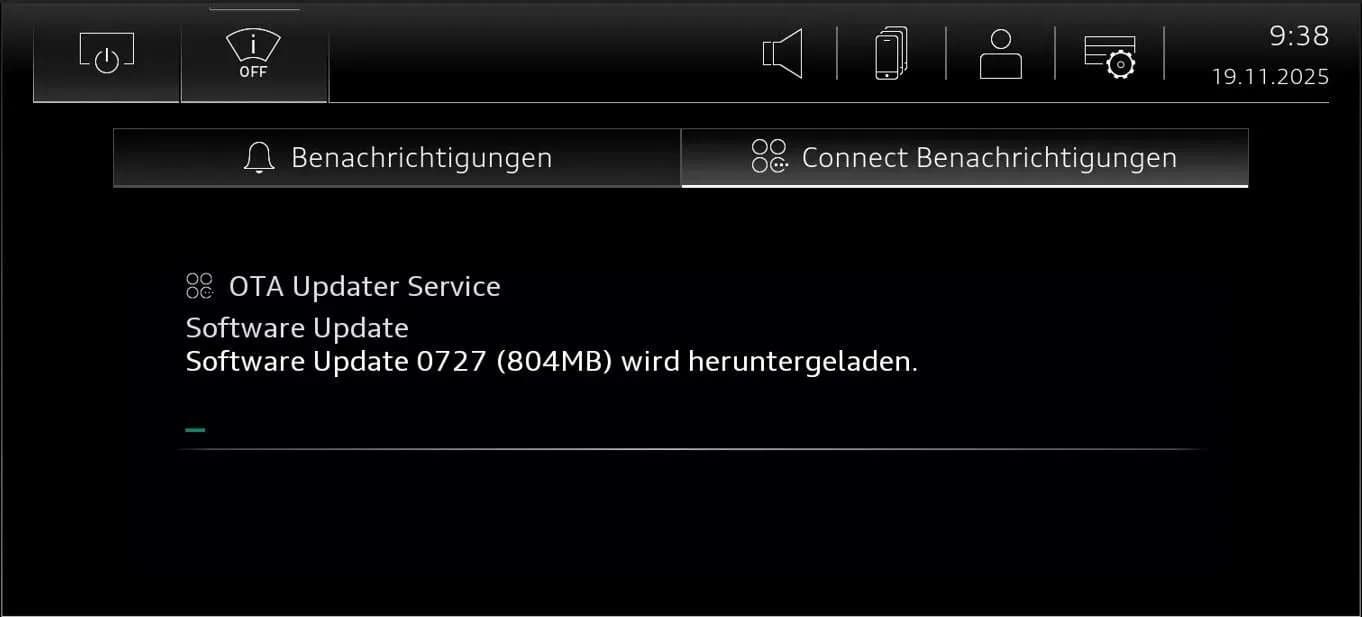
Open the notification center by pressing and dragging down the bar in the top center of the MMI, then select the "Audi connect notifications" tab. The MMI screen may display messages such as "Benachrichtigungen," "Connect Benachrichtigungen," and "Keine Benachrichtigungen." It may take several minutes for further information to appear, so technicians are advised to "Please wait."
The system will then show "OTA Updater Service," "Software Update," and "Software Update 0727 (804MB) wird heruntergeladen." The TSB emphasizes: "Please note: This procedure will only work if the USB stick is still inserted." Wait approximately 5 minutes until the download is complete. Once complete, the message "Download des Software Update beendet. Ein Neustart ist erforderlich." will appear, and the USB stick can then be removed: "Now please remove the USB stick."
Restart the system by pressing and holding the volume control for 10 seconds. Verify the update's success by checking the notification center / Audi connect notifications, looking for a message like "Gratulation! Software 0621 wurde erfolgreich installiert" followed by "Vielen Dank!" Finally, finish the update in ODIS by selecting "Complete/Next."
Step 2: Manual Update for Control Unit 1 for Information Electronics (005F) via Red Menu
This step must only be performed after successfully completing the AED control unit update (Step 1). This phase updates the Control unit for information electronics (MIB3, DA 005F).
Similar to Step 1, the MIB3 control unit can only be updated via the red menu in the MMI. Technicians must use the following functions in ODIS-S:
- Use "Flash" mode
- Select "SVM special functions -> Activation of update menu (red menu)"
- Perform test
- Select "Complete/Next"
Follow the instructions in ODIS, inserting the USB update medium (DA 005F) into the USB connection. The control unit will switch to update mode, performing multiple resets and display changes. Scroll to the bottom of the MMI list of control units, press "Resume," and select "Quit" to finish the update. After the system restarts and the MMI is fully initialized, remove the USB stick and complete the update in ODIS by selecting "Complete/Next."
Step 3: Enter SVM Code
After the software updates are complete, open "SVM code input" in the ODIS-S menu. Enter the SVM code: "BLA3CHECK" to document that the control unit has been updated. ODIS will display the entry: "Event in Audi Software Version Management (SVM): 8067." This indicates that an event memory entry regarding software version management has been logged. Finish entering the SVM code by selecting "Complete/Next."
Step 4: Bus Sleep Mode
After performing the software update, put the vehicle into bus sleep mode. Then, switch the ignition back on and start the MMI.
Step 5: Erase Event Memory
Run the test program "J794 - Checking SVM" in ODIS-S. The event memory entry resulting from the previous event 8067 will change to intermittent and can then be erased.
Step 6: Check Emergency Call LED
Verify that the emergency call LED in the roof module lights up in green again. If the LED does not turn green, refer to TSB 2079652, titled "Emergency call LED in roof module not lit up in green," for further diagnosis.
Step 7: End Diagnostic Session
Conclude the diagnostic session and send the diagnostic log online.
Required Parts and Tools
To perform this software update, specific USB-C sticks are required for creating the update media. General information on USB-C sticks for software updates can be found in TSB 2060523, "91 MIB3: Software Update Instructions."
For the AED control unit (DA 078E) update medium, the following part number is needed:
| Vehicle type | Part number |
|---|---|
| Audi A3 (8Y) | 8W0906961GS |
For the MIB3 update media, download the software with the corresponding part number onto a USB-C stick (minimum USB 2.0 with 32 GB). The following part number is required:
| Vehicle type | Part number |
|---|---|
| Audi A3 (8Y) | 8W0906961GN |
Warranty Information
This Technical Service Bulletin (TSB 2081005/1) is informational only if the vehicle is outside of any warranty. All warranty claims submitted for payment must comply with the Audi Warranty Policies and Procedures Manual and are subject to review or audit by Audi Warranty. When performing this TSB, time stamps are not required for billing under warranty, and the work can be performed by non-productive personnel or on other vehicles simultaneously.
- Claim Type: Complaints about MMI functions / Complaints about MMI app functions
- Service Number for MMI functions: 9196
- Service Number for MMI app functions: 9123
- Damage Code: 0041
Labor Operations
| Labor Operations | Code | Time Units (TU) |
|---|---|---|
| Prepare repair | 0151 0010 | 20 TU |
| AED update (manual) | 0151 0040 | 140 TU |
| MMI software update (manual) | (included in 0151 0040) |
The preparation repair includes parking the vehicle and charging the 12V battery. The AED update labor operation covers connecting the tester, starting ODIS, flash mode, entering the SVM code, and inserting the USB stick. The MMI software update is included within the AED update labor time. The claim comment should state: "As per TSB 2081005/1."
Additional Information
All parts and service references provided in this TSB 2081005/1 are subject to change and/or removal by Audi of America, Inc.
Source: NHTSA ID 10248443
Galeria
3 imagens
Frequently Asked Questions
- What is Audi TSB 2081005/1 about?
- Audi Technical Service Bulletin 2081005/1 addresses MMI function problems and the 'Emergency call fault' message appearing in the instrument cluster of 2026 Audi A3, S3, and RS 3 vehicles. It provides a detailed software update procedure for the MIB3, AED2, and OCU3 control units.
- What are the common symptoms resolved by this Audi S3 MMI software update?
- Owners may experience various problems with their MMI functions or see an 'Emergency call fault' message displayed in the instrument cluster. These issues are typically resolved by the software update outlined in TSB 2081005/1, which ensures a proper Audi S3 MMI software update.
- Which control units are affected by this software update?
- The software update targets the Android embedded device 2 (AED2, DA 078E), the Emergency call module control unit and communication unit (OCU3, DA 0075), and the Control unit for information electronics (MIB3, DA 005F). This ensures a comprehensive Audi S3 MMI software update.
- Are there any special tools or parts required for this update?
- Yes, specific USB-C sticks are required for the software update media. For the AED control unit (DA 078E), part number 8W0906961GS is needed for the Audi A3 (8Y), and for the MIB3 update, part number 8W0906961GN is required for the Audi A3 (8Y). A USB-C stick with a minimum of 32 GB (USB 2.0) is necessary, and larger capacity sticks should be avoided due to potential formatting issues.
- Is this software update covered under warranty?
- If the vehicle is still under warranty, this Technical Service Bulletin is generally covered. However, if the vehicle is outside of its warranty period, the bulletin is for informational purposes only, and the repair may not be covered. Certain items, like the USB-C stick itself and the loading of software onto it, are not billable under warranty. The service number for MMI functions is 9196, and for MMI app functions is 9123, with a damage code of 0041.
What Audi S3 owners report
Counted from the records in our database across 8 model years.
- 88
- Owner complaints
- 12
- Recalls
- 1,590
- Service bulletins
- 1
- Crashes reported
- 0
- Fires reported
- 2
- Injuries reported
Electrical System, the system this article covers, accounts for 11 of 88 complaints (13%).
Complaints by model year
| 2015 | 53 | |
|---|---|---|
| 2016 | 14 | |
| 2017 | 9 | |
| 2018 | 5 | |
| 2019 | 2 | |
| 2020 | 1 | |
| 2022 | 2 | |
| 2024 | 2 |
Most-reported systems
- Air Bags — 49
- Electrical System — 11
- Fuel/Propulsion System — 10
- Power Train — 10
- Seats — 8
Complaints are owner reports filed with NHTSA. They are unverified, and counts depend on how many vehicles were sold, so they are not a failure rate.
Related Articles
2026 Audi S3 Emergency Assist Intervention TSB 2081476/1
Audi Technical Service Bulletin 2081476/1 details issues with the emergency assist system in 2026 Audi S3, A3, RS 3, and Q3 vehicles. Owners may experience unexpected system activation and various instrument cluster warnings related to lane departure, adaptive cruise, or driver inactivity.
2026 Audi MQBevo Active Front Assist Intervention TSB
Audi Technical Service Bulletin 2081074/1 details instances where the active front assist system intervenes in 2026 Audi A3, S3, RS 3, and Q3 MQBevo vehicles. This TSB provides guidance for workshops on diagnosing and understanding these system interventions.
2025-2026 Audi A3/S3/RS3 Mirror Heating Issue
A Technical Service Bulletin (TSB 2076087/2) addresses concerns from 2025-2026 Audi A3, S3, and RS3 owners regarding the exterior mirror heating not working. This TSB clarifies that the mirror heating is intentionally disabled when Audi Drive Select is in efficiency mode due to efficiency…
2025-2026 Audi A3/S3/RS3 Seat Heater Button Flashes
Owners of 2025-2026 Audi A3, S3, and RS3 models may experience their seat heater button on the air conditioner control console flashing, indicating a software issue. Audi's TSB 2077639/2 explains that no repairs are currently needed, and component replacement will not resolve the problem.
2022-2026 Audi Remote Key Not Working TSB 2080521/1
Audi has issued Technical Service Bulletin 2080521/1 for 2022-2026 A3, S3, RS 3, Q4 e-tron, and Q4 Sportback e-tron models regarding remote control key malfunctions. Owners may find their key unable to lock/unlock the vehicle or its LED not flashing when pressed.
Leave a comment
Comments are moderated and may take a moment to appear. Only your first name and the initial of your last name are shown publicly.
Comments
Be the first to comment.