2021-2024 Nissan Remote Command DTCs B2E4B-06, B2E60-06
Nissan has issued TSB NTB21-037D for 2021-2024 Sentra, Pathfinder, and Rogue models experiencing NissanConnect remote command issues with DTCs B2E4B-06, B2E60-06, B2E61-06. The problem is linked to a cloud-server, and replacing the TCU is not the solution. Learn what steps to take.

Si applica anche a
- Nissan Pathfinder
- 2022–2024
- Nissan Rogue
- 2021–2024
- Nissan Sentra
- 2021, 2022, 2024
Symptoms
Owners of certain 2021-2024 Nissan vehicles may experience problems with their NissanConnect® Service remote commands. This means features like remote start, remote door lock/unlock, or vehicle status checks might not function as expected through the NissanConnect app or service.
Fault Codes / DTCs
When these issues occur, a technician inspecting the vehicle's Telematics Control Unit (TCU) may find one or more of the following Diagnostic Trouble Codes (DTCs) displayed as "CRNT" (Current):
- B2E4B-06
- B2E60-06
- B2E61-06
These codes specifically point to a communication or functionality issue within the TCU related to the remote services.
Diagnosis and Trigger Conditions
Nissan has identified that these DTCs and the associated NissanConnect remote commands malfunction are caused by an issue with a cloud-server that interacts with the vehicle's Telematics Control Unit (TCU). This indicates the problem is external to the vehicle's hardware itself, stemming from the backend service infrastructure.
Important Warnings for Owners and Technicians
Nissan has issued critical advisories regarding this specific issue:
- "Do NOT replace the TCU. Replacing the TCU will not resolve the concern."
- "Do NOT replace any parts."
These warnings are crucial as they prevent unnecessary and costly parts replacements that will not fix the underlying cloud-server problem. Owners should be aware that if a dealer suggests replacing the TCU for these specific DTCs, it contradicts Nissan's official guidance.
Repair Procedure Summary
For technicians, the repair procedure involves a specific communication process with Nissan rather than a physical repair. If a customer reports issues with NissanConnect remote commands and the specified DTCs are present, the technician must send an email to [email protected]. This email must include:
- The technician's name
- Phone Number
- Dealer Name and Code
- The vehicle's VIN
- All DTCs displayed as CRNT
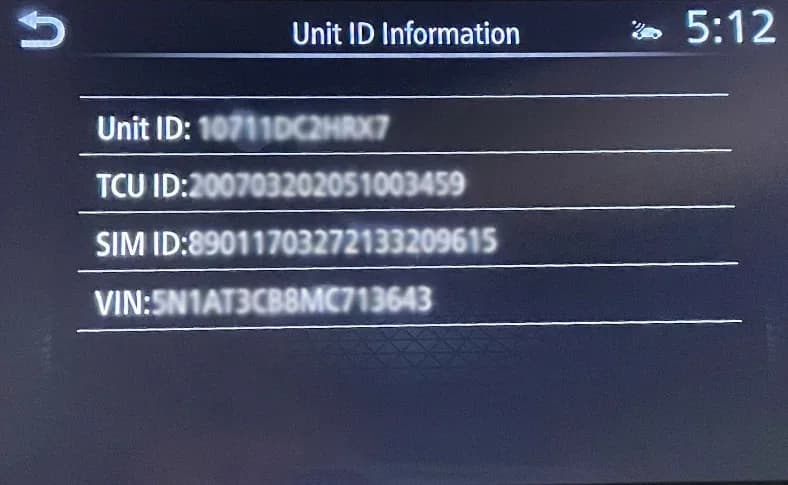
- A photo of the "Unit ID Information" screen, which can be found in the vehicle's infotainment system under
Settings > NissanConnect® Services > Unit ID Information.
Nissan advises allowing up to 48 business hours (Monday-Friday) for a response to this email, which will provide the next steps for resolution. This process confirms that the solution is managed by Nissan's backend support, not through a vehicle hardware repair.
Owner Action
If you own a 2021-2024 Nissan Sentra, Pathfinder, or Rogue and are experiencing problems with your NissanConnect remote commands or have had these DTCs diagnosed, you should contact your authorized Nissan dealer. Inform them about the specific symptoms and mention Technical Service Bulletin NTB21-037D. Your dealer will follow the prescribed procedure to communicate with Nissan and resolve the cloud-server related issue affecting your vehicle's remote services.
Frequently Asked Questions
- What are the common symptoms addressed by Nissan TSB NTB21-037D?
- The primary symptom is an issue with NissanConnect® Service remote commands, where features like remote start or lock/unlock may not function correctly.
- Which DTCs are associated with the NissanConnect remote commands problem?
- The specific Diagnostic Trouble Codes (DTCs) linked to this issue are B2E4B-06, B2E60-06, and B2E61-06, displayed as CRNT in the Telematics Control Unit (TCU).
- Should the Telematics Control Unit (TCU) be replaced to fix these DTCs?
- No, Nissan's TSB NTB21-037D explicitly states, "Do NOT replace the TCU. Replacing the TCU will not resolve the concern." The issue is related to a cloud-server, not the TCU hardware itself.
- What is the recommended action for owners experiencing these issues?
- Owners should contact their authorized Nissan dealer. The dealer will follow a specific procedure to email Nissan with vehicle details and a photo of the 'Unit ID Information' screen to resolve the cloud-server related problem.
What Nissan Sentra owners report
Counted from the records in our database across 45 model years.
- 5,975
- Owner complaints
- 62
- Recalls
- 710
- Service bulletins
- 600
- Crashes reported
- 123
- Fires reported
- 523
- Injuries reported
The 2023 model year
20 complaints, the 39th most of 45 model years on file. Owners reported 1 crash, 0 fires and 2 injuries for this year, which also has 1 recall on file.
Electrical System, the system this article covers, accounts for 839 of 5,975 complaints (14%), including 8 for 2023.
Complaints by model year
| 2001 | 236 | |
|---|---|---|
| 2002 | 318 | |
| 2013 | 638 | |
| 2014 | 380 | |
| 2015 | 352 | |
| 2016 | 270 | |
| 2017 | 231 | |
| 2019 | 223 | |
| 2020 | 207 | |
| 2023 | 20 |
Most-reported systems
- Power Train — 1,287
- Electrical System — 839
- Air Bags — 779
- Engine — 679
- Engine And Engine Cooling — 650
Latest recalls for the 2023 model year
- 24V154000 — Air Bags (Feb 2024)
Recent owner reports about electrical system
The camera views are all pink or turning pink. Also when getting to 70mph on the interstate, the car begins to shudder. The vehicle has 52,000 miles on it.
Read owner complaints →The contact owns a 2023 Nissan Sentra. The contact stated that while the vehicle was parked in the driveway and shifted to park(P), the vehicle started to slowly roll backwards unexpectedly.
Complaints are owner reports filed with NHTSA. They are unverified, and counts depend on how many vehicles were sold, so they are not a failure rate.
Related Articles
2021-2024 Nissan ICC Inoperative with DTC C1A16 or C2582
Nissan has issued TSB NTB19-033G for 2021-2024 models experiencing Intelligent Cruise Control (ICC) malfunctions, AEB/FEB warning lights, or radar obstruction messages with DTCs C1A16 or C2582. The bulletin outlines diagnostic steps and potential ICC distance sensor replacement.
2020-2025 Nissan Sentra Loss of Power DTC P2100 P2101
Nissan has released TSB NTB25-005 for 2020-2025 Sentra models experiencing a loss of power. This issue is often accompanied by diagnostic trouble codes P2100 ('ETC MOT PWR-B1') or P2101 ('ETC FNCTN/CIRC-B1') stored in the Engine Control Module (ECM). The bulletin provides a revised diagnostic…
2020-2023 Nissan Models: DTC B2E1B-06 (Automatic eCall) Bulletin Inactive
Nissan Technical Service Bulletin NTB23-031A, concerning DTC B2E1B-06 (Automatic eCall) in various 2020-2023 models, has been declared inactive. Owners who previously encountered this diagnostic trouble code should note that this specific bulletin is no longer applicable.
2021-2024 Nissan BCM Replacement Service Bulletin
Nissan TSB NTB20-074B provides crucial service information for replacing the Body Control Module (BCM) in 2021-2024 ARIYA, Pathfinder, Rogue, and Sentra vehicles. It outlines essential steps for module configuration and intelligent key pairing to prevent damage and ensure proper function.
2022-2023 Nissan Sentra Battery Light On and Electrical Power Loss
Nissan Technical Service Bulletin NTB22-096A details a common issue in 2022-2023 Sentra models where owners may experience a 'battery light is ON', loud engine noise, or a complete loss of electrical power. The recommended fix involves replacing the Drive Belt Auto Tensioner, Alternator, and Drive…
Leave a comment
Comments are moderated and may take a moment to appear. Only your first name and the initial of your last name are shown publicly.
Comments
Be the first to comment.