2025-2026 Kia EV6 and Sportage DCU Software Update
Kia has issued Service Action SA635 to improve the Data Connectivity Unit (DCU) software in certain 2025-2026 EV6 and Sportage vehicles. This update resolves issues with remote start, Kia Access App functionality, and connected navigation.

Si applica anche a
- Kia EV6
- 2025
Kia has released Service Action SA635 to enhance the Data Connectivity Unit (DCU) software in specific 2025 Kia EV6 and 2026 Kia Sportage models equipped with Kia Connect Services. This Kia DCU software update aims to resolve various connectivity and remote function issues, ensuring optimal performance of your vehicle's smart features.
Why this matters
The Data Connectivity Unit (DCU) is crucial for many modern vehicle functions, especially those relying on remote access and connected services. When the DCU does not operate correctly, it can disrupt convenience features and navigation, impacting the overall user experience. This service action ensures these critical systems function as intended.
Symptoms of DCU issues
Owners of affected 2025 Kia EV6 and 2026 Kia Sportage vehicles may experience one or more of the following symptoms related to the DCU:
- "Remote Start/ Remote Climate Control function not working"
- "Vehicle Status on the Kia Access App not updating"
- "Connected navigation/routing not functioning properly"
If you notice any of these issues, your vehicle may require the Kia DCU software update.
Important warnings for owners
Kia has provided several critical notices regarding this service action:
- "A Service Action is a repair program without customer notification that is performed during the warranty period. Any dealer requesting to perform this repair outside the warranty period will require DPSM approval."
- "Before attempting an ECU upgrade on any Kia model, make sure to first determine whether the applicable model is equipped with an immobilizer security system. Failure to follow proper procedures may cause the PCM to become inoperative after the upgrade and any claims associated with this repair may be subject to chargeback."
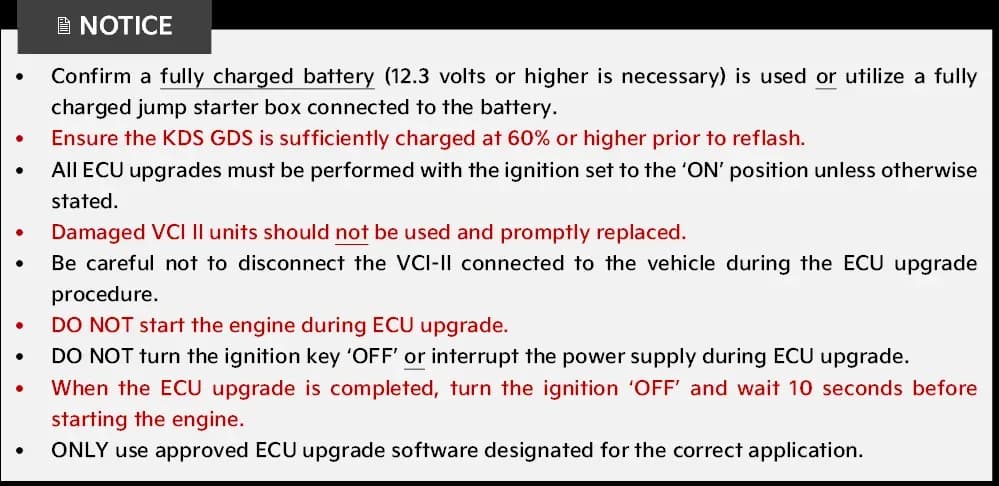
- "DO NOT start the engine during ECU upgrade."
- "DO NOT turn the ignition key 'OFF' or interrupt the power supply during ECU upgrade."
- "Be careful not to disconnect the VCI-II connected to the vehicle during the ECU upgrade procedure."
- "Damaged VCI II units should not be used and promptly replaced."
- "ONLY use approved ECU upgrade software designated for the correct application."
- "If the automatic upgrade fails, turn the ignition 'OFF' for about 10 seconds then place it back in the 'ON' position to reset the control unit BEFORE performing the manual upgrade."
Repair procedure summary
The Kia DCU software update involves reprogramming the Data Connectivity Unit (DCU) using the Kia Diagnostic System (KDS) tablet. For EV6 (CV1a) models, a specific 'Service Mode' must be enabled before the update:
- Open the driver door and keep it open throughout the process.
- Press the ignition 'Power ON' button once without depressing the brake pedal.
- Press and hold the right side 'MUTE' button on the steering wheel while pressing the left side 'UP/DOWN' button UPWARDS five times.
- Confirm 'Service Mode' is displayed in the instrument cluster.
Once the vehicle is ready, a technician will connect the KDS tablet and perform the software upgrade. The process typically uses 'Auto Mode' for the ECU upgrade, but 'Manual Mode' may be used if 'Auto Mode' fails. After the upgrade, the ignition must be turned 'OFF' for 10 seconds before starting the engine.
Required tools and parts
Technicians will use specialized equipment for this service action:
- Kia Diagnostic System (KDS)
- ECI Adapter: Part Number GIT1XDDMN057 or GIT0XDDMN052 (required if using VCI-II)
- VCI-III Connector: Part Number GITGOVKNNN006 (connects directly to KDS)
Software and ROM ID information
This service action updates the DCU software. The specific upgrade events and ROM IDs are as follows:
Upgrade Event #872 (CV1a) for EV6
- System: DCU
- ECU P/No.: 96510XG100
- Previous ROM ID: 120.NA.011870.011870, 120.NA.011951.011951
- New ROM ID: 120.NA.012054.012054
- Manual Mode Password: 1897
Upgrade Event #873 (NQ5a) for Sportage
- System: DCU
- ECU P/No.: 96510P1720
- Previous ROM ID: 120.NA.011870.011870, 120.NA.011951.011951
- New ROM ID: 120.NA.012054.012054
- Manual Mode Password: 8473
Technicians must refer to TSB SST081 for detailed software upgrade instructions.
Warranty information
This service action is covered under warranty. The applicable codes are:
- N Code: N99
- C Code: C99
Labor Operation Codes:
- Sportage (NQ5a): 250A60RO (0.4 M/H)
- EV6 (CV1a): 250A35RO (0.4 M/H)
Owners should note that Kia is not notifying consumers directly about this service action. It is performed during the warranty period, and dealers must obtain DPSM approval for repairs outside this period.
Source: NHTSA ID 11026827
Galleria
13 immagini
Frequently Asked Questions
- What is Kia Service Action SA635?
- Service Action SA635 is a technical service bulletin from Kia to improve the Data Connectivity Unit (DCU) software performance in certain 2025 EV6 and 2026 Sportage vehicles. This update addresses issues with remote functions and connected services.
- What problems does the Kia DCU software update fix?
- This software update resolves issues such as the 'Remote Start/ Remote Climate Control function not working', 'Vehicle Status on the Kia Access App not updating', and 'Connected navigation/routing not functioning properly'.
- How do I know if my Kia EV6 or Sportage needs this update?
- If you own a 2025 Kia EV6 or 2026 Kia Sportage and experience problems with remote start, the Kia Access App not updating vehicle status, or connected navigation, your vehicle may need this update. You can check with your Kia dealer, referencing Service Action SA635.
- Will I be notified by Kia about this service action?
- No, Kia is not directly notifying consumers about this service action. It is a repair program performed during the warranty period. Owners should be aware of the symptoms and consult their dealer if they experience them.
What Kia Sportage owners report
Counted from the records in our database across 32 model years.
- 4,907
- Owner complaints
- 38
- Recalls
- 679
- Service bulletins
- 322
- Crashes reported
- 208
- Fires reported
- 274
- Injuries reported
The 2026 model year
41 complaints, the 29th most of 32 model years on file. Owners reported 5 crashes, 0 fires and 2 injuries for this year, which also has 1 recall on file.
Electrical System, the system this article covers, accounts for 687 of 4,907 complaints (14%), including 10 for 2026.
Complaints by model year
| 1998 | 303 | |
|---|---|---|
| 1999 | 284 | |
| 2000 | 304 | |
| 2001 | 228 | |
| 2002 | 234 | |
| 2012 | 392 | |
| 2013 | 381 | |
| 2017 | 404 | |
| 2023 | 310 | |
| 2026 | 41 |
Most-reported systems
- Engine — 1,558
- Electrical System — 687
- Service Brakes — 613
- Power Train — 481
- Engine And Engine Cooling — 477
Latest recalls for the 2026 model year
- 26V046000 — Electrical System (Jan 2026)
Recent owner reports about electrical system
COMPONENT: Shift-by-wire transmission selector / hybrid control system. The vehicle is available for inspection upon request. WHAT HAPPENED: Intermittently, after starting the vehicle, it will not engage Drive or Reverse.
Read owner complaints →Wiring harness keeps getting chewed up by rodents in engine bay. Had to have Kia fix 2 times for the parking distance sensors. Have done lots of prevention things to keep from engine bay, but attracted to this vehicle. My 2 other vehicles no problems.
Complaints are owner reports filed with NHTSA. They are unverified, and counts depend on how many vehicles were sold, so they are not a failure rate.
Related Articles
2026 Kia Sportage Health Check: Electrical System TSBs
The 2026 Kia Sportage currently has no reported recalls, owner complaints, or federal investigations. However, several manufacturer service bulletins address electrical system components, specifically the Parking Detection Warning (PDW) system and Data Connectivity Unit (DCU).
2026 Kia Sportage EV6 Remote Connectivity Update
Kia is rolling out an Over-the-Air (OTA) software update for the Data Connectivity Unit (DCU) in certain 2026 Sportage and EV6 models. This update enhances remote connectivity features, ensuring a more reliable connection for Kia Connect services.
2025-2026 Kia EV6 and Sportage DCU Software Update (SA635)
Kia has released Service Action SA635 to improve the Data Connectivity Unit (DCU) performance in 2025-2026 EV6 and Sportage vehicles. This software update addresses issues like non-functional remote start, inaccurate Kia Access App status, and connected routing problems.
2026 Kia Models Emissions Data Collection TSB DC26
Kia TSB 261 outlines the procedure for collecting California emissions data (DC26) from the Engine Control Unit (ECU) of various 2026 Kia models. This is a mandatory process for CARB compliance.
2026 Kia Sportage Remote Connectivity OTA Update
Kia has released an Over-the-Air (OTA) software update for certain 2026 Sportage vehicles to improve the Data Connectivity Unit (DCU) logic for remote connectivity. This update, identified as Service Action 635, takes approximately 2 minutes to install in-vehicle.
Leave a comment
Comments are moderated and may take a moment to appear. Only your first name and the initial of your last name are shown publicly.
Comments
Be the first to comment.