2022 Hyundai Tucson Volume Unavailable Software Update
Hyundai has released Service Campaign 22-01-077H to address "Bluelink/Bluetooth volume unavailability" in certain 2022 Tucson (NX4) vehicles. This technical service bulletin details a software update procedure to restore audio functionality.
 Ahmet Topcu2022 Hyundai Tucson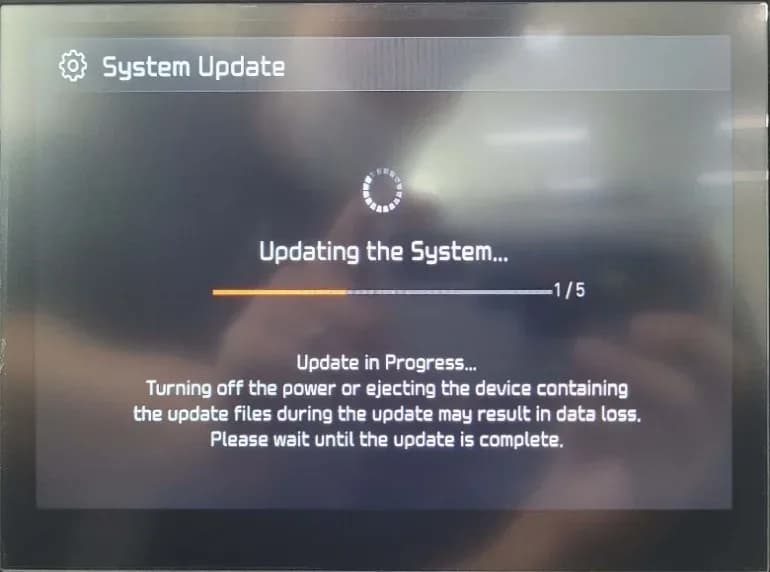
Why This Matters
Owners of certain 2022 Hyundai Tucson (NX4) vehicles may experience a frustrating issue where the Bluelink or Bluetooth audio volume becomes unavailable. This prevents proper use of hands-free calling, media playback, and navigation audio. Hyundai has released Service Campaign T9D, documented in Technical Service Bulletin (TSB) 22-01-077H, to provide a software update solution for this problem.
Symptoms
The primary symptom owners will notice is the "Bluelink/Bluetooth volume unavailability." This means that despite the system being connected, no audio output is heard through the vehicle's speakers for Bluelink services or Bluetooth-connected devices. This issue specifically impacts the D-Audio system in the affected vehicles.
Diagnosis / Trigger Conditions
This issue is caused by a software anomaly within the D-Audio system. There are no specific diagnostic trouble codes (DTCs) associated with this condition; rather, the problem is identified by the absence of Bluelink or Bluetooth audio. The TSB outlines a direct software update to correct the underlying cause.
Repair Procedure Summary
The repair for the "Hyundai Tucson volume unavailable" issue involves updating the D-Audio software using a specialized USB memory stick. The procedure, as detailed in TSB 22-01-077H, includes several steps:
- The technician turns the vehicle on and confirms the selection on the head unit screen.
- The vehicle's battery charge is verified, and the power is switched to the "On" position to prevent interruptions during the update.
- The technician navigates to the system's settings menu by pressing the SETUP button, then selecting the GENERAL option.
- The current software version is checked. If it is an older version (specifically NX4.USA.D2V.002.001.210901 or earlier), the update proceeds.
- A specialized S/W UPDATE USB MEMORY STICK is inserted into the vehicle's USB slot.
- The system is checked to ensure the USB stick is functioning correctly, often by playing an MP3 file from the stick.
- The UPDATE button is pressed on the screen to initiate the software installation.
- The update process runs automatically, taking approximately 15 minutes. During this time, the display may show the Hyundai logo or go black momentarily.
- Once the update is complete, the system will automatically restart.
- The technician then confirms that the software has been successfully updated to the new version, NX4.USA.D2V.003.100.220331, by checking the SW INFO/UPDATE screen.
- Finally, the USB memory stick is safely removed from the vehicle.
Required Tools or Parts
To perform this software update, a specific S/W UPDATE USB MEMORY STICK is required. The part number for this item is 96160-DAV2. Hyundai dealerships receive one of these sticks, and additional units can be ordered through normal parts channels. The causal part number for warranty claims is 96160-N9480, with operation code 20D076R0.
Important Warnings for Owners
Owners should be aware of several critical points regarding this service campaign:
- Hyundai states that dealers "must perform this Service Campaign whenever an affected vehicle is in the shop for any maintenance or repair." This ensures that the update is applied proactively.
- During the update process, it is crucial that the battery is sufficiently charged and the vehicle's power is switched to "On." Technicians are warned: "Do not remove the USB memory stick or turn off the ignition switch during the update. This will prevent the update from occurring." This also applies to owners if they were to attempt the update themselves, which is not recommended.
- Hyundai also warns that "Turning off the power or ejecting the device containing the update files during the update may result in data loss. Please wait until the update is complete."
- Note that the final software version displayed might vary slightly in region code (e.g., "USA" vs. "CAN") depending on the vehicle's market.
Owner Action
If you own a 2022 Hyundai Tucson (NX4) produced between November 9, 2021, and April 18, 2022, and are experiencing "Hyundai Tucson volume unavailable" for Bluelink or Bluetooth audio, you should contact your authorized Hyundai dealership. This repair is covered under Service Campaign T9D (TSB 22-01-077H) and will be performed free of charge. Dealers can identify open campaigns for your vehicle by accessing the "Vehicle Information" screen (VIS) via WEBDCS.
Source: NHTSA ID: 10222077
Galleria
9 immagini
Frequently Asked Questions
- What is Service Campaign 22-01-077H for?
- Service Campaign 22-01-077H addresses the issue of "Bluelink/Bluetooth volume unavailability" in certain 2022 Hyundai Tucson (NX4) vehicles, specifically those produced between November 9, 2021, and April 18, 2022.
- How is the "Hyundai Tucson volume unavailable" problem fixed?
- The problem is resolved by performing a D-Audio software update using a special USB memory stick (part number 96160-DAV2) at a Hyundai dealership. This update changes the software version from NX4.USA.D2V.002.001.210901 to NX4.USA.D2V.003.100.220331.
- Will I be charged for the software update for my 2022 Hyundai Tucson?
- No, this is a service campaign (T9D), and the software update should be performed free of charge by an authorized Hyundai dealership. The operation code for this warranty claim is 20D076R0.
- What should I do if my 2022 Hyundai Tucson has no Bluelink or Bluetooth volume?
- If you are experiencing "Hyundai Tucson volume unavailable" for Bluelink or Bluetooth audio, you should schedule an appointment with your local Hyundai dealership. They will perform the necessary software update as part of Service Campaign 22-01-077H.
Related Articles
2021-2024 Hyundai Santa Fe / Tucson DTC U028700 EOP
Hyundai has issued Technical Service Bulletin (TSB) 26-AT-002H for certain 2021-2024 Santa Fe and Tucson vehicles. This TSB addresses diagnostic trouble code U028700, indicating a "Lost Communication With Trans Fluid Pump Module," which can cause the Idle Stop & Go (ISG) system to become…
2022 Hyundai Tucson Inoperable Horn Warranty Extension
Hyundai has issued a warranty extension for certain 2022 Tucson (NX4A) vehicles experiencing an inoperable horn. This issue, detailed in TSB 26-BE-004H, is caused by foreign substances oxidizing internal horn parts. Coverage is extended to 10 years/120,000 miles.
2022 Hyundai Tucson Inoperative Horn TSB 26-BE-004H
Hyundai has issued Technical Service Bulletin 26-BE-004H for certain 2022 Tucson (NX4A) vehicles experiencing an inoperative horn. This TSB extends warranty coverage to 10 years/120,000 miles for horn replacement due to internal oxidation from foreign substances.
2021-2022 Hyundai Anti-Theft Ignition Cylinder Protector TSB
Hyundai has issued Technical Service Bulletin 25-01-089H (Customer Satisfaction Campaign P33) to address vehicle theft concerns by installing an anti-theft ignition cylinder protector and anti-theft decals on various 2021-2022 models.
2021-2022 Hyundai Anti-Theft Ignition Cylinder Protector Campaign P33
Hyundai has launched Customer Satisfaction Campaign P33 for 2021-2022 models, offering a free anti-theft ignition cylinder protector and decals. This hardware upgrade, detailed in TSB 25-01-089H, is available upon customer request to counter social media theft methods.
Leave a comment
Comments are moderated and may take a moment to appear. Only your first name and the initial of your last name are shown publicly.
Comments
Be the first to comment.