2021-2022 Audi ConBox Software Update for Connectivity Issues
Audi has released TSB 90T6 to address ConBox software issues in 2021-2022 models. This update resolves myAudi login failures, navigation traffic delays, and problems with over-the-air map updates and other Audi connect services.

Si applica anche a
- Audi A4
- 2022
- Audi A6
- 2022
- Audi A7
- 2022
- Audi e-tron GT
- 2022
- Audi Q7
- 2022
- Audi Q8
- 2022
- Audi RS 5
- 2022
- Audi RS 6 Avant
- 2022
- Audi RS 7
- 2022
- Audi RS Q8
- 2022
- Audi S6
- 2022
- Audi S7
- 2022
- Audi S8
- 2021
- Audi SQ5
- 2022
- Audi SQ7
- 2022
- Audi SQ8
- 2022
▸ Mostra altri 10▾ Mostra meno
Audi has issued Technical Service Bulletin (TSB) 90T6, released on April 12, 2022, to provide a software update for the ConBox module in various 2021-2022 Audi vehicles. This proactive update aims to prevent common connectivity and infotainment issues that owners might experience. This Audi ConBox software update specifically targets the ConBox software to improve the reliability of Audi connect services.
Symptoms
Owners of affected 2021-2022 Audi models may experience one or more of the following symptoms related to the ConBox software:
- The myAudi login fails with an error message of "Your login was unsuccessful. Please try again later."
- The online traffic information in the navigation map does not display speed and flow data, or it appears delayed.
- Over-the-air navigation map updates do not initiate or complete successfully.
- Intermittent technical issues with all other Audi connect services.
Important Warnings and Owner Advisories
Audi has provided several critical warnings and advisories for technicians performing this update, which also contain important information for owners:
- Do Not Use Guided Fault Finding (GFF): The flash process must be performed through "Audi Flashing," not Guided Fault Finding (GFF). Using GFF will prolong the process, and requests for additional time will not be considered.
- Prohibited Wireless Connections: Performing a software update using a Bluetooth or WiFi connection significantly increases the risk of losing connection, which could damage the control module. Requests for additional time or parts will be denied if the GFF log indicates a wireless connection was used. Using Bluetooth or WiFi for this action is PROHIBITED! Damage caused to electronic components (e.g., ECM, TCM) during the SVM flash process due to improper procedures is not covered.
- Radiator Fan Safety: "Radiator Fan(s) may cycle ON high speed during the Update Process! There is a serious risk that personal injury may result if contact is made with spinning fan blades. Keep hands and all objects away from Radiator Fan(s) during Update Process!"
- Hazard Warning Lights Required: "The procedure may cancel itself if the hazard warning lights are not switched on. The hazard warning lights prevent the system from switching to bus sleep mode during the update."
- Proper Operating Mode: The operating mode "Flash" must be used. Performing this software update using "Diagnosis" (Guided Fault Finding) could result in non-payment of the claim.
- Elsa System is Authoritative: The Elsa system is the only binding inquiry and verification system for vehicle eligibility; other systems are not valid and may result in non-payment of a claim.
- All Safety Recalls First: All safety recalls must be completed prior to completing this campaign.
- No Wash/Loaner Claims: Do not claim vehicle wash or loaner services under this action.
- Battery Connection: When connecting the charger directly to the battery, technicians must connect the positive cable to the positive terminal of the battery and the negative cable to the grounding lug on the chassis. They MUST NOT connect the ground cable directly to the negative terminal of the battery.
Repair Procedure Summary
The Audi ConBox software update involves a specific, multi-step procedure performed by an authorized Audi dealer using specialized diagnostic equipment. Technicians must adhere strictly to these steps to ensure a successful update and warranty coverage.
- Vehicle Eligibility Verification: Technicians must check the Elsa Campaign/Action Information screen on the day of repair to confirm the vehicle shows the
90T6code and its status is "open." An Elsa printout showing the "open" status must be attached to the repair order. If the90T6code appears to have been performed but still shows "open" in Elsa, the Warranty department must be contacted for guidance. If multiple software update campaigns are open, they must be performed in order of their start date, with the oldest one being completed first. - Diagnostic Tool Preparation: Ensure the ODIS software on the VAS Diagnostic Tester (VAS6150X/VAS6160X or equivalent) is completely up to date by checking the "Alerts" section on the ServiceNet homepage for the current ODIS version. The diagnostic tester must be plugged in using its supplied power adapters, not relying on battery power alone. The screen saver and power-saving settings on the diagnostic tester must be disabled to prevent it from entering power save mode during the update. Any ODIS "Hot-Fix" patches must be removed from the scan tool before beginning this operation.
- Battery Stabilization: A battery charger, specifically a GRX3000VAS- (or equivalent), must be attached in POWER SUPPLY MODE to the vehicle battery or underhood charging posts. The battery voltage must remain above 12.5 volts for the entire duration of the software update. Failure to maintain adequate voltage can cause the update to fail and damage the control module, and such damage will not be covered under warranty.
- Vehicle Preparation: The hood and battery cover are opened. The hazard warning lights must be switched on to prevent the system from entering bus sleep mode during the update.
- Diagnostic Connection: The VAS Diagnostic Tester must be connected to the vehicle via a USB cable. Wireless connections (Bluetooth or WiFi) are strictly prohibited for this procedure due to the increased risk of connection loss and potential control module damage.
- ODIS Configuration - Communication Path:
- Start the ODIS program.
- Confirm the scan tool is communicating with the diagnostic head via USB cable. If a Bluetooth or WiFi symbol is shown, the diagnostic head must be disconnected from the vehicle and reconnected via USB.
- From the home screen of the scan tool, select "Admin."
- Navigate to the "General" tab and select "GFF Process."
- Under "Communication path selection," choose "Only allow DoIP communication."
- Select "Save" and confirm "Yes" when prompted, "Do you really want to save?"
- Return to the home screen. This communication path setting is temporary for the current diagnostic session and will reset to "Automatic detection" for subsequent sessions.
- Software Flash Initiation:
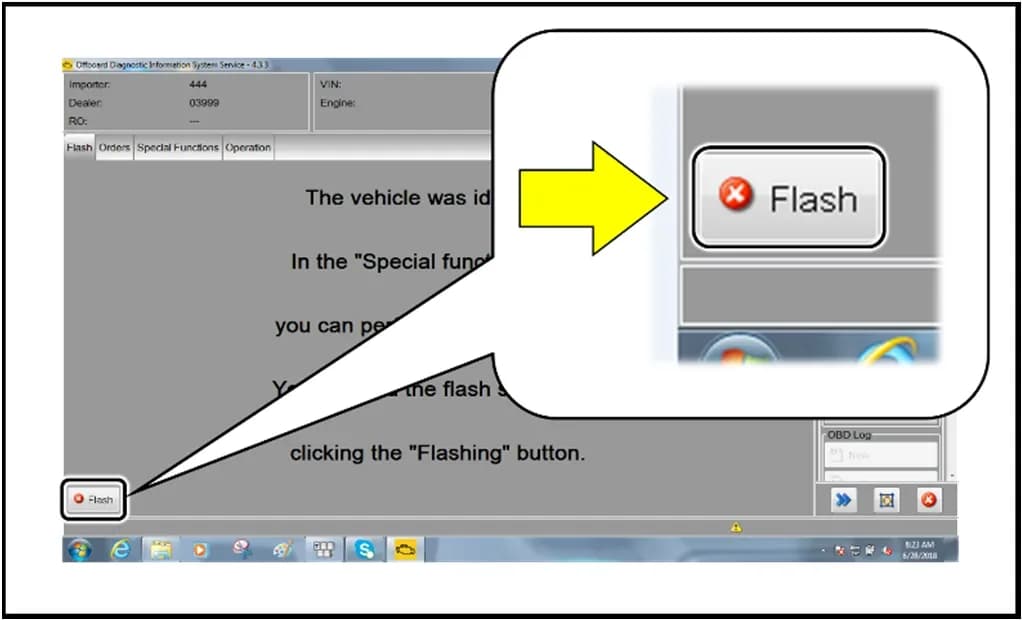
- From the home screen, highlight "Flash." The operating mode "Flash" must be used; using "Diagnosis" (Guided Fault Finding) could lead to non-payment of the claim.
- Select "Starting Flashing" and follow the on-screen prompts.
- Select "No RO" if prompted.
- SVM Code Input:
- Highlight "SVM – Code Input."
- Select "Perform test."
- Enter the corrective action code
90T6A016. - Select "Accept" and follow the remaining on-screen prompts to complete the software update.
- Post-Update Procedures:
- After receiving confirmation that the flash completed successfully, select "Send" to transmit the diagnostic protocol online.
- Click "Flash" to exit the flash session.
- To clear any event memory entries that may have been generated during the flashing procedure, the vehicle must be put into bus sleep mode. This is achieved by disconnecting the diagnostic tester, removing the key from the vehicle, and locking the vehicle with the remote for 5 minutes.
- Document customer presets if they were recorded before the update.
Required Tools or Parts
Performing this ConBox software update requires specific equipment:
- Battery Tester/Charger: GRX3000VAS- (or equivalent)
- Diagnostic Tester: VAS6150X/VAS6160X- (or equivalent)
Warranty Information
This update is typically covered under the New Vehicle Limited Warranty. For warranty claims, the following details apply:
- Service Number:
90T6 - Damage Code:
0099 - Parts Vendor Code:
002 - Claim Type:
- Sold vehicle:
7 10 - Unsold vehicle:
7 90
- Sold vehicle:
- Causal Indicator: Mark labor as causal.
- Labor Operations:
2706 89 50: Connect battery charger (10 Time Units)9170 25 99: Update infotainment control module software (Time stated on diagnostic protocol)
Owner Action
If your 2021-2022 Audi vehicle is experiencing issues such as "Your login was unsuccessful. Please try again later." messages, delayed navigation traffic, or problems with over-the-air map updates, you should contact an authorized Audi dealer. The dealer will verify if your vehicle is eligible for the Audi ConBox software update and perform the necessary software installation. This update is typically covered under the New Vehicle Limited Warranty, provided the vehicle meets the specified criteria and the procedure is performed within the allotted time frame.
NHTSA ID: 10210255
Galleria
15 immagini
Frequently Asked Questions
- What is the Audi TSB 90T6 about?
- Audi TSB 90T6 addresses a ConBox software update for 2021-2022 Audi vehicles. It aims to resolve various connectivity issues, including myAudi login problems, navigation traffic delays, and failures with over-the-air map updates.
- What specific error messages or symptoms does the ConBox update fix?
- This update fixes issues such as the myAudi login failing with the message "Your login was unsuccessful. Please try again later.", online navigation map traffic not showing or being delayed, and over-the-air navigation map updates not starting or completing. It also resolves intermittent issues with other Audi connect services.
- Can I perform the Audi ConBox software update myself?
- No, the ConBox software update requires specialized diagnostic tools and a precise procedure that should only be performed by trained technicians at an authorized Audi dealer. Improper execution can lead to damage to control modules, which may not be covered by warranty.
- What is the SVM code associated with this update?
- The specific SVM code used by technicians to perform this ConBox software update is 90T6A016.
- Which Audi models are affected by the 90T6 ConBox update?
- The 90T6 ConBox update applies to various 2021-2022 Audi models, including the A4, A5, A6, A7, A8, e-tron, Q5, Q7, Q8, RS5, RS6 Avant, RS7, RSQ8, S5, S6, S7, S8, SQ5, SQ7, and SQ8.
What Audi e-tron owners report
Counted from the records in our database across 5 model years.
- 158
- Owner complaints
- 14
- Recalls
- 1,706
- Service bulletins
- 7
- Crashes reported
- 6
- Fires reported
- 3
- Injuries reported
The 2022 model year
31 complaints, the 3rd most of 5 model years on file. Owners reported 1 crash, 2 fires and 2 injuries for this year, which also has 6 recalls on file.
Complaints by model year
| 2019 | 84 | |
|---|---|---|
| 2020 | 1 | |
| 2021 | 36 | |
| 2022 | 31 | |
| 2023 | 6 |
Most-reported systems
- Electrical System — 81
- Power Train — 24
- Engine — 23
- Fuel/Propulsion System — 18
- Service Brakes — 18
Latest recalls for the 2022 model year
- 26V240000 — Service Brakes, Hydraulic (Apr 2026)
- 25V900000 — Back Over Prevention (Dec 2025)
- 23V867000 — Electrical System (Dec 2023)
Complaints are owner reports filed with NHTSA. They are unverified, and counts depend on how many vehicles were sold, so they are not a failure rate.
Related Articles
2022 Audi e-tron Electrical System Problems: Complaints & TSBs
Owners of the 2022 Audi e-tron frequently report significant electrical system malfunctions, ranging from sudden power loss and charging hazards to software crashes. Braking issues and unexpected automatic emergency braking are also common concerns, alongside numerous technical service bulletins…
2022-2026 Audi Guided Fault Finding Reporting Obligation
Audi has issued Technical Service Bulletin TPI 2033392, also known as Transaction No. 2081531/1, regarding a reporting obligation for technicians when Guided Fault Finding produces an unexpected result. This TSB outlines the process for contacting Audi Product Support for diagnostic assistance.
2022-2026 Audi Infotainment System Complaints
Audi has released Technical Service Bulletin (TSB) 2081405/1 to address various customer complaints regarding infotainment systems in 2022-2026 Audi vehicles. This TSB helps technicians diagnose issues often caused by external media or mobile devices, rather than vehicle technology.
2018-2026 Audi Models Cracking Noise TSB 2061464/11
Audi Technical Service Bulletin 2061464/11 describes a cracking noise from the front or rear axle when changing direction in various 2018-2026 Audi models. The issue is due to stub axle movement and is resolved by bonding the stub axle to the wheel bearing with locking fluid.
2022-2026 Audi Parking Aid False Warnings TSB 2024323/13
Audi has released Technical Service Bulletin 2024323/13 to address customer complaints of false parking aid warnings. This bulletin details various environmental and vehicle-specific conditions that can cause the parking aid system to issue alerts even when no obstacles are present. It provides…
Leave a comment
Comments are moderated and may take a moment to appear. Only your first name and the initial of your last name are shown publicly.
Comments
Be the first to comment.