2021-2023 Hyundai AVN Radio Crash & Uneven Road Warning
Hyundai Technical Service Bulletin 24-BE-001H-1 provides a software update for 2021-2023 Hyundai models equipped with AVN 5th Gen Wide systems. This update resolves issues causing the radio app to crash and the 'Uneven Road Ahead, Drive carefully' warning to appear.
 Marcus Weber2022 Hyundai Tucson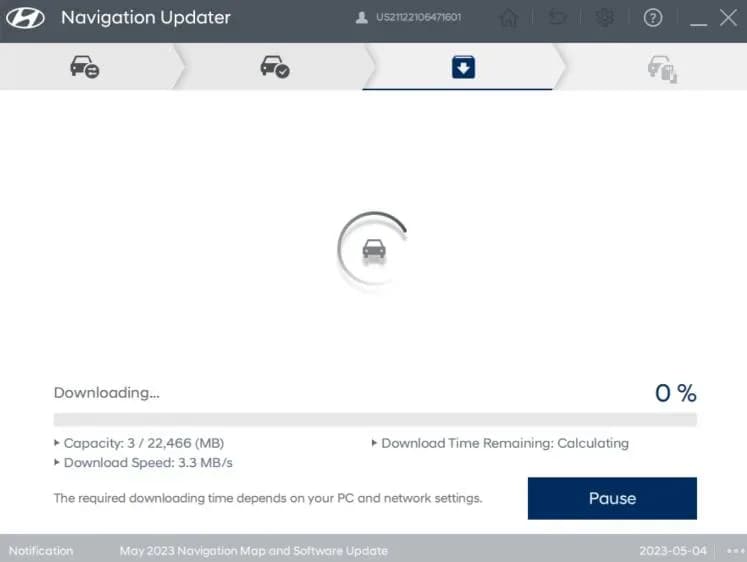
S'applique également à
- Hyundai Elantra
- 2021–2023
- Hyundai Ioniq 5
- 2022–2023
- Hyundai Kona
- 2022–2023
- Hyundai Kona N
- 2022–2023
- Hyundai Palisade
- 2021–2023
- Hyundai Sonata
- 2021–2023
- Hyundai Tucson
- 2023
- Hyundai Veloster N
- 2021–2022
▸ Afficher 2 de plus▾ Afficher moins
Hyundai has released Technical Service Bulletin (TSB) 24-BE-001H-1 to address a software issue affecting the Audio Video Navigation (AVN) 5th Generation Wide system in various 2021-2023 models. This bulletin provides a procedure for updating the AVN software to resolve instances of the radio application crashing and the display of an "Uneven Road Ahead, Drive carefully" warning message. If you are experiencing a Hyundai AVN radio crash or this specific warning, this TSB outlines the necessary steps for resolution.
This TSB has been revised to exclude the Venue (QX) model, which will be covered in a separate, dedicated TSB.
Symptoms
Owners of affected vehicles may observe the following conditions:
- The radio application frequently crashes when attempting to enter radio mode.
- A message reading "Uneven Road Ahead, Drive carefully" appears on the instrument cluster, often accompanied by an audible warning sound.
Diagnosis
To determine if your vehicle requires this update, a technician will check the currently installed AVN software version. If the software version is one of the following, an update is necessary:
- 221011
- 221025
- 221115
- 221220
- 221228
The target updated software version should be 230203 or greater.
Repair Procedure Summary
The repair involves updating the AVN software using a USB drive. The general steps are as follows:
- Turn the vehicle's ignition switch to the 'ON' position.
- Access the AVN system's 'Setup' menu, then navigate to 'General'.
- Verify the current software version to confirm the need for an update.
- Insert the prepared USB drive containing the software update into the vehicle's USB port.
- On the AVN screen, select 'Update', then confirm by selecting 'OK', and finally 'Start' to begin the update process.
- After the update is complete, confirm that the software version has been successfully updated to 230203 or a newer version.
If a pre-loaded USB drive is not available, the software can be downloaded from https://update.hyundai.com onto a blank 64GB USB drive. This process involves selecting the vehicle model, downloading the update file, and then transferring it to the USB drive.
Required Tools or Parts
Technicians will use specific USB drives pre-loaded with the software update:
- RADIOSWUPDATEA: For Elantra, Elantra Hybrid, IONIQ 5, Kona (OS), Palisade (20-22MY), Sonata, Sonata Hybrid, and Veloster N.
- RADIOSWUPDATEB: For Kona N, Kona EV, Palisade (23MY & later), and Tucson.
Alternatively, a blank 64GB USB drive can be used to download the software directly from Hyundai's update portal.
Important Warnings for Owners and Technicians
- IONIQ 5 Servicing: "If servicing an IONIQ 5 (NE1) vehicle, it can only be performed at IONIQ certified Hyundai dealerships."
- Battery and Power: Ensure the vehicle's battery is sufficiently charged and the power is switched to 'ON' throughout the update to prevent battery drain.
- USB Drive Removal: "Do NOT remove the USB drive, or turn OFF the ignition switch during the update. This will prevent the update from completing." Removing the USB device or turning off power during the update may cause data loss or system failure.
- Genuine Parts: Verify that the AVN system is a genuine Hyundai part (not aftermarket) before proceeding with the update.
- USB Drive Formatting: If using a previously used USB drive for downloading the software, be aware that formatting the drive will delete all its prior content.
Owner Action
If your Hyundai vehicle is experiencing a Hyundai AVN radio crash or displaying the "Uneven Road Ahead, Drive carefully" warning, it is recommended to schedule an appointment with an authorized Hyundai dealership. The software update described in TSB 24-BE-001H-1 is typically covered under the vehicle's normal warranty. The dealership will perform the necessary software update to resolve the issue.
Source: NHTSA ID 11006111
Galerie
24 images
Frequently Asked Questions
- What issues does Hyundai TSB 24-BE-001H-1 address?
- Hyundai TSB 24-BE-001H-1 addresses issues where the radio application crashes frequently and an "Uneven Road Ahead, Drive carefully" warning message appears on the cluster in certain Hyundai models equipped with the AVN 5th Gen Wide system.
- Which Hyundai models are affected by the AVN radio app crash and "Uneven Road Ahead" warning?
- The TSB applies to various 2021-2023 Hyundai models including the Elantra, Elantra Hybrid, IONIQ 5, Kona, Kona N, Kona EV, Palisade, Sonata, Sonata Hybrid, Tucson, and Veloster N, provided they are equipped with the AVN 5th Gen Wide system.
- What is the fix for the "Uneven Road Ahead, Drive carefully" warning?
- The fix involves updating the AVN 5th Gen Wide system software to version 230203 or newer, as outlined in Hyundai Technical Service Bulletin 24-BE-001H-1. This software update resolves the underlying condition causing the warning.
- Can I perform the AVN software update myself?
- While the TSB outlines steps for downloading the software, it is generally recommended to have an authorized Hyundai dealership perform the update to ensure proper installation and to maintain warranty coverage. Specifically, IONIQ 5 vehicles must be serviced at IONIQ certified Hyundai dealerships.
- Is the AVN software update covered under warranty?
- Yes, the AVN software update described in TSB 24-BE-001H-1 is typically covered under the vehicle's normal warranty. If a part is found to be out of warranty, prior approval for goodwill consideration may be requested.
Related Articles
2021-2024 Hyundai Santa Fe / Tucson DTC U028700 EOP
Hyundai has issued Technical Service Bulletin (TSB) 26-AT-002H for certain 2021-2024 Santa Fe and Tucson vehicles. This TSB addresses diagnostic trouble code U028700, indicating a "Lost Communication With Trans Fluid Pump Module," which can cause the Idle Stop & Go (ISG) system to become…
2022 Hyundai Tucson Inoperable Horn Warranty Extension
Hyundai has issued a warranty extension for certain 2022 Tucson (NX4A) vehicles experiencing an inoperable horn. This issue, detailed in TSB 26-BE-004H, is caused by foreign substances oxidizing internal horn parts. Coverage is extended to 10 years/120,000 miles.
2022 Hyundai Tucson Inoperative Horn TSB 26-BE-004H
Hyundai has issued Technical Service Bulletin 26-BE-004H for certain 2022 Tucson (NX4A) vehicles experiencing an inoperative horn. This TSB extends warranty coverage to 10 years/120,000 miles for horn replacement due to internal oxidation from foreign substances.
2021-2022 Hyundai Anti-Theft Ignition Cylinder Protector TSB
Hyundai has issued Technical Service Bulletin 25-01-089H (Customer Satisfaction Campaign P33) to address vehicle theft concerns by installing an anti-theft ignition cylinder protector and anti-theft decals on various 2021-2022 models.
2021-2022 Hyundai Anti-Theft Ignition Cylinder Protector Campaign P33
Hyundai has launched Customer Satisfaction Campaign P33 for 2021-2022 models, offering a free anti-theft ignition cylinder protector and decals. This hardware upgrade, detailed in TSB 25-01-089H, is available upon customer request to counter social media theft methods.
Leave a comment
Comments are moderated and may take a moment to appear. Only your first name and the initial of your last name are shown publicly.
Comments
Be the first to comment.