2011-2022 Hyundai Remote Start Horn Honking TSB
Hyundai has issued Technical Service Bulletin 23-BE-010H to address an issue where the horn honks when remote starting certain 2011-2022 models. This TSB provides a software update for the OEM remote start module to eliminate the unexpected horn honking.
 Marcus Weber2022 Hyundai Tucson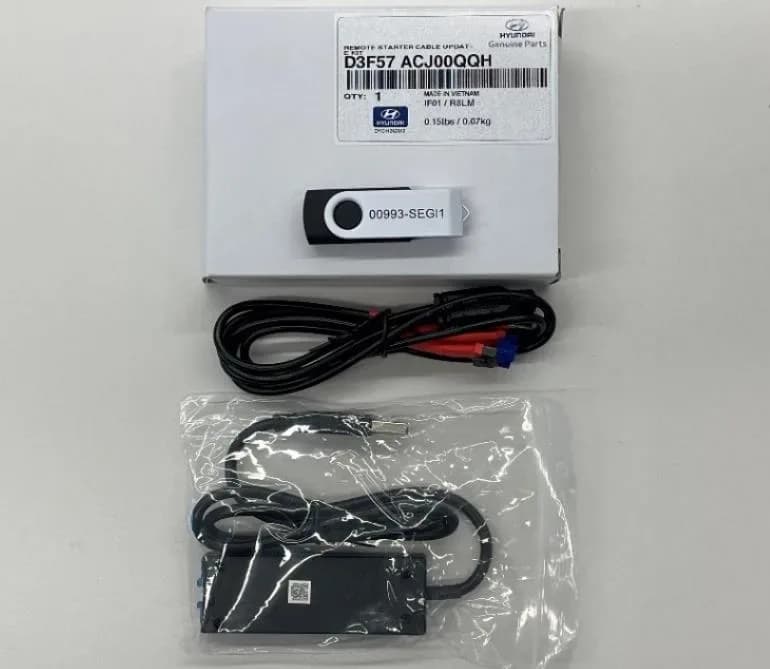
S'applique également à
- Hyundai Accent
- 2021–2022
- Hyundai Elantra
- 2021–2022
- Hyundai Kona
- 2021–2022
- Hyundai Palisade
- 2021
- Hyundai Santa Fe
- 2021–2022
- Hyundai Tucson
- 2021
- Hyundai Veloster
- 2021
- Hyundai Venue
- 2021
▸ Afficher 2 de plus▾ Afficher moins
Important Warnings and Notices
Hyundai has issued a critical notice regarding this software update:
- "The software-update only applies to the OEM Genuine Hyundai Remote start system. It does not apply to any other aftermarket systems." Owners with non-OEM remote start systems will not benefit from this update, and attempting to apply it may cause unforeseen issues.
Symptoms
Owners of certain 2011-2022 Hyundai models equipped with the OEM remote start system, specifically the "OEM Genuine Hyundai Remote Start System" (Model RED301-1WAY, Part Number F3F57-AC430), may notice an unexpected "horn honking when remote starting the vehicle". This condition typically occurs after the vehicle has received a previous software update related to service campaign 993, which involves an "IBU/BCM Software Update and Decals Application". The primary symptom is the horn sounding when the remote start function is activated.
Diagnosis and Trigger Conditions
The Hyundai remote start horn honking issue is specifically linked to vehicles that have undergone service campaign 993, which involves an "IBU/BCM Software Update and Decals Application". If your Hyundai, equipped with the OEM remote start system, exhibits the horn honking symptom after this particular campaign, it indicates that the remote start module requires the software update detailed in TSB 23-BE-010H to correct the behavior.
Warranty Information
This service procedure, identified by Operation Code "993RSTR0" for "REMOTE START MODULE REMOVAL, REINSTALL, AND APPLICATION/MODULE SOFTWARE UPDATE", is designed to be submitted as a "Campaign" type claim. The estimated operation time for this update is 0.3 hours. The causal part for this operation is "D3F57-ACJ00QQH", with nature code "114" and cause code "ZZ3". If any other parts are found to require replacement during this TSB and are still under warranty, a separate claim should be submitted. For parts out of warranty, a Prior Approval request for goodwill consideration may be necessary. This TSB also requires "Repair validation photos", including VIN and mileage, as per the Digital Documentation Policy.
Required Tools and Parts
To perform this software update, a "Remote Starter Cable Update Kit" with part number "D3F57-ACJ00QQH" is required. This kit includes an update cable, a module, and a USB stick containing the necessary software update program and instructions. Additionally, replacement USB sticks can be ordered separately using part number "00993-SEGI1". The software used for the update is the "Mobis Hyundai Rework Downloader 1.0.0".
Repair Procedure Summary
The repair for the Hyundai remote start horn honking involves a multi-step process to update the software of the OEM remote start module. This procedure should be performed by a qualified technician.
1. Software Installation on a Computer
The first phase involves installing the necessary software on a desktop or laptop computer:
- Insert the provided USB stick into the computer's USB port.
- Access the USB content, which includes two files: "Mobis Hyundai Rework Downloader 1.0.0" (the software download file) and "Mobis Hyundai Rework Downloader US..." (a Microsoft Word document containing the update instruction manual).
- Open the "Mobis Hyundai Rework Downloader 1.0.0" file to begin the application software download.
- When prompted by the User Account Control, select "Yes" to allow the app to make changes.
- Proceed through the installation wizard by selecting "Next" on the welcome screen and directory selection.
- Select "Start" on the confirmation screen to install "MOBIS HYUNDAI Rework Downloader 1.0.0".
- Select "Extract" to unpack and launch the installer for "FTDI CDM Drivers" (version 2.12.36.4).
- Follow the "Device Driver Installation Wizard", selecting "Next" and then agreeing to the license by selecting "I accept the agreement" and "Next", followed by "Finish" once the drivers are successfully installed.
- The system may then display screens related to "Microsoft Visual C++ 2012 Redistributable (x64) - 11.0.61030 Modify Setup"; follow any prompts to repair or install if needed.
- Once the application software update is complete, safely eject the USB stick from the computer, confirming the "Safe To Remove Hardware" message.
2. Remote Start Module Preparation
Next, the remote start module in the vehicle needs to be prepared for the update:
- Remove the panel located under the steering column to access and locate the remote start module.
- Disconnect the remote start module from the vehicle's wiring.
- Disconnect the antenna wire from the remote start module.
- Connect the black 6-pin wire from the "Remote Starter Cable Update Kit" (D3F57-ACJ00QQH) to the remote start module.
- Connect the black 4-pin wire from the update kit to the update kit module.
3. Module Software Update
With the software installed and the module connected, the update can proceed:
- Connect the update kit to the computer's USB port.
- Locate and open the "Mobis Hyundai ..." icon on the computer's home screen.
- Select "Yes" when prompted by the User Account Control to open the program.
- Select the "REFRESH" button to initiate communication between the program and the remote start module.
- If the module's software is already updated, a "PASS" message will be displayed, and no further action is needed.
- If an update is available, a pop-up message will appear, asking: "V3.60 You can update the program. Are you sure you want to proceed with the program updated with the information you have set up vehicle?" Select "Yes" to start the update.
- An update bar will display the progress.
- Once completed, a message will appear with "PASS" and the note: "V1.32 – V3.60. It has been updated. You can now remote the main unit".
- Technicians are instructed to take a screenshot of this "Remote Start Module Update Complete" screen and upload it to STUI (Service Technical Update Information).
4. Reinstallation and Confirmation
Finally, the module is reinstalled, and the repair is confirmed:
- Disconnect the black 6-pin connector from the remote start module.
- Reinstall the remote start module back into the vehicle.
- To confirm the repair, ensure all doors, hood, and trunk are closed.
- Press the lock button on the OEM remote.
- Wait 35 seconds.
- Start the vehicle using the engine start remote.
- Confirm that the horn does not honk when the engine starts via the remote command.
Owner Action
If you own a 2011-2022 Hyundai model equipped with the OEM remote start system and experience the Hyundai remote start horn honking issue during remote start, especially after a service campaign 993 update, you should contact your authorized Hyundai dealer. This software update is a technical service bulletin, and while typically covered under warranty as a "Campaign" type claim, it's best to confirm with your dealer regarding specific coverage and to schedule the service.
Source: NHTSA ID: 10243403, TSB ID: 23-BE-010H
Galerie
24 images
Frequently Asked Questions
- What is Hyundai TSB 23-BE-010H about?
- Hyundai Technical Service Bulletin 23-BE-010H addresses an issue where the horn honks unexpectedly when using the OEM remote start system on certain 2011-2022 Hyundai models. This TSB provides a software update for the remote start module to resolve the problem.
- Which Hyundai models are affected by the remote start horn honking issue?
- The TSB applies to various 2011-2022 Hyundai models, including the Tucson, Santa Fe, Elantra, Accent, Kona, Veloster, Venue, Palisade, Sonata, and Genesis Coupe, specifically those equipped with the OEM remote start system and having received service campaign 993.
- What causes the Hyundai remote start horn honking problem?
- The horn honking issue during remote start is typically triggered after the vehicle has undergone a previous software update as part of service campaign 993 (IBU/BCM Software Update and Decals Application). The remote start module then requires an additional software update to correct this behavior.
- What is the fix for the Hyundai remote start horn honking?
- The fix involves a software update to the OEM remote start module. A technician will use a specialized update kit and software (Mobis Hyundai Rework Downloader 1.0.0) to reprogram the module, eliminating the unintended horn honking during remote start operation.
- Is the remote start module software update covered under warranty?
- Yes, the warranty information provided in the TSB indicates that claims should be submitted as a 'Campaign' type, suggesting the repair is covered under warranty. Owners should confirm specific coverage with their Hyundai dealer.
Related Articles
2021-2024 Hyundai Santa Fe / Tucson DTC U028700 EOP
Hyundai has issued Technical Service Bulletin (TSB) 26-AT-002H for certain 2021-2024 Santa Fe and Tucson vehicles. This TSB addresses diagnostic trouble code U028700, indicating a "Lost Communication With Trans Fluid Pump Module," which can cause the Idle Stop & Go (ISG) system to become…
2022 Hyundai Tucson Inoperable Horn Warranty Extension
Hyundai has issued a warranty extension for certain 2022 Tucson (NX4A) vehicles experiencing an inoperable horn. This issue, detailed in TSB 26-BE-004H, is caused by foreign substances oxidizing internal horn parts. Coverage is extended to 10 years/120,000 miles.
2022 Hyundai Tucson Inoperative Horn TSB 26-BE-004H
Hyundai has issued Technical Service Bulletin 26-BE-004H for certain 2022 Tucson (NX4A) vehicles experiencing an inoperative horn. This TSB extends warranty coverage to 10 years/120,000 miles for horn replacement due to internal oxidation from foreign substances.
2021-2022 Hyundai Anti-Theft Ignition Cylinder Protector TSB
Hyundai has issued Technical Service Bulletin 25-01-089H (Customer Satisfaction Campaign P33) to address vehicle theft concerns by installing an anti-theft ignition cylinder protector and anti-theft decals on various 2021-2022 models.
2021-2022 Hyundai Anti-Theft Ignition Cylinder Protector Campaign P33
Hyundai has launched Customer Satisfaction Campaign P33 for 2021-2022 models, offering a free anti-theft ignition cylinder protector and decals. This hardware upgrade, detailed in TSB 25-01-089H, is available upon customer request to counter social media theft methods.
Leave a comment
Comments are moderated and may take a moment to appear. Only your first name and the initial of your last name are shown publicly.
Comments
Be the first to comment.