2021 Audi MMI 'Software Update Could Not Be Downloaded' TSB
Owners of certain 2021 Audi vehicles may encounter an erroneous message on their MMI wireless control head stating 'The software update could not be downloaded.' This issue, addressed by TSB 91 21 66 2062264/1, is due to a software malfunction in the MIB3 system and can be resolved with a specific…
 David Chen2021 Audi Q8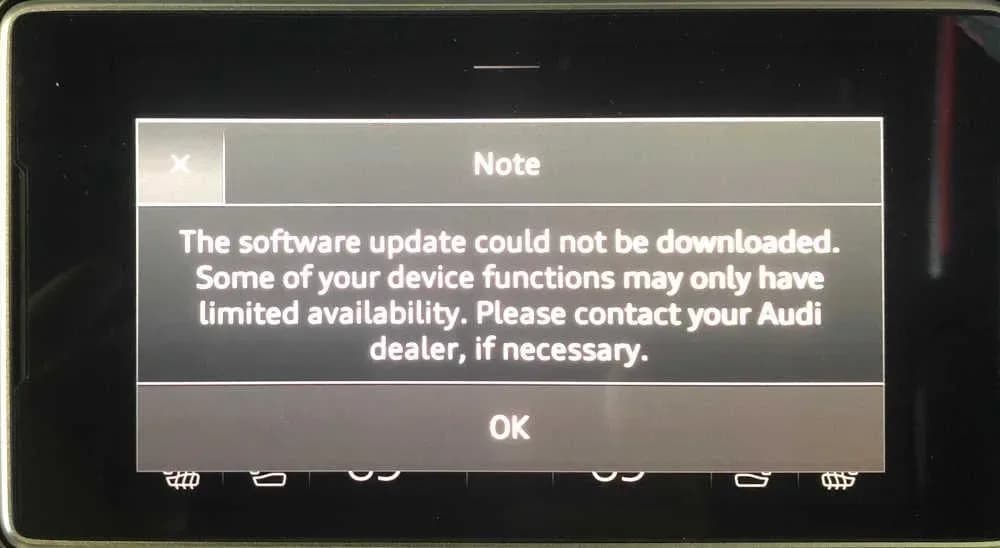
S'applique également à
- Audi A6
- 2021
- Audi Q7
- 2021
- Audi RS Q8
- 2021
- Audi S6
- 2021
- Audi S8
- 2021
- Audi SQ7
- 2021
- Audi SQ8
- 2021
▸ Afficher 1 de plus▾ Afficher moins
Symptoms of the Audi MMI Software Update Issue
Owners of certain 2021 Audi vehicles may observe a specific message displayed on their wireless control head (SCON). The verbatim message states: "The software update could not be downloaded. Some of your device functions may only have limited availability. Please contact your Audi dealer, if necessary." This message indicates a problem with the MMI system's ability to download software updates, potentially affecting the functionality of some device features.
Technical Background and Diagnosis
According to Audi Technical Service Bulletin (TSB) 91 21 66 2062264/1, this issue stems from a software malfunction within the MIB3 infotainment system. The system erroneously displays the "software update could not be downloaded" message, even if there isn't a critical update failure. This TSB supersedes a previous bulletin, PSS TSB 2061670 (also known as PSS 91), which addressed the same concern. The problem is not typically caused by a hardware fault but rather an internal software logic error.
Repair Procedure Summary
The resolution for the "Audi MMI software update" issue involves updating the MMI system software using a specific repair script. This procedure, outlined in TSB 91 21 66 2062264/1, is typically performed by an authorized Audi service technician.
Here's a summary of the steps involved:
- Obtain Update File: A specialized update file, known as the "Audi A8 MIB3 SCON Repair Script," is downloaded from Audi's ServiceNet portal.
- Prepare USB Flash Drive: The downloaded file is extracted onto a FAT32 formatted USB flash drive.
- Vehicle Preparation: The vehicle's ignition is turned on, and the MMI system is allowed to fully boot up.
- Initiate Update: The prepared USB flash drive is inserted into the vehicle's USB port. The update script is designed to start running automatically upon insertion.
- Completion and Removal: Once the script has finished executing, the USB flash drive is safely removed from the USB port.
- Bus Sleep Cycle: The vehicle is then turned off, and sufficient time is allowed for a bus sleep cycle to complete.
- SCON Restart (If Needed): In some instances, the SCON (Rear MMI control panel) may require a manual restart. This is performed by pressing and holding the "Volume Down" button for at least 20 seconds.
Required Tools or Parts
The primary tool required for this service procedure is a USB flash drive. This drive must be formatted to FAT32 to ensure compatibility with the MMI system for the software update.
Warranty Information
This service is covered under Audi's warranty policies. For vehicles within 48 months or 50,000 miles, it falls under Claim Type 110. For Certified Pre-Owned (CPO) vehicles, it is covered under Claim Type G10, requiring owner verification. If the vehicle is outside these warranty parameters, the Technical Service Bulletin serves as informational guidance, and costs may apply. The specific Service Number for this operation is 9196, with a Damage Code of 0039. The labor operation for updating the Information Electronics Control Module is identified as 9196 2599, with an allocated time of 20 Technical Units (TU).
What Owners Should Do
If your 2021 Audi displays the "software update could not be downloaded" message on the MMI wireless control head, it is recommended to contact your authorized Audi dealer. They have access to the specific repair script and the necessary tools to perform the software update as outlined in TSB 91 21 66 2062264/1. This will resolve the erroneous message and ensure your MIB3 system functions correctly.
Source: NHTSA ID: 10187351
Frequently Asked Questions
- What does "The software update could not be downloaded" mean on my Audi MMI?
- This message, "The software update could not be downloaded. Some of your device functions may only have limited availability. Please contact your Audi dealer, if necessary.", indicates an erroneous software malfunction within your Audi's MIB3 infotainment system, preventing proper software updates.
- Which Audi models are affected by the MMI software download issue?
- This issue primarily affects 2021 Audi A6, S6, RS 6 Avant, A8, S8, Q7, SQ7, Q8, SQ8, and RS Q8 models equipped with the MIB3 system.
- How is the Audi MMI "software update could not be downloaded" message fixed?
- The fix involves updating the MMI system software using a specific repair script, known as the "Audi A8 MIB3 SCON Repair Script," which is loaded onto a FAT32 formatted USB flash drive and inserted into the vehicle's USB port. This procedure is detailed in TSB 91 21 66 2062264/1.
- Is the repair for the Audi MMI software update issue covered under warranty?
- Yes, for vehicles within 48 months or 50,000 miles, the repair is covered under Audi's standard warranty (Claim Type 110). Certified Pre-Owned (CPO) vehicles are also covered under Claim Type G10.
- Can I fix the "Audi MMI software update" error myself?
- While the process involves a USB flash drive, the necessary repair script is typically accessed by authorized Audi service technicians through their ServiceNet portal. It is recommended to contact your Audi dealer for this specific software update.
Related Articles
2021-2025 Audi Engine Control Module Software Update 53ZC
Audi has issued an update to its Engine Control Module (ECM) software campaign 53ZC / WARR EXT – U82, dated March 20, 2026. This dealer communication indicates that additional vehicles have been added to the affected chart for this important software update. Owners of 2021-2025 Audi Q8, A7, A6…
2021-2025 Audi Fuel System DTCs P014800 and P008700
Audi Technical Service Bulletin (TSB) 2079461/3 details diagnostic and repair procedures for 2021-2025 Audi vehicles experiencing a 'MIL light on' or 'limp-home function' due to fuel system DTCs P014800 or P008700. This bulletin guides technicians on diagnosing and potentially replacing the…
2021-2025 Audi Black Trim Discoloration TSB
Audi has issued Technical Service Bulletin 2078651/4 to address red, purple, gray, or metallic discoloration on black exterior trim strips in 2021-2025 Audi models. This TSB explains the cause (paint UV resistance issue) and outlines the replacement procedure for affected components.
2021 Audi Virtual Cockpit Display Fault TSB 2078439/2
Audi TSB 2078439/2 addresses issues with the virtual cockpit display in 2021 A6, A7, A8, Q7, Q8 models, including a black screen or "Instrument cluster: fault" message, often accompanied by DTC B200049.
2021-2026 Audi TFSI Engine Oil Leak TSB 2053278/10
Audi has released Technical Service Bulletin 2053278/10 to address oil leaks from the cylinder head on 2.9 and 3.0 TFSI engines in various 2021-2026 models. Learn about symptoms, diagnosis, and the recommended repair process.
Leave a comment
Comments are moderated and may take a moment to appear. Only your first name and the initial of your last name are shown publicly.
Comments
Be the first to comment.