2021-2024 Kia AVN 5.0 Non-Responsive Radio Icon TSB
Kia has issued TSB ELE303 to address a non-responsive or inoperative radio icon on AVN 5.0 Wide infotainment systems in certain 2021-2024 models. This bulletin outlines a software update procedure to resolve issues with AM, FM, and SXM radio functionality.
 Sarah Mitchell2023 Kia Sportage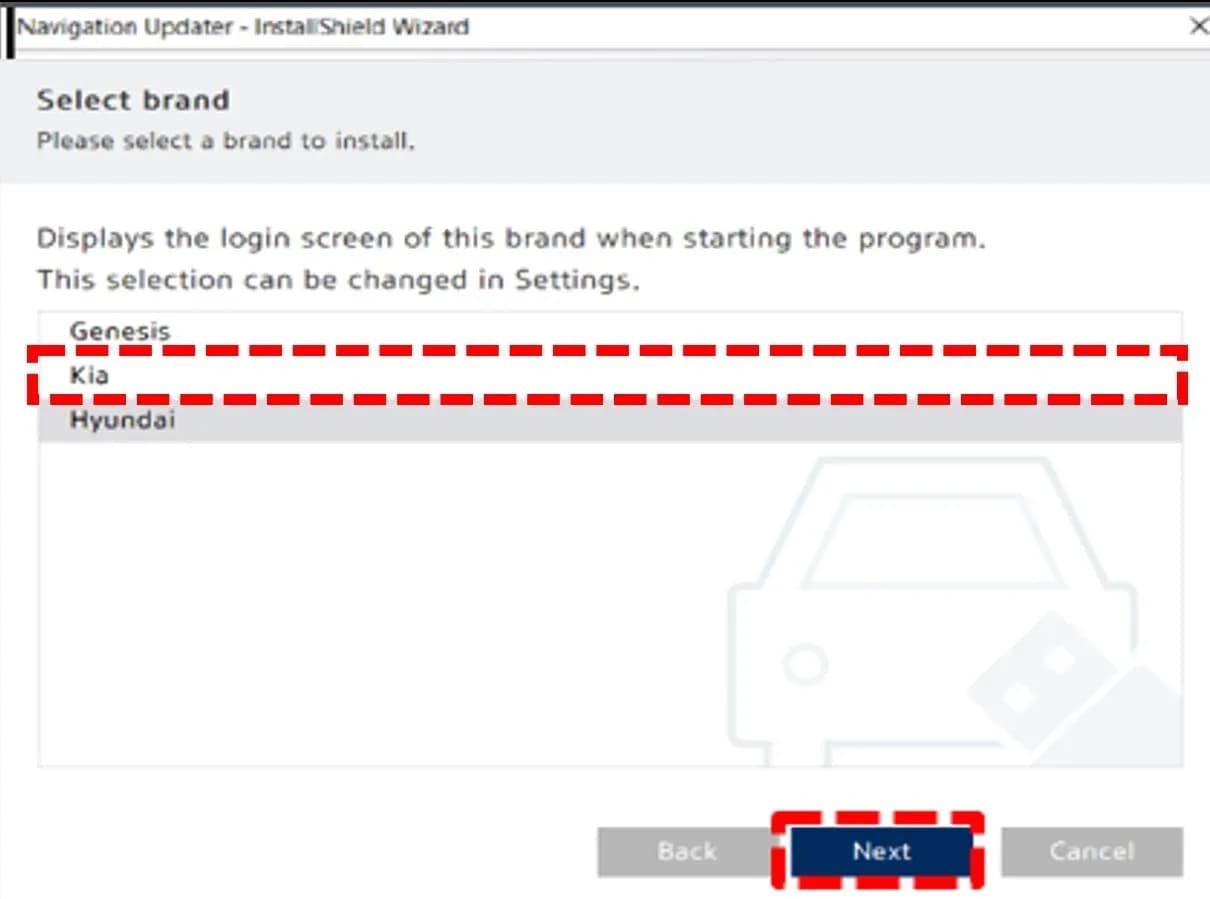
S'applique également à
- Kia Carnival
- 2022–2023
- Kia EV6
- 2022–2023
- Kia Forte
- 2022–2023
- Kia K5
- 2021–2024
- Kia Niro
- 2021–2023
- Kia Seltos
- 2021–2023
- Kia Sorento
- 2021–2023
- Kia Soul
- 2021–2023
- Kia Stinger
- 2022–2023
▸ Afficher 3 de plus▾ Afficher moins
Symptoms
Owners of certain 2021-2024 Kia models equipped with the AVN 5.0 Wide infotainment system may experience a "non-responsive" or "inoperative" radio. This issue affects AM, FM, and SXM radio functions.
Specifically, the AVN unit may not respond when the 'RADIO' hard key/button is pressed. The system may also fail to respond when the 'RADIO' icon is selected from the AVN menu screen. This indicates a problem with the Kia AVN radio non-responsive functionality.
Diagnosis and Trigger Conditions
This issue specifically affects 5th Generation AVN Wide units. To determine if your vehicle is affected, the current software version displayed in the 'General Settings' menu of your AVN unit needs to be checked.
If the last six digits of your AVN Software Version are among the following older versions (221011, 221025, 221115, 221220, 221228), then your vehicle is a candidate for this software update. If your software version is not listed, this TSB may not apply to your specific issue.
Repair Procedure Summary
To resolve the Kia AVN radio non-responsive issue, a software update must be performed using a USB flash drive. The process involves downloading the latest software to a computer, transferring it to a USB drive, and then installing it in the vehicle.
First, access the Kia Navigation Updater website and download the updater program to your computer. Follow the prompts to select your region and vehicle make. Next, choose your specific vehicle model and year from the provided list.
Once the update files are downloaded to your computer, insert a formatted USB flash drive and copy the files to it. Take the USB drive to your vehicle, turn the ignition to the 'ON' position, and ensure the Radio/Media system is 'OFF'. Insert the USB drive into the designated slot underneath the AVN unit.
Navigate through the AVN screen to 'Setup', then 'General', and finally 'SW Info/Update'. Select 'Update' and follow any on-screen instructions. The update process can take a significant amount of time, up to 2 hours and 30 minutes in some cases. After the update is complete, verify the software version in 'General Settings' to confirm successful installation.
Required Tools or Parts
To perform this software update, you will need the following:
- USB Flash Drive: A 64GB USB flash drive is recommended for downloading the update files. This item is locally sourced and does not have a specific Kia part number.
- Computer with Internet Access: Necessary for downloading the Kia Navigation Updater program and the software update files from the official Kia website.
Important Warnings
Owners and technicians should be aware of several critical advisories related to this software update:
- A Technical Service Bulletin is a field fix repair program without customer notification that may be performed during the warranty period. Any dealer requesting to perform this repair outside the warranty period will require DPSM approval.
- During the update process, DO NOT turn the ignition switch 'OFF', start the engine, and/or remove the USB drive from the vehicle. Interrupting the process can cause severe damage to the AVN unit.
- It is crucial to confirm that a fully charged battery (12.3 volts or higher) is used before starting the update to prevent power loss during the procedure.
- The system will be unavailable during the update, meaning all features, including the rear camera and audio, are restricted. This is normal behavior.
- There will be multiple occurrences where the Kia logo will appear, the display will be black, or messages like "Preparing System Update" or "Updating..." will be shown for an extended period of time. This is also normal and does not indicate a problem.
- In some cases, the software update may take up to 2 hours and 30 minutes to complete. Plan accordingly for this duration.
- If any issues occur during or after the software update, contact Kia America Techline for assistance.
Owner Action
If you are experiencing a Kia AVN radio non-responsive issue, you have two primary options. The simplest approach is to visit your authorized Kia dealer. They can perform the software update for you, and it is typically covered under warranty (Warranty Information: N Code: 111, C Code: ZZ3, Labor Op Code: 96560F00).
Alternatively, if you are comfortable with technical procedures, you can perform the software update yourself by following the detailed steps outlined in this bulletin. Ensure you have a 64GB USB flash drive and a computer with internet access. Always adhere to the important warnings to prevent any damage to your vehicle's infotainment system. The update will resolve the non-responsive radio icon problem.
Source: NHTSA TSB ID 11010698
Galerie
31 images
Frequently Asked Questions
- What is Kia TSB ELE303 about?
- Kia TSB ELE303 addresses a software issue in 2021-2024 Kia models with AVN 5.0 Wide infotainment systems that causes the radio icon (AM, FM, SXM) to be non-responsive or inoperative. The bulletin provides a software update procedure to fix this problem.
- What are the symptoms of the non-responsive radio icon on Kia AVN 5.0 Wide systems?
- Symptoms include the AVN unit not responding when pressing the 'RADIO' hard key/button or when selecting the 'RADIO' icon on the AVN menu screen. This indicates a Kia AVN radio non-responsive state for AM, FM, and SXM functions.
- Can I perform the AVN 5.0 Wide software update myself, or do I need to go to a dealer?
- You can perform the software update yourself by downloading the Kia Navigation Updater and files to a USB drive and following the in-vehicle instructions. However, if you prefer, an authorized Kia dealer can perform the update, and it is typically covered under warranty.
- How long does the AVN 5.0 Wide software update take?
- The software update process can take a significant amount of time, potentially up to 2 hours and 30 minutes, to complete. During this period, the infotainment system will be restricted.
- What should I do if my Kia's AVN radio is non-responsive?
- If your Kia AVN radio is non-responsive, first check your software version in 'General Settings'. If it matches one of the affected older versions, you should either visit a Kia dealer for the software update or perform the update yourself using a USB flash drive and the Kia Navigation Updater.
Related Articles
2023 Kia Sportage Cooling System Performance TSB
Kia has issued Technical Service Bulletin ENG259 (Rev 1) for 2023 Sportage models experiencing a Multifunction Indicator Lamp (MIL) illumination with specific cooling system performance DTCs. The bulletin outlines the procedure to replace the Integrated Thermal Management Module (ITM) and update…
2021-2023 Kia Sorento Sportage GDI Misfire DTC TSB
Kia has issued Technical Service Bulletin FUE068 (CA2505) for 2021-2023 Sorento and Sportage models with the Theta III 2.5L GDI engine. This bulletin addresses cylinder misfire DTCs (P030000-P030400) that can lead to no-start, misfire, or reduced power due to GDI fuel injector damage.
2023 Kia Sportage Cooling System Performance TSB
This Kia Technical Service Bulletin (TSB ENG259) addresses Malfunction Indicator Lamp (MIL) illumination with DTCs P218100, P2181F0, or P2181F1 in 2023 Kia Sportage vehicles. The issue stems from Integrated Thermal Management Module (ITM) degradation, leading to cooling system performance issues…
2023 Kia Sportage AVNT Screen Flickering TSB
A Technical Service Bulletin (TSB ELE355) has been issued for the 2023 Kia Sportage (NQ5a) regarding the Audio Video Navigation Telematics (AVNT) head unit. Owners may experience the AVNT screen flickering 'ON/OFF' due to an intermittent coaxial cable connection.
2021-2023 Kia Sorento and Sportage Misfire DTCs
Kia Technical Service Bulletin FUE068 addresses GDI fuel injector issues in 2021-2023 Sorento and Sportage models, which can cause misfire DTCs, no-start conditions, and reduced engine power.
Leave a comment
Comments are moderated and may take a moment to appear. Only your first name and the initial of your last name are shown publicly.
Comments
Be the first to comment.