2021-2022 Kia Head Unit Log Collection for Malfunctions
This Kia Pitstop bulletin (PS677) outlines the procedure for collecting log files from AVN 5.0/W and Display Audio 2.0/V head units in 2021-2022 Kia models. This process helps technicians diagnose customer complaints about malfunctioning infotainment systems.
 Marcus Weber2021 Kia Sportage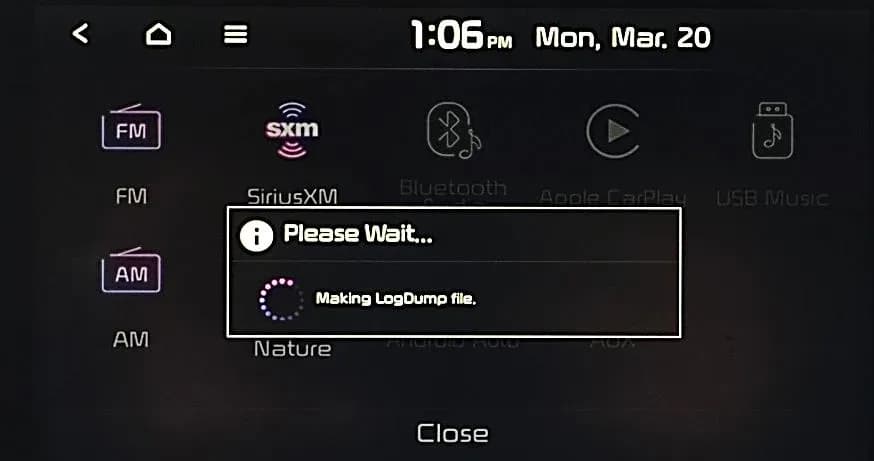
Si applica anche a
- Kia Carnival
- 2022
- Kia Forte
- 2021
- Kia K5
- 2021
- Kia Niro
- 2021
- Kia Rio
- 2021
- Kia Sedona
- 2021
- Kia Seltos
- 2021
- Kia Sorento
- 2021
- Kia Soul
- 2021
- Kia Stinger
- 2021–2022
- Kia Telluride
- 2021
▸ Mostra altri 5▾ Mostra meno
This Pitstop bulletin, PS677 Revision 2, issued on April 7, 2023, provides detailed instructions for technicians to collect log files from certain Kia head units. This procedure is crucial for diagnosing customer complaints about infotainment systems that are malfunctioning or not working as intended. When Kia America Techline requests log files, service technicians use this guide to extract data from the head units for analysis.
Symptoms
Owners may experience various issues with their vehicle's infotainment system, including the AVN 5.0/W or Display Audio 2.0/V head units. These symptoms generally involve the head unit malfunctioning or not operating as expected.
Diagnosis / Trigger Conditions
Log file collection is initiated when a customer reports a complaint about their head unit, and Kia America Techline requests these files for further analysis. The process involves duplicating the concern and then extracting diagnostic data directly from the head unit using a USB storage device.
Repair Procedure Summary
There are two primary procedures for collecting log files, depending on the specific head unit installed in the vehicle. Both methods require a USB storage device and involve entering a special 'Dealer Mode' on the head unit.
For AVN5.0 Wide Head Unit Log Collection
- Insert a USB storage device into the vehicle's USB media port.
- Reproduce the customer's concern or issue on the head unit.
- Press and hold the 'RADIO' hard key on the head unit until the pop-up window "Making LogDump file." is displayed.
- Once the "LogDump Success" message appears, select 'OK'.
- To enter Dealer Mode, first ensure the radio is in FM mode. Then, adjust the 'Volume' to level '7', tap the 'General Settings' banner, adjust 'Volume' to level '3', tap the 'General Settings' banner again, adjust 'Volume' to level '1', and tap the 'General Settings' banner one last time.
- Enter the password "2400" and select 'OK'.
- Select 'Copy image to USB' from the Dealer Mode menu.
- After the "USB copy is completed" message appears, select 'OK'.
- Remove the USB storage device from the vehicle, insert it into a computer, and locate the log file, which will start with "log-".
- Attach this log file to the specific Techline case, ensuring the date and time of the concern are noted.
For AVN5.0 and Display Audio 2.0 (DA2V) Head Unit Log Collection
- Insert a USB storage device into the vehicle's USB media port.
- Reproduce the customer's concern or issue on the head unit.
- Press and hold the 'RADIO' hard key on the head unit for at least 10 seconds.
- Press and hold the 'RADIO' hard key again until the pop-up window "Making LogDump file." is displayed.
- After the "LogDump Success" message appears, select 'Close'.
- To enter Dealer Mode, press and hold the 'SETUP' hard key to display 'General Settings'. Then, adjust the 'Volume' (A) to level '7' and press down on the 'Tune' knob (B). Repeat this for volume levels '3' and '1', ensuring the radio is in FM mode.
- Enter the password "2400" and select 'OK'.
- Select either 'Copy image to USB' or 'Copy all to usb' from the Dealer Mode menu.
- After the "USB copy is complete" message is displayed, remove the USB storage device.
- Insert the USB drive into a computer and locate the log files, which will end in ".tar".
- Attach these log files to the specific Techline case, noting the date and time of the concern.
Important Warnings
- When submitting log files, always include the date and time the concern occurred in the Techline case.
- The log dump procedure requires the radio to be in FM mode for successful completion.
- A log dump will not complete if the head unit is in any other mode.
- For newer head units, the "Copy all to usb" option may appear. If it does not, refer to the specific instructions for "Log File Collection (Log Dump) for AVN5.0 and Display Audio 2.0 head units" on page 5 of the original bulletin.
Owner Action
If you own a 2021-2022 Kia and are experiencing issues with your AVN 5.0/W or Display Audio 2.0/V head unit, you should contact your authorized Kia dealer. They will be able to follow the procedures outlined in this bulletin to collect the necessary diagnostic log files if requested by Kia America Techline, helping to resolve your head unit malfunctions.
NHTSA ID: 10235104
Galleria
33 immagini
Frequently Asked Questions
- What is Kia Pitstop PS677 about?
- Kia Pitstop PS677 is a technical service bulletin that provides detailed instructions for technicians to collect diagnostic log files from malfunctioning AVN 5.0/W and Display Audio 2.0/V head units in 2021-2022 Kia vehicles.
- Why would a technician collect log files from my Kia's head unit?
- Technicians collect log files from your Kia's head unit when you report a malfunction, and Kia America Techline requests these files. The data helps them analyze the specific issues and diagnose why the head unit is not working as intended.
- What are the key steps for collecting log files from a Kia AVN5.0 Wide head unit?
- The process involves inserting a USB, duplicating the concern, holding the 'RADIO' key until "Making LogDump file." appears, confirming "LogDump Success", entering Dealer Mode using a specific volume knob sequence and password "2400", selecting 'Copy image to USB', and then transferring the "log-" file to the Techline case.
- Are there any special conditions for collecting these log files?
- Yes, for both procedures, the radio must be in FM mode for the log dump to complete successfully. Additionally, technicians must note the date and time of the customer's concern in the Techline case when submitting the files.
Related Articles
2021-2022 Kia Sportage Emissions ECM Update SC340
Kia has issued a voluntary emissions service campaign, SC340, for certain 2021-2022 Sportage vehicles. This campaign involves upgrading the Engine Control Module (ECM) software to ensure compliance with Federal and California emissions standards.
2021-2022 Kia Theft Protection Upgrade (CS2312)
Kia has issued a customer satisfaction campaign (CS2312) for 2021-2022 Kia models, providing a software upgrade and a new anti-theft ignition cylinder protector to address vehicle thefts. Owners of eligible vehicles can receive these upgrades free of charge.
2021-2022 Kia Sportage Emissions Software Update
Kia is implementing a Voluntary Emissions Service Campaign (SC340 FLT 103) for 2021-2022 Kia Sportage vehicles with 2.4L GDI engines. This campaign involves a software update to the Electronic Control Module (ECM) to optimize emissions logic and ensure compliance with federal and California…
2021-2022 Kia Theft Deterrent Ignition Cylinder Protector TSB
Kia has issued Technical Service Bulletin CS2312 for certain 2021-2022 models, including the Sportage, Seltos, and K5, to install a Theft Deterrent Ignition Cylinder Protector and anti-theft decals. This aims to enhance vehicle security following previous anti-theft software upgrades.
2014-2021 Kia Theta II GDI ECM Logic Improvement SC340
Kia's SC340 service campaign updates the Electronic Control Module (ECM) software in 2014-2021 Kia models with 2.4L Theta II GDI engines to improve emissions compliance and Diagnostic Trouble Code (DTC) judgment logic.
Leave a comment
Comments are moderated and may take a moment to appear. Only your first name and the initial of your last name are shown publicly.
Comments
Be the first to comment.