2021-2024 Jeep, Ram, Dodge VP2R Radio Software Level Check
This Stellantis manufacturer communication (S1908000050 Rev. A) provides step-by-step instructions for technicians and owners to access the hidden Engineering menu on VP2R radios to verify the current software version level in 2021-2024 Jeep, Ram, and Dodge vehicles.

Gilt auch für
- Jeep Grand Cherokee
- 2021–2022
- Jeep Renegade
- 2021
- Dodge Challenger
- 2021–2023
- Dodge Charger
- 2021–2023
- Dodge Durango
- 2021–2024
- Ram 1500
- 2021–2024
- Ram 2500
- 2021–2024
- Ram 3500
- 2021–2024
- Ram 4500
- 2021–2024
▸ 3 weitere anzeigen▾ Weniger anzeigen
This manufacturer communication, identified as S1908000050 Rev. A, provides a detailed, step-by-step guide for accessing the Engineering menu on VP2R radios. This procedure allows technicians and vehicle owners to verify the current software version level of the radio system. This information is crucial for various purposes, including troubleshooting, confirming software updates, or ensuring compatibility with other vehicle systems for models like the 2021 Jeep Compass VP2R radio software.
Why Check Your Radio Software?
Understanding the software version installed on your VP2R radio is important for several reasons. For instance, if you are experiencing issues with your infotainment system, knowing the exact software build can help in diagnosing the problem. Furthermore, when new features or bug fixes are released, verifying the software version ensures that your vehicle has received the latest updates. This procedure applies to a wide range of Stellantis vehicles, including Jeep, Ram, and Dodge models from 2021 to 2024, such as the 2021 Jeep Compass VP2R radio software.
How to Access the VP2R Radio Engineering Menu
The process to reach the hidden Engineering menu on your VP2R radio involves a specific sequence of taps and entries within the infotainment system's interface. Follow these steps carefully:
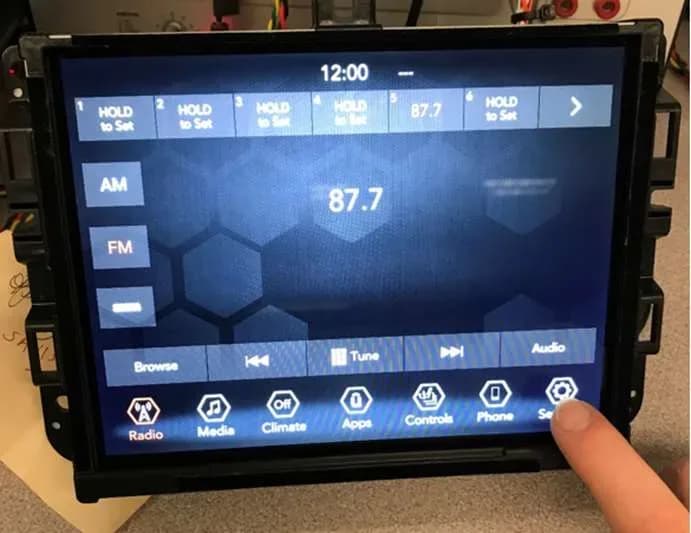
- Go to Settings: From your VP2R radio's main display, locate and select the "Settings" icon.
- Scroll Down: Within the "Settings" menu, scroll down through the available options.
- Select Phone/Bluetooth: Find and tap on the "Phone/Bluetooth" option.
- Select Do Not Disturb: Inside the "Phone/Bluetooth" menu, select "Do Not Disturb."
- Select Custom: Choose the "Custom" option from the "Do Not Disturb" settings.
- Customize Auto Reply Message: Proceed to the "Customize Auto Reply Message" section.
- Enter "EngMenu9Pdx": When presented with the option to type a message, accurately enter "EngMenu9Pdx". It is critical to type this exactly as shown, as it is case-sensitive. After typing, confirm your entry by hitting OK.
- View Engineering Menu: Successfully completing these steps will open the Engineering Menu. Here, you can view detailed radio part information, including the "FW/SW version" (e.g., "174002/00173800/00173800") and the CPU identification (e.g., "CPU_J6ECO 4.0 (BOARD_PV)"). This provides the specific software level of your VP2R radio.
Important Note for Owners
Stellantis communication S1908000050 Rev. A explicitly states that this document does not authorize warranty repairs. It serves as a record of past experiences and does not provide conclusions about vehicle issues. The communication emphasizes that technicians are responsible for determining the appropriate course of action based on their expertise. Owners should understand that this procedure is for informational purposes and does not guarantee a warranty claim for any related issues.
NHTSA ID: 11000992
Galerie
7 Bilder
Frequently Asked Questions
- What is the purpose of Stellantis communication S1908000050 Rev. A?
- This communication provides step-by-step instructions for accessing a hidden Engineering menu on VP2R radios to check the current software version level. It's an informational guide for technicians and owners.
- Which vehicles are affected by this procedure for checking VP2R radio software?
- This procedure applies to various 2021-2024 Jeep, Ram, and Dodge models equipped with a VP2R radio, including the 2021 Jeep Compass VP2R radio software.
- What specific text do I need to enter to access the Engineering menu?
- To access the Engineering menu, you must type "EngMenu9Pdx" exactly as shown (case-sensitive) into the "Customize Auto Reply Message" section of your radio's settings.
- Does this communication authorize warranty repairs for radio issues?
- No, Stellantis communication S1908000050 Rev. A explicitly states that it does not authorize warranty repairs. It is an informational document for diagnostic purposes.
What Jeep Compass owners report
Counted from the records in our database across 20 model years.
- 4,014
- Owner complaints
- 29
- Recalls
- 1,555
- Service bulletins
- 157
- Crashes reported
- 54
- Fires reported
- 118
- Injuries reported
The 2021 model year
81 complaints, the 13th most of 20 model years on file. Owners reported 5 crashes, 2 fires and 0 injuries for this year.
Electrical System, the system this article covers, accounts for 1,105 of 4,014 complaints (28%), including 34 for 2021.
Complaints by model year
| 2007 | 435 | |
|---|---|---|
| 2011 | 188 | |
| 2012 | 184 | |
| 2014 | 308 | |
| 2016 | 293 | |
| 2017 | 229 | |
| 2018 | 948 | |
| 2019 | 331 | |
| 2021 | 81 | |
| 2022 | 226 |
Most-reported systems
- Engine — 1,268
- Electrical System — 1,105
- Power Train — 552
- Suspension — 363
- Fuel/Propulsion System — 315
Recent owner reports about electrical system
The contact owns a 2021 Jeep Compass. The contact stated that while driving 75 MPH, the vehicle unexpectedly stalled in the middle of the highway. The vehicle lost power, but was able to be restarted, and the vehicle drove in LIMP Mode to the dealer.
Read owner complaints →To Whom It May Concern: I am writing to formally submit a complaint regarding my 2021 Jeep Compass, particularly concerning recurring mechanical, electrical, and safety-related problems that have created serious concerns about the vehicle's reliability and…
Complaints are owner reports filed with NHTSA. They are unverified, and counts depend on how many vehicles were sold, so they are not a failure rate.
Related Articles
2021-2023 Jeep Compass Radio Display Red Stripes TSB
This Technical Service Bulletin (TSB) 08-078-26 addresses a customer concern of 'Red stripes on the radio display' in 2021-2023 Jeep Compass vehicles equipped with Uconnect 5 systems. The issue is resolved by updating the radio software to version R62.00.23 via USB.
2021-2026 Jeep Handsfree Kick Feature Not Working TSB
Owners of 2021-2026 Jeep Compass, Grand Cherokee, Wagoneer, and Chrysler Pacifica vehicles may experience issues with the handsfree kick feature for their power liftgate or sliding door. This TSB, S2623000007, outlines diagnostic steps for intermittent operation.
2021-2026 Jeep Taillamp Condensation Clearing TSB
Jeep has released Technical Service Bulletin (TSB) 08-075-26 for 2021-2026 Compass, Grand Cherokee, and Wagoneer models experiencing taillamp condensation. This bulletin outlines a procedure to clear fogging and determine if replacement is needed.
2020-2025 Jeep Compass Alternator Pulley Failure TSB
This Technical Service Bulletin (TSB) 08-387-25, issued December 2, 2025, addresses alternator decoupler pulley failure in certain 2020-2025 Jeep Compass and Meridian models, which can lead to the battery not charging, no-start conditions, and dashboard warning lights. This TSB is specifically for…
2021-2024 Jeep Compass Alternator Pulley Cap Failure TSB
This Technical Service Bulletin (TSB) 08-217-25 REV. A addresses alternator pulley cap failure in 2021-2024 Jeep Compass models, causing symptoms like 'Service Battery' and engine noise. Note: This service action has been canceled, and owners should refer to CSN 70C for details.
Leave a comment
Comments are moderated and may take a moment to appear. Only your first name and the initial of your last name are shown publicly.
Comments
Be the first to comment.