2025 Hyundai Tucson DCU Software Logic Error TSB
Hyundai has issued Service Action TSB HCE25-92-E770-NX4 for the 2025 Tucson to correct a Data Connectivity Unit (DCU) software logic error. This bulletin outlines an Over-The-Air (OTA) software enhancement to resolve the issue.
 David Chen2025 Hyundai Tucson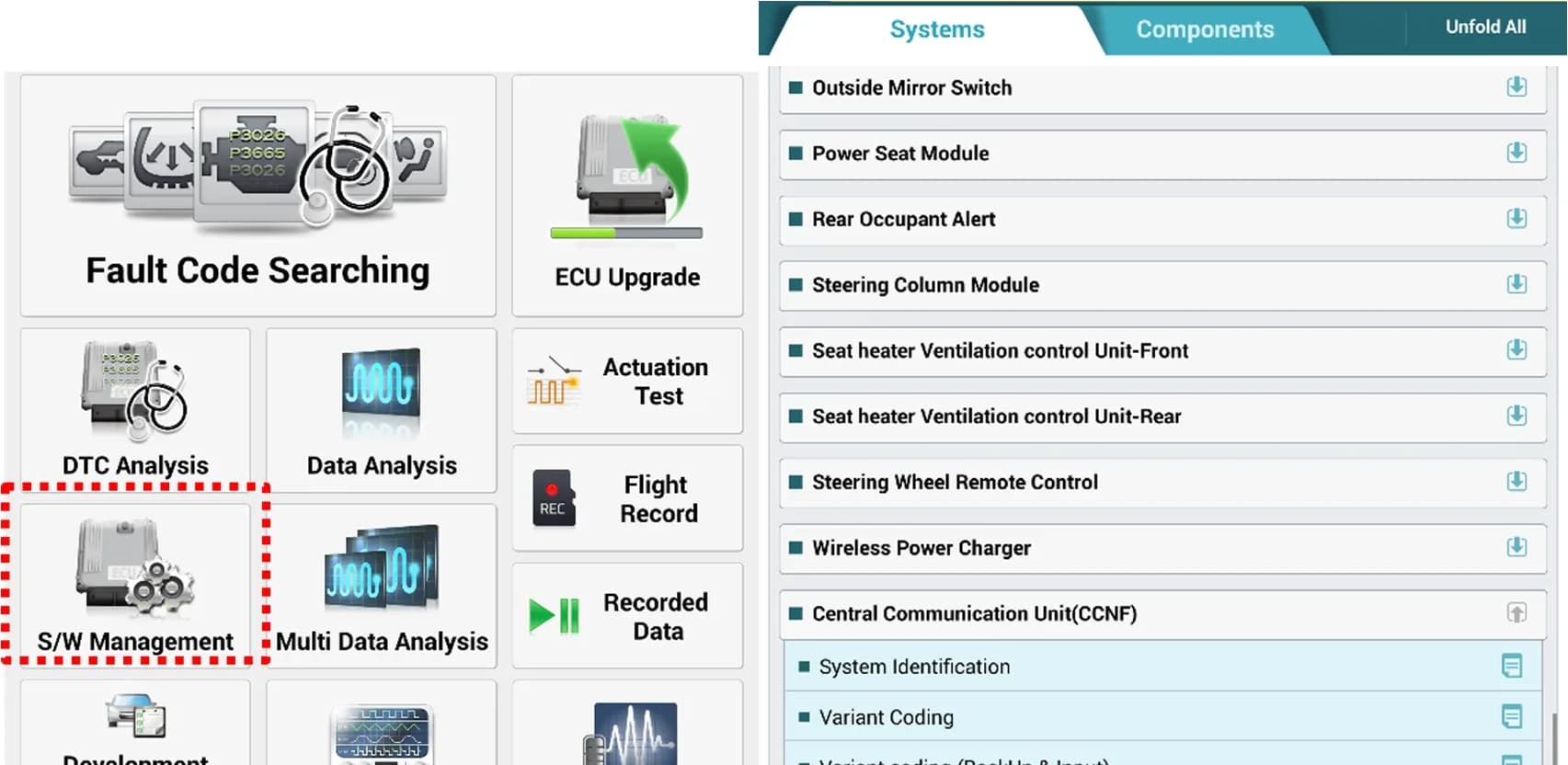
Hyundai has released Service Action TSB HCE25-92-E770-NX4 OB PE/NX4 PE/NX4 PE HEV/NX4 PHEV/NX4a PE/NX4m PENX4, published on September 5, 2025, to address a software issue affecting the Data Connectivity Unit (DCU) in certain 2025 Hyundai Tucson models. This bulletin provides instructions for a software enhancement delivered via an Over-The-Air (OTA) update to improve the DCU's logic.
This service action is crucial for owners of affected vehicles to ensure proper functionality of the DCU. The Hyundai Tucson DCU upgrade aims to correct an internal software flaw that could impact the vehicle's electrical system.
Symptoms
The primary symptom addressed by this service action is a "SW operation logic error (DCU internal timer initialization logic not implemented)". This indicates an internal software flaw within the Data Connectivity Unit that could lead to unexpected behavior or malfunctions related to the DCU's operations.
Important Warnings
Owners and technicians should be aware of several critical advisories related to this software update:
- Battery Condition: A fully charged 12V auxiliary battery is required before starting the update. If the vehicle has been stored for an extended period, run the engine to ensure an adequate battery charge state.
- Accessory Use: Turn off all lamps and accessories, including the headlamp switch (if in auto mode), heater, A/C, blower, radio, seat warmer, and defroster, to prevent battery discharge during the upgrade process.
- Ignition Position: The upgrade must be performed with the ignition switch in the ON position.
- Disconnection Risk: Do not disconnect any cables connected to the vehicle or the scan tool during the upgrade.
- Engine Operation: Do not start the engine or turn off the ignition switch during the upgrade procedure.
- System Interaction: While performing the upgrade, do not touch any system buttons (such as 'BACK', 'HOME', etc.).
- OTA Update Failure: If the automatic OTA initialization fails after the upgrade, it must be performed manually.
- Manual Upgrade Conditions: The manual upgrade procedure should only be performed if the automatic upgrade fails. If an automatic upgrade fails, turn the ignition key off for approximately 10 seconds, then back to the ON position to reset the control unit before attempting a manual upgrade.
- OP Code Usage: The OP code for this TSB is exclusively for situations where the OTA update fails and requires updating via GDS (Global Diagnostic System).
Diagnosis / Trigger Conditions
To determine if a vehicle is affected and requires this Hyundai Tucson DCU upgrade, technicians must check the version of the vehicle's control unit ROM ID. This is done by referencing the ROM ID Information Table provided in the bulletin before attempting any software upgrade. It is also advised to remember the current ROM ID before the upgrade, in case a manual ECU upgrade becomes necessary.
Repair Procedure Summary
The repair involves a software enhancement to the DCU, primarily delivered via an Over-The-Air (OTA) update. If the OTA update fails, a manual upgrade procedure using specialized diagnostic tools is required.
Automatic Upgrade Procedure (GDS-Mobile / GDS Smart):
- Connect the GDS-M diagnostic tool to the vehicle.
- Select 'S/W Management' and then 'Central Communication Unit (CCNF)' followed by 'OTA Initialization'.
- Follow the on-screen instructions to initiate the upgrade.
- The GDS-Mobile will read the current ROM ID and identify the newest upgrade event.
- Select the appropriate upgrade event, such as "1296.NX4 OB PE/NX4 PE/NX4 PE HEV/NX4a PE/NX4m PE DCU LOGIC IMPROVEMENT (CA)" or "1297.NX4 OB PE/NX4 PE/NX4 PE HEV/NX4a PE/NX4m PE DCU LOGIC IMPROVEMENT (NA)".
- The system will check the battery voltage, ensuring it is at least 12 volts. If the voltage is low, the engine should be run to charge the battery.
- The upgrade process will proceed in two stages (1/2 and 2/2), with progress displayed on a bar graph.
- After the upgrade is complete, turn the ignition key off for 30 seconds, then back to ON, and confirm on-screen.
- Perform the OTA initialization process. If it fails, remove and reconnect the power connector or battery (-) terminal from the indoor fuse box for at least 5 seconds.
- Conduct a self-diagnosis to check for and clear any incidental Diagnostic Trouble Codes (DTCs that may have been created during the upgrade.
- Start the engine to confirm proper vehicle operation.
Manual Upgrade Procedure (GDS-Mobile / GDS Smart):
This procedure is only for use if the automatic upgrade fails.
- Within the upgrade screen, select 'Manual Mode' and then choose the upgrade event.
- Select the control unit part number, such as 96510-N9130, by referencing the ROM ID Information Table.
- Enter the corresponding password (e.g., 0319 for P/No 96510-N9130 or 2419 for P/No 96510-N9140).
- Confirm battery voltage is sufficient (at least 12 volts).
- Proceed with the upgrade, monitoring the progress.
- Follow the same post-upgrade steps as the automatic procedure, including OTA initialization, checking for DTCs, and confirming vehicle operation.
Required Tools or Parts
To perform this Hyundai Tucson DCU upgrade, specific tools and software versions are necessary:
- Diagnostic Tool: GDS-M/Smart (Global Diagnostic System Mobile/Smart)
- Interface Module: ECI (Ethernet Communication Interface) module
- Vehicle Communication Interface: VCI-II DLC cable
- DCU Part Number: 96510-N9130 (and potentially 96510-N9140 for certain manual upgrade scenarios)
- New ROM ID: 120.CA.012054.012054 (supersedes older ROM IDs like 120.CA.011509.011509, 120.CA.011606.011606, 120.CA.011646.011646, 120.CA.011951.011951)
Owner Action
If you own a 2025 Hyundai Tucson and suspect your vehicle may be affected by the "SW operation logic error (DCU internal timer initialization logic not implemented)", it is recommended to contact your authorized Hyundai dealership. They can verify if your vehicle requires the Hyundai Tucson DCU upgrade and perform the necessary software enhancement. This is a service action, and typically such updates are performed at no cost to the owner under warranty.
Source: NHTSA ID: 11023100
Gallery
11 images
Frequently Asked Questions
- What is the purpose of the Hyundai TSB HCE25-92-E770-NX4?
- The TSB HCE25-92-E770-NX4 addresses a software logic error within the Data Connectivity Unit (DCU) of certain 2025 Hyundai Tucson vehicles. It provides instructions for a software enhancement, typically delivered via an Over-The-Air (OTA) update, to correct the "SW operation logic error (DCU internal timer initialization logic not implemented)".
- How will I know if my 2025 Hyundai Tucson needs this DCU upgrade?
- Your Hyundai dealership can determine if your 2025 Hyundai Tucson requires the DCU upgrade by checking the current ROM ID version of your vehicle's control unit. This service action is part of a proactive measure to enhance vehicle performance and reliability.
- Can I perform the Hyundai Tucson DCU upgrade myself?
- No, the `Hyundai Tucson DCU upgrade` requires specialized diagnostic tools like the GDS-M/Smart and an Ethernet Communication Interface (ECI) module, along with specific procedures. It is recommended that this service action be performed by a trained technician at an authorized Hyundai dealership.
- What happens if the OTA update fails for my DCU?
- If the Over-The-Air (OTA) update for the DCU fails, the service bulletin outlines a manual upgrade procedure that technicians can follow using the GDS-M/Smart tool. This ensures that the necessary software enhancement is still applied to your vehicle's Data Connectivity Unit.
Related Articles
Should 2025 Hyundai Tucson Owners Worry? Recall & TSB Roundup
The 2025 Hyundai Tucson has faced 4 recalls, addressing critical issues like potential engine damage and roll-away risks. Owners should also be aware of 20 service bulletins, many related to software updates for telematics and infotainment systems.
2024-2025 Hyundai Sonata, Tucson DTC P2B59F0 TSB
Hyundai Technical Service Bulletin 26-EM-009H addresses a warning lamp and Diagnostic Trouble Code (DTC) P2B59F0 in 2024-2025 Sonata and Tucson models. This issue, related to the Integrated Thermal Management Module, requires an Engine Control Module (ECM) software update.
2021-2026 Hyundai Front View Camera Warning and Calibration
Hyundai Technical Service Bulletin (TSB) 26-AD-001H details issues with the front view camera in 2021-2026 Hyundai models, leading to warning lights and diagnostic trouble code C272246. This TSB outlines diagnosis and repair procedures for calibration problems.
2025 Hyundai Tucson Inoperative Horn TSB 26-BE-002H
Hyundai has issued Technical Service Bulletin (TSB) 26-BE-002H for 2025 Hyundai Tucson models experiencing an inoperative horn. This TSB outlines a procedure to replace both high and low-pitch horn assemblies due to internal oxidation, ensuring proper vehicle safety.
2025-2026 Hyundai Tucson DCU Software Update TDFC
Hyundai has re-launched Service Campaign TDFC for 2025-2026 Tucson (NX4A) vehicles to correct a Data Communication Unit (DCU) software error. This issue can cause telematics services to shut down after one year. The fix involves a software update, available via OTA for Bluelink subscribers or at a…
Leave a comment
Comments are moderated and may take a moment to appear. Only your first name and the initial of your last name are shown publicly.
Comments
Be the first to comment.