2022-2023 Hyundai Display Audio Software Update
Hyundai has released Service Campaign 24-01-045H-1 to provide a software update for Display Audio 2.0V and AVN 5th Gen Wide systems in various 2022-2023 models. This update ensures proper functionality of the infotainment system.
 Marcus Weber2022 Hyundai Tucson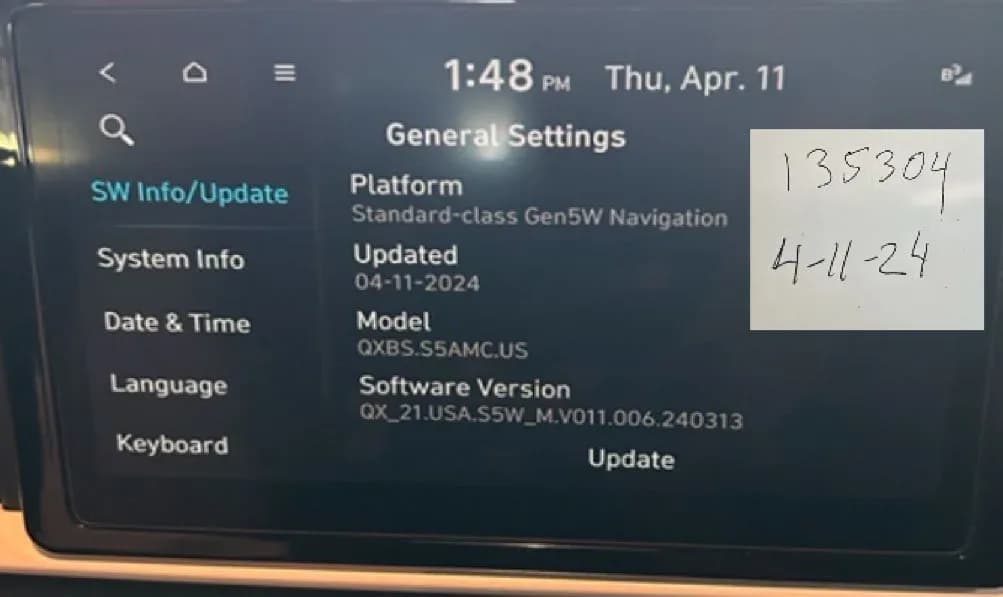
Also applies to
- Hyundai Elantra
- 2022–2023
- Hyundai Elantra N
- 2022
- Hyundai Kona
- 2022–2023
- Hyundai Kona N
- 2022–2023
- Hyundai Palisade
- 2022
- Hyundai Santa Cruz
- 2022–2023
- Hyundai Santa Fe
- 2022–2023
- Hyundai Sonata
- 2022–2023
- Hyundai Tucson
- 2023
- Hyundai Veloster N
- 2022
- Hyundai Venue
- 2022
▸ Show 5 more▾ Show fewer
Hyundai has issued Service Campaign 24-01-045H-1, a crucial software update for vehicles equipped with either the Display Audio 2.0V or AVN 5th Gen Wide infotainment systems. This campaign supersedes bulletin 24-01-045H and was released in August 2024 to refine previous instructions and include additional models like the Kona N (OS N), update causal parts for the Elantra N (CN7 N), and clarify part distribution to dealers.
This Hyundai Display Audio software update is designed to improve the functionality and performance of the vehicle's audio and navigation systems. It is a proactive measure to ensure all affected vehicles operate with the latest software.
Important Dealer Information
Hyundai mandates that dealers perform this service campaign on all affected vehicles prior to customer retail delivery. Additionally, the update must be applied whenever an affected vehicle is in the shop for any maintenance or repair. Dealers can identify open campaigns by accessing the “Vehicle Information” screen via WebDCS.
What's Being Addressed
This service campaign, identified as 24-01-045H-1, provides a software update for two primary infotainment systems: the Display Audio 2.0V and the AVN 5th Gen Wide. The update is delivered via a specialized USB memory stick, with different types (VDS1TYPE, VDS2TYPE, VDS3TYPE, VDS6TYPE) distributed to dealers based on the specific head unit and vehicle model. Each dealer received one of each USB drive type for the campaign's start.
Warranty Information
Warranty claims for this service campaign should be submitted on the Claim Entry Screen as a “Campaign” type. The labor operation code for Display Audio Software Update is 40D059R0, 40D059R2, or 40D059R3 depending on the model, while for AVN Software Update, it is 40D059R1, 40D059R4, or 40D059R5. The operation time is 0.3 man-hours for both. The Nature Code is M45 and the Cause Code is ZZ3. Causal part numbers vary by model and system, including but not limited to 96160-AA230LS5, 96160-G2GA0MGS, 96160-J9630NVC, 96560-AA080NNB, and 96560-K9700MPP.
If a part requires replacement during this campaign and is still under warranty, a separate claim should be submitted. If the part is out of warranty, a Prior Approval request for goodwill consideration is required before performing the work. Operation times include VIN, mileage, and photo capture of the “SW Info/Update” screen as per the Digital Documentation Policy.
Service Procedure Summary
This campaign involves a software update procedure for two different audio systems: Display Audio 2.0V and AVN 5th Gen Wide. Both procedures are similar and require the use of a specific S/W UPDATE USB MEMORY STICK. Repair validation photos are required as per the Warranty Digital Documentation Policy.
For Display Audio 2.0V Systems:
- Turn the ignition switch to the ON position.
- Press the "Setup" button on the infotainment screen to enter the Setup menu.
- Press the "General" button.
- Insert the appropriate USB flash drive (e.g., VDS1TYPE, VDS2TYPE, VDS3TYPE) into the vehicle's USB slot.
- Press the "Update" button at the bottom of the screen to begin the software update.
- On the pop-up asking "Update to the next version now?", select "Yes".
- The update process will take approximately 15 minutes. The screen may display the Hyundai logo multiple times or go black, which is normal.
- Once completed, confirm the "Software Version" on the "SW Info/Update" screen has been correctly updated. Specific updated software versions include D2V.003.200.240318 for VDS1TYPE and VDS2TYPE, and D2V.003.200.230302 for VDS3TYPE.
- Take a photo of the “SW Info/Update” screen, ensuring the updated S/W version, the last 6 digits of the VIN, and the date of repair (written on a piece of paper placed in the top right-hand corner) are visible. Upload this photo to STUI.
- Turn the engine/power ON and, if applicable, navigate through the steering wheel's Menu mode button and instrument cluster menus to change the "Warning Volume" to "Low" under "Driver Assistance > Warning Volume".
- Remove the USB flash drive.
For AVN 5th Gen Wide Systems:
- Turn the ignition switch to the ON position.
- Press the "Setup" button on the infotainment screen to enter the Setup menu.
- Press the "General" button.
- Insert the appropriate USB flash drive (e.g., VDS1TYPE, VDS2TYPE, VDS6TYPE) into the vehicle's USB slot.
- Press the "Update" button at the bottom of the screen to begin the software update.
- On the pop-up asking "Start the Audio System Update?", select "OK".
- On the next screen, select "Start" to proceed. The total update time is approximately 25 minutes.
- The update will continue even if the vehicle is turned off. During the update, all features, including the rear camera and audio, will be restricted. The screen may display the Hyundai logo multiple times or go black, which is normal.
- Once completed, confirm the "Software Version" on the "SW Info/Update" screen has been correctly updated. The last 6 digits of the updated software version for all models should be "240313".
- Take a photo of the “SW Info/Update” screen, ensuring the updated S/W version, the last 6 digits of the VIN, and the date of repair (written on a piece of paper placed in the top right-hand corner) are visible. Upload this photo to STUI.
- Turn the engine/power ON and, if applicable, navigate through the Settings menu to change the "Warning Volume" to "Low" under "Driver Assistance > Warning Volume".
- Remove the USB flash drive, and the service procedure is complete.
Important Warnings
- Battery Charge: Ensure the 12-volt battery is sufficiently charged and power is ON to prevent battery drain during the update process.
- Do NOT Interrupt: "Do NOT remove the USB flash drive or turn power OFF during the update. This may cause data loss or system failure."
- Genuine Equipment: Before performing the update, verify that the AVN system is genuine Hyundai equipment.
NHTSA ID: 10257321
Gallery
16 images
Frequently Asked Questions
- What is the purpose of Hyundai Service Campaign 24-01-045H-1?
- Hyundai Service Campaign 24-01-045H-1 provides a software update for the Display Audio 2.0V and AVN 5th Gen Wide infotainment systems in affected 2022-2023 Hyundai vehicles to ensure optimal performance and functionality.
- Which Hyundai models are affected by this software update?
- This update applies to various 2022-2023 Hyundai models, including the Elantra, IONIQ Hybrid/Plug-in, Kona, Palisade, Santa Cruz, Santa Fe, Sonata, Tucson, Veloster N, and Venue, equipped with the specified infotainment systems.
- What should I do if my vehicle is affected by this campaign?
- You should take your vehicle to an authorized Hyundai dealership. The software update is performed using a specialized USB memory stick (e.g., VDS1TYPE, VDS2TYPE, VDS3TYPE, VDS6TYPE) and is typically completed during routine maintenance or pre-delivery inspections.
- Are there any warnings during the update process?
- Yes, it is critical that the USB flash drive is NOT removed and power is NOT turned OFF during the update, as this could lead to data loss or system failure. The process may take up to 25 minutes, and the screen may go black or show the Hyundai logo multiple times, which is normal.
- Will this update affect my vehicle's warning volume settings?
- After the software update, technicians are instructed to adjust the "Warning Volume" setting to "Low" through the "Driver Assistance > Warning Volume" menu in the vehicle's settings, if applicable.
Related Articles
2021-2024 Hyundai Santa Fe / Tucson DTC U028700 EOP
Hyundai has issued Technical Service Bulletin (TSB) 26-AT-002H for certain 2021-2024 Santa Fe and Tucson vehicles. This TSB addresses diagnostic trouble code U028700, indicating a "Lost Communication With Trans Fluid Pump Module," which can cause the Idle Stop & Go (ISG) system to become…
2022 Hyundai Tucson Inoperable Horn Warranty Extension
Hyundai has issued a warranty extension for certain 2022 Tucson (NX4A) vehicles experiencing an inoperable horn. This issue, detailed in TSB 26-BE-004H, is caused by foreign substances oxidizing internal horn parts. Coverage is extended to 10 years/120,000 miles.
2022 Hyundai Tucson Inoperative Horn TSB 26-BE-004H
Hyundai has issued Technical Service Bulletin 26-BE-004H for certain 2022 Tucson (NX4A) vehicles experiencing an inoperative horn. This TSB extends warranty coverage to 10 years/120,000 miles for horn replacement due to internal oxidation from foreign substances.
2021-2022 Hyundai Anti-Theft Ignition Cylinder Protector TSB
Hyundai has issued Technical Service Bulletin 25-01-089H (Customer Satisfaction Campaign P33) to address vehicle theft concerns by installing an anti-theft ignition cylinder protector and anti-theft decals on various 2021-2022 models.
2021-2022 Hyundai Anti-Theft Ignition Cylinder Protector Campaign P33
Hyundai has launched Customer Satisfaction Campaign P33 for 2021-2022 models, offering a free anti-theft ignition cylinder protector and decals. This hardware upgrade, detailed in TSB 25-01-089H, is available upon customer request to counter social media theft methods.
Leave a comment
Comments are moderated and may take a moment to appear. Only your first name and the initial of your last name are shown publicly.
Comments
Be the first to comment.