2022 Hyundai Tucson Lane Keep Assist Software Update
A software update is available for 2022 Hyundai Tucson, Tucson Hybrid, and Tucson Plug-in Hybrid vehicles to address issues with the Lane Keep Assist (LKA) system. This update, identified as TSB 22-01-021H, aims to reduce the sensitivity of LKA warnings and improve lane recognition, especially…
 David Chen2022 Hyundai Tucson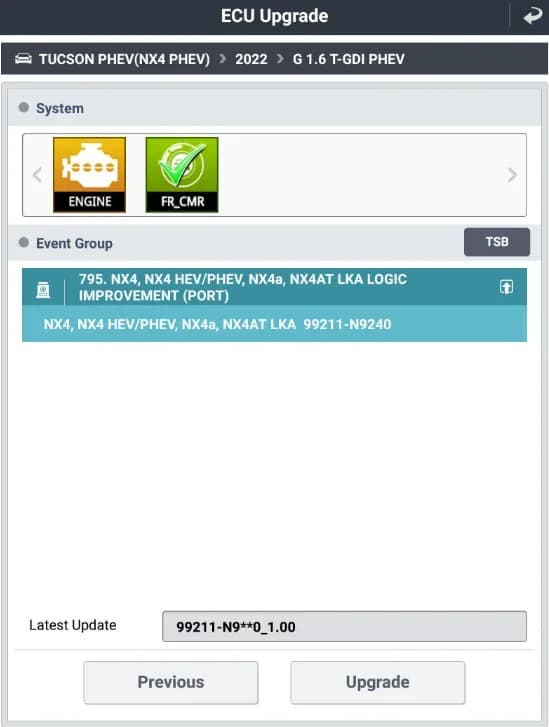
Hyundai has released a software update, identified as Service Campaign T7X and TSB 22-01-021H, to address concerns with the Lane Keep Assist (LKA) system in certain 2022 Hyundai Tucson models. This update aims to improve the functionality of the Hyundai Tucson Lane Keep Assist system by reducing the sensitivity of its warnings and enhancing its ability to recognize lanes, particularly when the vehicle is entering an interstate.
This bulletin, 22-01-021H, provides crucial information for technicians to perform the necessary software revision. The update specifically targets the logic of the LKA system to prevent instances of "misrecognition of missing lanes" and overly sensitive warnings.
Important Warnings
This service campaign is designated as "Dealer Stock ONLY." This means that dealers are required to perform this software update on all affected vehicles before they are delivered to customers for retail sale. Owners will not receive a notification letter for this update, as it is intended for vehicles in dealer inventory.
Symptoms
Owners of affected 2022 Hyundai Tucson vehicles may notice the Hyundai Tucson Lane Keep Assist system exhibiting:
- Overly sensitive warnings from the LKA system.
- Instances of "misrecognition of missing lanes," especially when driving onto an interstate or similar road conditions.
Diagnosis / Trigger Conditions
To determine if a vehicle requires this update, technicians must check the current software version (ROM ID) of the Lane Keep Assist control unit. This involves accessing the vehicle's "Vehicle Information" screen via WEBDCS and comparing the installed ROM ID to the information provided in the TSB's ROM ID Information Table. The update applies to vehicles with older ROM IDs, such as 99211-N9000 (version 1.03), 99211-N9100 (version 1.00/1.01), 99211-N9200 (version 1.00/1.01), 99211-N9210 (version 1.00), and 99211-N9220 (version 1.00). The target new ROM ID is 99211-N9240 (version 1.00).
If any diagnostic test performed during the update process shows "Failed," technicians are instructed to check for and erase any Diagnostic Trouble Codes (DTCs) in all modules, cycle the ignition and GDS, and attempt a Capacitive Discharge before re-attempting the test.
Repair Procedure Summary
The repair involves updating the Lane Keep Assist (LKA) software using the GDS-Mobile system. The procedure, outlined in TSB 22-01-021H, includes several critical steps and cautions:
- Preparation: Ensure the vehicle's battery is above 12 volts. If the vehicle has been stored, run the engine to ensure adequate battery charge. Turn off all lamps and accessories (heater, A/C, radio, etc.) to prevent battery discharge during the update. The ignition switch must be in the ON position, and the engine must not be started during the upgrade.
- GDS-Mobile Connection: Connect the VCI-II interface to the vehicle's DLC connector. Ensure the Tablet PC used for GDS-Mobile is fully charged.
- Software Update: Access the ECU Upgrade function on GDS-Mobile. Technicians can choose between automatic or manual upgrade modes. For automatic mode, select "FR_CMR" from the system menu and then choose the event "795.NX4, NX4 HEV/PHEV, NX4A, NX4AT LKA LOGIC IMPROVEMENT" to initiate the update. The system will check the battery voltage; it must be at least 12 volts.
- Upgrade Process: The software upgrade proceeds in two stages (1/2 and 2/2). Technicians must not disconnect any cables or touch system buttons during this process. Once the upgrade reaches 100%, the ignition key must be turned OFF for 10 seconds, then back ON.
- Post-Update: After the upgrade is complete, check for and clear any incidental Diagnostic Trouble Codes (DTCs) that may have been generated. Finally, start the engine to confirm proper vehicle operation.
Required Tools or Parts
Technicians will require specific equipment to perform this software update:
- GDS-Mobile System: This includes the Tablet PC and the VCI-II interface.
- Causal Parts: The warranty information references causal parts 99211-N9200 and 99211-N9100, although the primary action is a software upgrade.
Owner Action
If you own a 2022 Hyundai Tucson, Tucson Hybrid, or Tucson Plug-in Hybrid and experience issues with your Hyundai Tucson Lane Keep Assist system, such as overly sensitive warnings or lane misrecognition, you should contact your authorized Hyundai dealership. While this particular service campaign is primarily for dealer stock, your dealership can check if your vehicle's LKA software requires this update and perform the necessary service. The operation time for this LKA upgrade is estimated at 0.4 hours.
Source: NHTSA ID: 10208861
Gallery
16 images
Frequently Asked Questions
- What is TSB 22-01-021H about?
- TSB 22-01-021H is a Hyundai Technical Service Bulletin that provides a software update for the Lane Keep Assist (LKA) system in certain 2022 Hyundai Tucson models. The update aims to reduce the sensitivity of LKA warnings and improve the system's ability to recognize lanes, especially when entering interstates.
- Which Hyundai Tucson models are affected by this LKA update?
- This software update applies to certain 2022 model year Hyundai Tucson (NX4), Tucson (NX4A), Tucson Hybrid (NX4 HEV), and Tucson Plug-in (NX4 PHEV) vehicles.
- Will I receive a recall notice for this Lane Keep Assist issue?
- No, this is a 'Dealer Stock ONLY' service campaign (T7X). Hyundai is not notifying consumers directly. Dealers are required to perform this update on affected vehicles before customer retail delivery. If you own an affected vehicle, you should contact your Hyundai dealership to inquire about the update.
- What are the benefits of the Lane Keep Assist software update?
- The software update improves the **Hyundai Tucson Lane Keep Assist** system by revising its logic. This results in less sensitive LKA warnings and better recognition of lane markings, which can enhance the driving experience and reduce instances of 'misrecognition of missing lanes'.
- How long does the LKA software update take?
- The estimated operation time for the Lane Keep Assist software upgrade is 0.4 hours, as indicated in the warranty information of TSB 22-01-021H.
Related Articles
2021-2024 Hyundai Santa Fe / Tucson DTC U028700 EOP
Hyundai has issued Technical Service Bulletin (TSB) 26-AT-002H for certain 2021-2024 Santa Fe and Tucson vehicles. This TSB addresses diagnostic trouble code U028700, indicating a "Lost Communication With Trans Fluid Pump Module," which can cause the Idle Stop & Go (ISG) system to become…
2022 Hyundai Tucson Inoperable Horn Warranty Extension
Hyundai has issued a warranty extension for certain 2022 Tucson (NX4A) vehicles experiencing an inoperable horn. This issue, detailed in TSB 26-BE-004H, is caused by foreign substances oxidizing internal horn parts. Coverage is extended to 10 years/120,000 miles.
2022 Hyundai Tucson Inoperative Horn TSB 26-BE-004H
Hyundai has issued Technical Service Bulletin 26-BE-004H for certain 2022 Tucson (NX4A) vehicles experiencing an inoperative horn. This TSB extends warranty coverage to 10 years/120,000 miles for horn replacement due to internal oxidation from foreign substances.
2021-2022 Hyundai Anti-Theft Ignition Cylinder Protector TSB
Hyundai has issued Technical Service Bulletin 25-01-089H (Customer Satisfaction Campaign P33) to address vehicle theft concerns by installing an anti-theft ignition cylinder protector and anti-theft decals on various 2021-2022 models.
2021-2022 Hyundai Anti-Theft Ignition Cylinder Protector Campaign P33
Hyundai has launched Customer Satisfaction Campaign P33 for 2021-2022 models, offering a free anti-theft ignition cylinder protector and decals. This hardware upgrade, detailed in TSB 25-01-089H, is available upon customer request to counter social media theft methods.
Leave a comment
Comments are moderated and may take a moment to appear. Only your first name and the initial of your last name are shown publicly.
Comments
Be the first to comment.