2023-2025 Honda CR-V Rear Camera Black and White Image TSB
Honda Service Bulletin 25-071 describes an issue where the rear camera in 2023-2025 Honda CR-V vehicles may intermittently display a black and white image when in reverse. A software update for the audio unit resolves this problem.
 Sarah Mitchell2024 Honda CR-V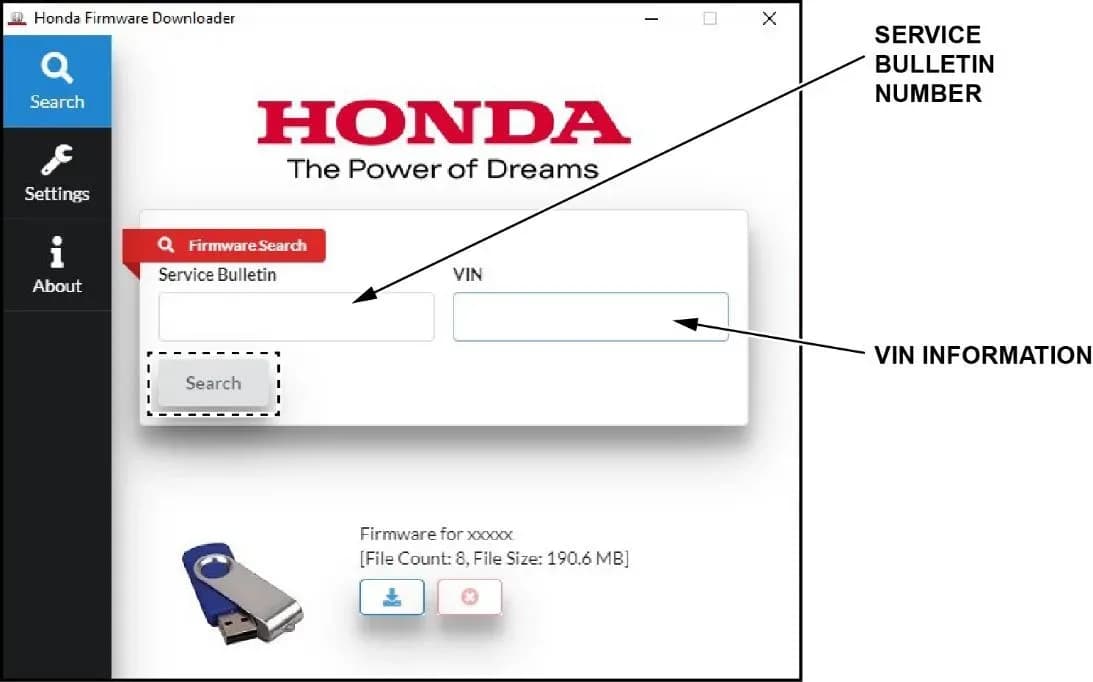
Também se aplica a
- Honda CR-V
- 2023, 2025
Owners of 2023-2025 Honda CR-V vehicles may experience an issue where the Honda CR-V rear camera black and white image appears when the vehicle is shifted into reverse. This condition can occur intermittently, with the display switching between color and black and white modes.
This problem is addressed by Honda Service Bulletin 25-071, which provides a software update for the vehicle's audio unit.
Symptoms
The primary symptom owners will notice is the rear camera display showing a "black and white image" when the vehicle is in reverse. This can happen sporadically, and the display may even switch back to color during the same reverse maneuver.
Possible Cause
The root cause of the Honda CR-V rear camera black and white display is an incorrect software threshold setting within the audio unit. When the color burst signal from the camera is low, this software threshold processes the image as black and white instead of color.
Important Warnings for Owners
Honda provides several critical warnings regarding the software update process:
- Loss of power during the update can cause irreparable damage to the audio unit. It is essential to maintain a stable power supply throughout the procedure.
- If a "TIMEOUT err" or "UNDEF err" message appears during the firmware download, the USB flash drive may be damaged or faulty. A new or different USB flash drive should be used.
- The audio unit software should only be updated if the software information displayed on the screen matches the information table provided in the bulletin.
- Updating with incorrect software will damage the audio unit and require its replacement.
- DO NOT disconnect the USB flash drive until the software update is complete.
- Honda explicitly states that the information in this bulletin is intended for use only by skilled technicians who have the proper tools, equipment, and training. These procedures should not be attempted by "do-it-yourselfers." Contact an authorized Honda automobile dealer to determine if this information applies to your vehicle.
Required Materials and Tools
To perform this software update, technicians will need a blank USB-A Flash Drive formatted to FAT32. Additionally, a power supply such as a Midtronics DCA-8000 Dynamic Diagnostics Charging System in "Reflash Mode" or an Associated Equipment Corporation ESS6100 100A Smart Charger in "Power Supply Mode | DIAG+" is required to maintain constant voltage during the update. The ESS6100 must be connected directly to the vehicle's 12-volt battery.
Warranty Claim Information
For authorized Honda dealers, the warranty claim details for this service are as follows:
| Operation Number | Description | Flat Rate Time | Defect Code | Symptom Code | Template ID | Failed Part Number |
|---|---|---|---|---|---|---|
| 0100A1 | Update the audio unit software | 0.3hr | 03265 | 03273 | A25071A | 8A100-3A0-A02 |
Software Update Procedure Summary
This procedure involves several key steps to resolve the Honda CR-V rear camera black and white issue, as detailed in Honda Service Bulletin 25-071:
- Preparation: Ensure no other devices are connected to the vehicle's USB ports. Connect a stable power supply to the vehicle's 12-volt battery and apply the parking brake to prevent headlights from activating. Push the "ENGINE START/STOP" button to ON without pressing the brake pedal.
- Enter Diagnostic Menu: With the audio unit OFF, simultaneously press and hold the "PHONE" and "CONNECT" buttons, then press the "VOL/AUDIO knob" five times to access the diagnostic menu. From there, navigate to "System" and then "Version" to check the current software versions. The target software versions are: Software Version 01.10.030, System Micom 01.01.187, Video Processor 01.01.058, and Media Processor 01.01.046.
- Download Firmware: Using a computer, open the Honda Firmware Downloader (version 1.8.0 or later). Input the vehicle's VIN (in CAPS) and the Service Bulletin Number 25-071. Download the required software update file, H1P2Z047.kwi, onto a blank, FAT32-formatted USB flash drive. The download process may take up to 15 minutes. If a "TIMEOUT err" or "UNDEF err" message appears, use a different USB drive.
- Update Audio Unit: Insert the USB flash drive into the vehicle's USB data port. With the audio unit OFF, re-enter the diagnostic menu by pressing and holding "PHONE" and "CONNECT" buttons, then pressing the "VOL/AUDIO knob" five times. Select "System" and then "Software Update." Confirm that the displayed software information matches the required versions. If they match, select "YES" to begin the update. The update process takes approximately 32 minutes, including a 16-minute software checking phase. Do not disconnect the USB flash drive during this time.
- Confirmation: After the update, the unit will automatically reboot to "Audio is OFF" mode. Re-enter the diagnostic menu and confirm that the software versions have been updated to the specified levels. Push the "VOL/AUDIO knob" to exit the diagnostic menu, turn the audio unit ON, and hold the "VOL/AUDIO knob" for more than 2 seconds to bypass anti-theft mode. Finally, remove the USB flash drive.
Owner Action
If your 2023-2025 Honda CR-V is experiencing a "black and white image" from the rear camera, it is recommended to contact an authorized Honda dealer. They can verify if your vehicle is affected by Honda Service Bulletin 25-071 and perform the necessary audio unit software update. This update is typically covered under warranty.
Source: NHTSA ID 10250672
Galeria
26 imagens
Frequently Asked Questions
- What is Honda Service Bulletin 25-071 about?
- Honda Service Bulletin 25-071 addresses an issue in 2023-2025 Honda CR-V vehicles where the rear camera may intermittently display a black and white image when the vehicle is in reverse. The bulletin outlines a software update for the audio unit to resolve this problem.
- Why is my Honda CR-V rear camera showing a black and white image?
- The black and white image on your Honda CR-V's rear camera is likely due to an incorrect software threshold setting in the audio unit. This setting can cause the system to process the camera's color signal as black and white, especially when the signal is weak.
- Can I perform the software update for the rear camera issue myself?
- Honda explicitly states that the information in Service Bulletin 25-071 is for skilled technicians with proper tools and training. Attempting the procedure yourself is not recommended, as loss of power or using incorrect software can cause irreparable damage to the audio unit. It's best to contact an authorized Honda dealer.
- What is the warranty claim information for this repair?
- The warranty claim information for this repair includes Operation Number 0100A1 for 'Update the audio unit software', with a flat rate time of 0.3 hours. The Defect Code is 03265, Symptom Code is 03273, and Template ID is A25071A. The Failed Part Number is 8A100-3A0-A02.
Related Articles
2024-2026 Honda Civic, CR-V, HR-V A/C Compressor Seizure
American Honda Motor Co., Inc. (AHM) is actively investigating A/C compressor seizure issues in specific 2024-2026 Honda Civic, CR-V, and HR-V vehicles. If your A/C is not blowing cold air and a technician finds a seized compressor, your vehicle may qualify for a special inspection.
2024-2026 Honda Civic, CR-V, HR-V A/C Compressor Seizure Investigation
American Honda Motor Co., Inc. (AHM) is actively searching for specific 2024-2026 Honda Civic, CR-V, and HR-V vehicles experiencing A/C compressor seizure. If your vehicle's A/C is "not blowing cold air" and the compressor is seized, Honda wants to inspect it before any repairs are made.
2022-2026 Honda Civic/CR-V/HR-V Front Wiper Motor Inop
American Honda Motor Co., Inc. (AHM) is investigating customer complaints regarding inoperative (inop) or misaligned front wiper motors in certain 2022-2026 Honda Civic, 2023-2026 Honda CR-V, and 2023-2026 Honda HR-V vehicles. AHM is requesting dealers to identify and report qualifying vehicles…
2023-2024 Honda CR-V Head Cover Oil Leak Investigation
American Honda Motor Co., Inc. (AHM) is actively searching for specific 2023-2024 FHEV Accord and CR-V vehicles experiencing an oil leak from the head cover gasket. This investigation aims to understand the root cause before any repairs are attempted.
2024-2026 Honda Civic, CR-V, HR-V A/C Compressor Seizure
Honda is actively collecting data on A/C compressor seizures in 2024-2026 Civic, CR-V, and HR-V vehicles experiencing a lack of cold air. This initiative, identified as 'A/C Compressor Seizure (ACTION REQUIRED)', aims to understand the root cause of the issue by examining specific parts.
Leave a comment
Comments are moderated and may take a moment to appear. Only your first name and the initial of your last name are shown publicly.
Comments
Be the first to comment.