2023-2024 BMW X1/X2 Active Safety MPH Display Issue
BMW has issued Service Information Bulletin (SIB) 65 06 24 to address an issue where the Active Safety menu in certain 2023 BMW X2 and 2024 BMW X1 vehicles incorrectly displays speeds as 0 miles per hour (MPH). This problem is caused by unfavorable software in the vehicle's headunit (HU-H6) apps…

Também se aplica a
- BMW X2
- 2023
Symptoms
Owners of certain BMW vehicles may notice that the speeds displayed in the Active Safety menu are incorrectly shown as "0 miles per hour (MPH)". This can be a confusing and potentially concerning issue for drivers relying on accurate information from their vehicle's safety systems. This specific symptom, where the BMW X1 Active Safety menu MPH display is incorrect, points to a software-related problem.
Cause
The root cause of this display anomaly is identified as unfavorable software within certain applications residing in the vehicle's headunit, specifically the HU-H6 unit. This software glitch prevents the correct speed data from being reflected in the Active Safety menu.
Important Warnings
BMW has indicated that this repair, identified by Service Information Bulletin (SIB) 65 06 24, is considered "MOBILE FRIENDLY." This means that for qualifying centers, the Service Action repair is eligible to be performed via Mobile Assistance, offering convenience to owners. It is also crucial that this update is completed before the first vehicle delivery to a customer or if the vehicle is already in the workshop or dealer inventory.
Repair Procedure
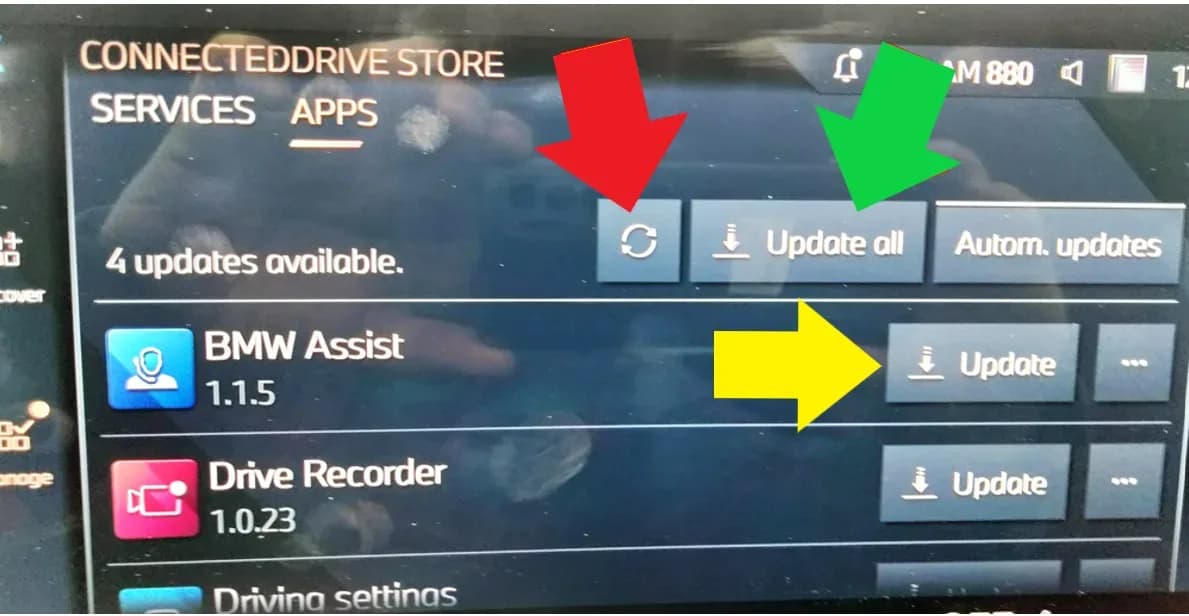
The fix for the incorrect BMW X1 Active Safety menu MPH display involves updating the vehicle applications through the ConnectedDrive Store app. This process is designed to be user-friendly and can be performed directly within the vehicle's infotainment system.
- Access the ConnectedDrive Store: From the App Home Screen, owners or technicians should select the "ConnectedDrive Store" app icon. This icon is typically found among other applications like Android Auto, Apple CarPlay, and BMW Maps, as depicted in the vehicle's display on page 2 of the bulletin.
- Navigate to Apps Management: Within the ConnectedDrive app, select the “Manage” tab and then choose the "Apps” menu to view all installed applications. This step is visually guided on page 2 of the bulletin.
- Initiate Updates: In the "Manage" tab, a list of all apps installed in the vehicle will be displayed. Any app with a newer version available will feature an “Update” button next to its entry. For convenience, an “Update All” button is also provided to update all available applications simultaneously. The bulletin clarifies that the two circular arrow buttons, used for updating provisioning and services, are not required for this specific procedure.
- Confirm Completion: Once the application updates are finished, the infotainment screen will display the message "All apps are up to date." This message, shown on page 4 of the bulletin, confirms that the procedure is complete, and the software issue causing the incorrect speed display in the Active Safety menu should be resolved.
Claim Information
This service action, SIB 65 06 24, is designated as repair code 0065680400, specifically for "U10 U11 Updating head unit apps." Reimbursement for this Service Action will be processed using the work package information provided. The special flat rate labor operation code for this action is 00 76 548, described as "Updating Apps in the ConnectedDrive Store," with a labor allowance of 1 FRU (Flat Rate Unit). When documenting the repair, technicians are instructed to reference only the SIB number and work package (e.g., "B65 06 24 WP 1") in their repair order notes and claim comments, unless otherwise mandated by state law.
Owner Action
Owners of affected vehicles should contact their authorized BMW dealer to have this service action performed. Given that the repair is "MOBILE FRIENDLY," some qualifying centers may offer the convenience of mobile assistance for this update. It is particularly important for vehicles in dealer inventory to have this update completed before their first delivery to a customer. This ensures that the BMW X1 Active Safety menu MPH display issue is resolved prior to the vehicle reaching its owner.
Source: NHTSA ID: 11000528
Galeria
4 imagens
What BMW X1 owners report
Counted from the records in our database across 14 model years.
- 853
- Owner complaints
- 27
- Recalls
- 556
- Service bulletins
- 40
- Crashes reported
- 17
- Fires reported
- 42
- Injuries reported
The 2024 model year
30 complaints, the 8th most of 14 model years on file. Owners reported 3 crashes, 0 fires and 1 injury for this year, which also has 3 recalls on file.
Electrical System, the system this article covers, accounts for 164 of 853 complaints (19%), including 2 for 2024.
Complaints by model year
| 2013 | 102 | |
|---|---|---|
| 2014 | 114 | |
| 2015 | 94 | |
| 2016 | 163 | |
| 2017 | 164 | |
| 2018 | 60 | |
| 2020 | 13 | |
| 2023 | 71 | |
| 2024 | 30 | |
| 2025 | 17 |
Most-reported systems
- Electrical System — 164
- Service Brakes — 136
- Air Bags — 128
- Power Train — 125
- Engine — 106
Latest recalls for the 2024 model year
- 26V422000 — Service Brakes, Hydraulic (Jul 2026)
- 24V697000 — Electronic Stability Control (Esc) (Sep 2024)
- 24V104000 — Service Brakes, Hydraulic (Feb 2024)
Recent owner reports about electrical system
Read owner complaints →The BMW 2024 X1 comes with the new iDrive9 that has eliminated most of the physical controls. Now there is a large touch screen that controls the radio, HVAC, Apple Car Play, cruise control, head lights, heated seats, etc.
Complaints are owner reports filed with NHTSA. They are unverified, and counts depend on how many vehicles were sold, so they are not a failure rate.
Related Articles
2023-2024 BMW X1/X2 Rear Axle Wheel Bearing Noise & Faults
BMW has issued Service Information Bulletin SIB 33 01 26 for 2023-2024 X1 and X2 models concerning rear axle wheel bearing noise and associated Dynamic Stability Control fault codes. This bulletin details symptoms, causes, and the repair procedure.
2024 BMW X1/X2 FC 034AEF Exhaust Cold Start Not Controllable
This BMW Service Information Bulletin (SIB 12 03 24) details a fix for the "Engine Malfunction Warning" and fault code FC 034AEF (Exhaust Cold Start, Not Controllable) affecting 2024 BMW X1 and X2 models. The issue is resolved via a DME software update using ISTA.
2024-2026 BMW X1/X2 DKG Transmission Oil Service TSB
BMW Service Information Bulletin SIB 28 01 25 addresses the 'Transmission oil service required' message (ID 2120) and subsequent 'Transmission fault!' (ID 368) in 2024-2026 BMW X1 and X2 models equipped with a Double Clutch Transmission (DKG). This bulletin outlines the conditions that trigger the…
2024-2026 BMW X1/X2 Power Windows & Mirrors Not Functioning
BMW SIB 61 15 25 identifies a software error in the TSG control module that can cause power windows and exterior mirrors to stop functioning on one side of 2024-2026 BMW X1, X2, and 2 Series Gran Coupe vehicles. A control unit reset via ISTA is the current solution.
2024-2025 BMW X1, X2, X3 Android Auto Connection Issues
BMW has released Service Information Bulletin SIB 65 10 25 to resolve Android Auto connection problems in 2024-2025 X1, X2, and X3 vehicles equipped with the HU-H6 head unit. The fix involves a software update to improve Bluetooth communication.
Leave a comment
Comments are moderated and may take a moment to appear. Only your first name and the initial of your last name are shown publicly.
Comments
Be the first to comment.