2022-2024 Audi A3/S3/RS3 Starting Issue TSB 97HY
Audi has released Technical Service Bulletin 97HY to address a potential starting issue in 2022-2024 A3, S3, and RS3 models. This update for the central electronics control module prevents situations where the vehicle may not start, ensuring reliable operation.
 David Chen2024 Audi S3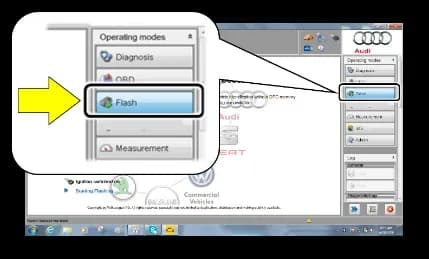
Si applica anche a
- Audi A3
- 2023–2024
- Audi RS 3
- 2022–2024
- Audi S3
- 2023
Symptoms and Technical Background
Audi has identified a condition where the central electronics system in certain 2022-2024 A3, S3, and RS3 vehicles may prevent the vehicle from starting under specific circumstances. In severe cases, this can lead to a complete no-start condition. This proactive update, identified as TSB 97HY, aims to prevent this Audi S3 starting issue before it occurs.
Important Warnings for Owners
Owners should be aware of critical safety information and operational details related to this update:
- Radiator Fan Hazard: During the update process, the radiator fan(s) may cycle on at high speed. There is a serious risk of personal injury if contact is made with the spinning fan blades. Always keep hands and all objects clear of the radiator fan(s) while the update is in progress.
- No Warranty for Voltage Damage: Control modules that are damaged due to insufficient voltage during the software update will not be covered under warranty. This underscores the importance of proper battery maintenance during the procedure.
- No Reimbursement for Unconfirmed Claims: A warranty claim for this update may not be reimbursed if there is no confirmation response in the database to support the claim.
- No Wash/Loaner Claim: Dealers are instructed not to claim vehicle wash or loaner vehicle costs under this specific action.
Diagnosis and Eligibility
To determine if your vehicle is eligible for this update, an authorized Audi dealer must check the vehicle's status in the Elsa Campaign/Action Information screen. The status must show "open" for the 97HY UPDATE. If the update appears to have been performed but the code remains open, the dealer must contact Audi Warranty before proceeding. All safety recalls must be completed before this campaign can be performed.
Repair Procedure Summary
The repair involves updating the Central Electronics control module via a software flash using the Audi diagnostic system. This procedure is identified by SVM code 97HYA600. Key steps for the technician include:
- Ensuring the ODIS software is completely up to date.
- Connecting a battery charger to the vehicle battery to maintain voltage above 12.5 volts throughout the update. This prevents potential damage to control modules.
- Disabling the screen saver and power-saving settings on the diagnostic tester.
- Connecting the VAS Diagnostic Tester using its supplied power adapters.
- Performing the flash process through "Audi Flashing" and explicitly not using "Guided Fault Finding (GFF)", as GFF prolongs the process and may lead to denied requests for additional time.
- Connecting the VAS Diagnostics Interface to the tester with a USB cable only. Using Bluetooth or Wi-Fi connections increases the risk of connection loss and damage to the control module, and may result in denied warranty claims.
- Completing all campaign software updates in a single, standalone ODIS Diagnostic Session.
- Removing any ODIS "Hot-Fix" patches before starting the operation.
- Switching off all vehicle consumers, including air conditioning, heater blower motor, lights, and heated seats.
- Moving the selector lever to the 'P' (Park) position.
- Selecting the "SVM – Code Input" option within the FLASH operating mode and entering SVM code 97HYA600.
- Following the on-screen prompts to complete the update.
- Ensuring the diagnostic log is sent to GFF Paperless when exiting the FLASH program.
Required Tools and Parts
Specialized tools are required for this software update to prevent the Audi S3 starting issue and ensure proper execution:
- Battery Tester/Charger: VAS5908 (or an equivalent charger with a current rating of at least 90A).
- Diagnostic Tester: VAS6150X/VAS6160X (or an equivalent).
Warranty Information
This update is covered under warranty, provided the vehicle is within the New Vehicle Limited Warranty period and shows the 97HY code in Elsa. The service number for this action is 97HY, with Damage Code 0099 and Parts Vendor Code 002. Labor operations include:
- 0151 00 10: Software update setup and battery charger connection.
- 0151 00 60: Performing the software update.
What Owners Should Know
Audi recommends informing customers in writing about all work performed, including any updates completed under TSB 97HY. If your vehicle is out of warranty or if you refused campaign work, U.S. dealers must submit a request through Audi Warranty Online under the Campaigns/Update option, while Canadian dealers upload the repair order to Audi WIN/Operations/Campaign Closure. For questions regarding claim entry, dealers should contact Audi Warranty.
Source: NHTSA ID 10253341
Galleria
3 immagini
Frequently Asked Questions
- What is Audi TSB 97HY about?
- Audi Technical Service Bulletin 97HY addresses a potential issue with the central electronics control module in certain 2022-2024 Audi A3, S3, and RS3 models that could prevent the vehicle from starting. The TSB provides a software update to resolve this condition proactively.
- Which Audi models are affected by the 97HY update?
- This update applies to specific 2022-2024 Audi A3, S3, and RS3 vehicles. Your dealer can check your vehicle's eligibility using the Elsa system.
- What is the fix for the Audi S3 starting issue?
- The fix for the Audi S3 starting issue, as outlined in TSB 97HY, involves a software update to the central electronics control module. This update is performed by an authorized Audi dealer using specialized diagnostic equipment and the SVM code 97HYA600.
- Are there any risks or special conditions during the central electronics module update?
- Yes, there are critical warnings. The radiator fan may cycle on at high speed, posing an injury risk. It's also crucial that the vehicle's battery voltage remains stable during the update, as modules damaged by insufficient voltage will not be covered under warranty. The diagnostic tool must be connected via USB, not wirelessly.
Related Articles
2024-2025 Audi MMI Emergency Call Fault Software Update TSB
Audi Technical Service Bulletin 2081007/1 addresses MMI function problems and 'Emergency call fault' messages in 2024-2025 Audi A3, S3, RS 3, and Q3 models. A software update for the MMI, OCU, and gateway modules resolves these issues.
2022-2025 Audi Pre Sense Warning, Jolt, or Braking TSB
Audi has released Technical Service Bulletin 2069662/3 to address customer complaints of false 'Audi pre sense' warnings, warning jolts, or unexpected brake engagement in 2022-2025 Audi A3, S3, and RS 3 models. This TSB outlines diagnostic steps for technicians.
2023-2024 Audi A3 / S3 / RS 3 P0A8200 Cooling Fan Fault
Audi has issued Technical Service Bulletin (TSB) 2080516/1 for 2023-2024 A3, S3, and RS 3 models equipped with the 48V MHEV system. It addresses the 'Vehicle electrical system fault' message and diagnostic trouble code P0A8200, related to the hybrid battery cooling fan or low battery charge.
2024-2025 Audi A3, S3, RS 3 Air Flow Intensity Issue TSB
Audi has issued Technical Service Bulletin 2074919/3 for 2024-2025 A3, S3, and RS 3 models regarding a concern where the air flow intensity does not change when the blower level is set higher than 4 in manual AC mode. This is a known software issue.
2021-2026 Audi A3/S3/RS3/Q3 Tire Pressure Warning TSB
Audi has released Technical Service Bulletin 2075088/2 to address false tire pressure warnings in the instrument cluster for 2021-2026 A3, S3, RS3, and Q3 models. This issue can be caused by dirt or foreign objects affecting the ABS speed sensors.
Leave a comment
Comments are moderated and may take a moment to appear. Only your first name and the initial of your last name are shown publicly.
Comments
Be the first to comment.