2022 Audi e-tron GT Software Update Service Action 93P9
Audi's Service Action 93P9 addresses 2022 e-tron GT models with a software update to enhance 12V battery performance and optimize energy management for improved range. This service is free until September 1, 2027.

Audi has issued Service Action 93P9, a software update for certain 2022 Audi e-tron GT vehicles. This action aims to enhance the vehicle's electrical system and overall efficiency. The 2022 Audi e-tron GT software update is available for 3,479 vehicles in the U.S. and 399 in Canada, totaling 3,878 units.
This software update introduces the latest system-related improvements. A key benefit is a reduced likelihood of decreased 12V battery performance. Additionally, the update manages the energy management process more efficiently, which can lead to an improved driving range for the 2022 Audi e-tron GT.
Important Warnings for Owners and Technicians
Audi has provided several critical warnings and instructions related to Service Action 93P9 that both owners and technicians should be aware of:
- Inventory Vehicles: Dealers must ensure that every affected inventory vehicle has this campaign completed before delivery to consumers.
- Free Service Expiration: This service action is available free of charge only until September 01, 2027. If a customer wishes to have this service performed after this date, normal dealership costs will apply.
- Radiator Fan Safety: "Radiator Fan(s) may cycle ON high speed during the Update Process! There is a serious risk that personal injury may result if contact is made with spinning fan blades. Keep hands and all objects away from Radiator Fan(s) during Update Process!"
- Diagnostic Connection: "Using Bluetooth or WiFi for this action is PROHIBITED! Damage caused to electronic components (e.g. ECM, TCM, etc.) during the SVM update process is not covered." The VAS Diagnostics Interface MUST ONLY be connected to the diagnostic tester with a USB cable.
- Flashing Method: "DO NOT USE Guided Fault Finding (GFF) to perform this flash. Using GFF will cause the flash to take longer. Requests for additional time will not be considered." The update must be performed using the "Flash" operating mode, not "Diagnosis" (Guided Fault Finding), to ensure claim payment.
- Safety Recalls: All safety recalls must be completed prior to performing this campaign.
- Battery Charger Connection: When connecting the battery charger, connect the positive cable to the positive terminal and the negative cable to the grounding lug on the chassis. "DO NOT connect the ground cable directly to negative terminal of the battery."
- Hazard Lights: "The procedure may cancel itself if the hazard warning lights are not switched on. The hazard warning lights prevent the system from switching to bus sleep mode during the update."
- Damages and Pre-existing Conditions: Damages resulting from improper repair or failure to follow work instructions are the dealer's responsibility and not eligible for reimbursement. Diagnosis and repair of pre-existing conditions in the vehicle are not covered under this action.
- ODIS Sessions: All campaign software updates must be completed during a single, standalone ODIS Diagnostic Session. Technicians must fully complete this campaign and send all logs before beginning any other campaigns or operations.
- ODIS Hot-Fix Patches: If there are any ODIS "Hot-Fix" patches installed, they must be removed from the scan tool before beginning this operation, as they may affect the update process.
Required Tools or Parts
To perform the 2022 Audi e-tron GT software update, technicians will need specific equipment:
- Battery Tester/Charger: Capable of a minimum 90 Amp continuous supply, specifically the -VAS5908- battery charger.
- Diagnostic Tester: -VAS6150X/VAS6160X- or an equivalent diagnostic system.
Detailed Repair Procedure
Service Action 93P9 involves a precise software update process. Here's a summary of the steps an authorized Audi dealer will follow:
1. Pre-Repair Checks and Preparation
Before starting the software update, technicians must:
- Verify Eligibility: Enter the vehicle's VIN into the Elsa system and check the "Campaign/Action" screen. The campaign status must show "open." If other open actions exist, the customer should be informed so all work can be completed concurrently.
- ODIS Software Update: Ensure the ODIS software on the VAS Diagnostic Tester is completely up to date by checking the "Alerts" section on the ServiceNet homepage for the current ODIS version.
- Diagnostic Tester Settings: Turn off the screen saver and power saving settings on the diagnostic tester to prevent it from entering power save mode during the update, which could damage the control module.
- Diagnostic Tester Power: Ensure the VAS Diagnostic Tester is plugged in using the supplied power adapters. It should not be used on battery power alone during the software update to prevent powering off and potential control module damage.
2. Vehicle and Equipment Setup
Proper setup is critical for a successful update:
- Battery Charger Connection: Connect the -VAS5908- battery charger to the vehicle's 12V battery. The charger must be capable of a minimum 90 Amp continuous supply and maintain battery voltage above 12.5 volts throughout the update. When connecting, attach the positive cable to the battery's positive terminal and the negative cable to the grounding lug on the chassis. Do NOT connect the ground cable directly to the negative terminal of the battery.
- Charger Configuration: Switch the -VAS5908- battery charger off and then on again, ensuring its display switches off before restarting. Set it to a charging voltage of 14.8 Volt and operate it in charging mode.
- Ignition and Consumers: Switch the vehicle's ignition on. Switch off all electrical consumers, such as headlights, heated seats, and climate control.
- Diagnostic Tester Connection: Connect the -VAS6150X/VAS6160X- Diagnostic Tester to the vehicle. The VAS Diagnostics Interface must only be connected to the tester with a USB cable; Bluetooth or WiFi connections are prohibited to prevent connection loss and potential control module damage.
- Hazard Lights: Turn the vehicle's hazard warning lights on. This prevents the system from switching to bus sleep mode during the update, as the procedure may cancel itself if the hazard lights are not switched on.
3. Diagnostic Scan and Bus Sleep (Pre-Update)
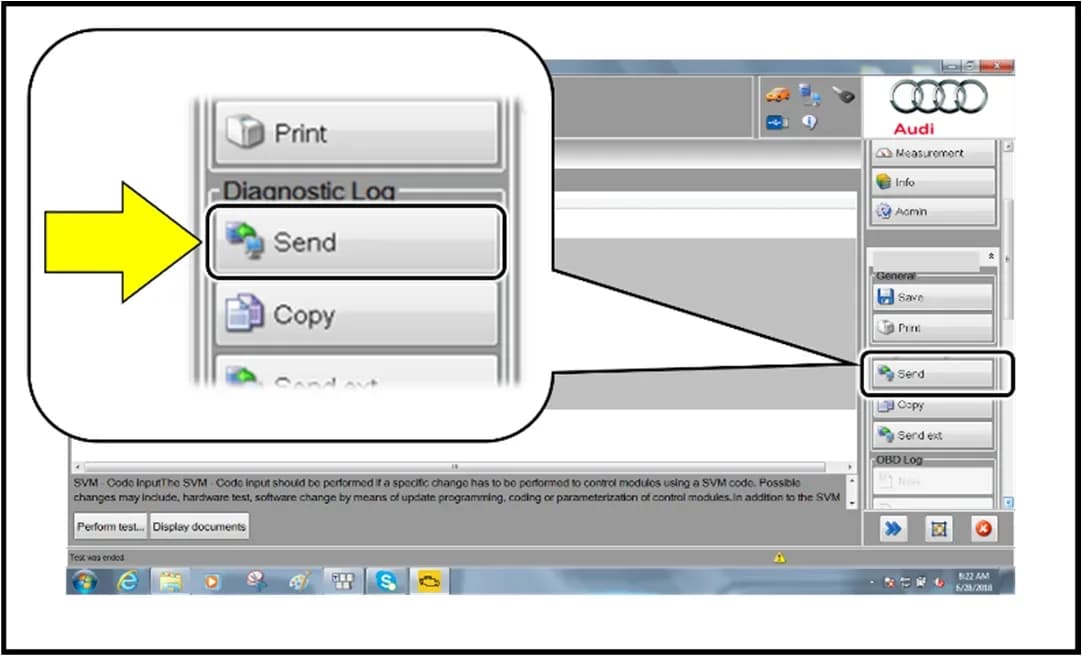
- Initial Diagnostic Scan: Perform a full diagnostic scan using the "Diagnosis" operating mode within the ODIS program. Send the diagnostic protocol online and save the diagnostic session for later use.
- Initiate Bus Sleep: Disconnect the 12V charger and remove the diagnostic interface from the vehicle. Close all doors, the hood, and the rear lid. Lock the vehicle and wait 1 to 2 minutes for it to enter bus sleep mode.
4. Software Update Execution (Service Number 93P9)
- Reconnect and Start Flash: Reconnect the diagnostic interface via USB. From the scan tool's home screen, highlight and select the "Flash" operating mode. It is crucial to use the "Flash" operating mode, not "Diagnosis" (Guided Fault Finding), as using GFF will prolong the process and may lead to non-payment of the claim. Follow the on-screen prompts.
- Select Options: Select "Starting Flashing" and follow the on-screen prompts. Then, select "No RO." Highlight "SVM – Code Input."
- Enter SVM Code: Select "Perform test" and enter the corrective action code 93P9A388 when prompted. Accept the code and continue to follow the on-screen instructions.
- Labor Operations: The labor operations associated with this service action include connecting the battery charger (Labor Op 2706 89 50, 10 Time Units), GFF Operations (Labor Op 0150 00 00, Time stated on diagnostic protocol), and performing the software update via Flash (Labor Op 9301 25 99, Time stated on diagnostic protocol). The Service Number for claiming is 93P9, with Damage Code 0099 and Parts Vendor Code 002.
5. Post-Update Procedures and Final Checks
- Ignition Cycle: After receiving confirmation that the flash completed successfully, turn the vehicle's ignition off for 60 seconds, then turn it back on. This extra ignition cycle step is necessary to clear any faults stored during the update.
- Exit Flash Session: Click "Flash" to exit the flash session.
- Bus Sleep (Post-Update): To clear any generated fault codes, disconnect the diagnostic tester, remove the key from the vehicle, and lock the vehicle with the remote for 5 minutes to induce bus sleep mode.
- Instrument Cluster Check: Check the instrument cluster for any fault messages or warning lamps; none should be present.
- Parking Brake Position Detection: If necessary, perform position detection for the parking brake by pressing the brake pedal, moving the selector lever to "N" for 5 seconds, waiting another 5 seconds, and then applying the parking brake. If the brake warning lamp still flashes, recalibrate and extend the waiting time.
- Charging Profile Restoration: For vehicles equipped with a 22 kW onboard charger, the charging profiles must be restored to factory settings. This is done using the "Diagnosis" operating mode, selecting "Self test," then "00C6 - High Voltage Battery Charger Control Module -J1050-" and "C6 - Reset charging timer and charging profiles to factory settings." Exit Diagnosis and send the diagnostic protocol online.
6. Documentation
- Diagnostic Protocol: After the update and all checks are complete, send the final diagnostic protocol online.
- Campaign Stamp: Once the campaign is completed, the technician will stamp the repair order using item# AUD4927ENG (for English-speaking regions) or AUD4927FRE (for French-speaking regions).
Owner Action
If you own a 2022 Audi e-tron GT, Audi will notify you about Service Action 93P9 in November 2022. You should contact your authorized Audi dealer as soon as possible to schedule the necessary software update. This work is estimated to take approximately two hours and will be performed free of charge. Remember, this complimentary service is only available until September 01, 2027. After this date, you may be responsible for the repair costs.
To check if your vehicle is affected or for any open recalls/service campaigns, you can visit www.audiusa.com (for US owners) or www.audi.ca (for Canadian owners) and use the Recall/Service Campaign Lookup tool with your Vehicle Identification Number (VIN). For further assistance, US owners can contact Audi Customer Experience at 1-800-253-2834, and Canadian owners can call Audi Customer Relations at 1-800-822-2834.
Source: NHTSA ID 10227042
Galleria
13 immagini
Frequently Asked Questions
- What is the purpose of Audi Service Action 93P9?
- Audi Service Action 93P9 is a software update for the 2022 Audi e-tron GT designed to reduce the likelihood of 12V battery performance decrease and improve energy management, which can positively impact the vehicle's driving range.
- How long will the 2022 Audi e-tron GT software update be free of charge?
- This software update, identified by Service Action 93P9, will be performed free of charge by authorized Audi dealers until September 01, 2027. After this date, normal dealership costs will apply.
- Are there any specific tools required for this software update?
- Yes, technicians performing Service Action 93P9 require a battery tester/charger capable of a minimum 90 Amp continuous supply, such as the -VAS5908-, and a diagnostic tester like the -VAS6150X- or -VAS6160X-.
What Audi e-tron GT owners report
Counted from the records in our database across 3 model years.
- 22
- Owner complaints
- 15
- Recalls
- 1,127
- Service bulletins
- 1
- Crashes reported
- 2
- Fires reported
- 0
- Injuries reported
The 2022 model year
8 complaints, the 2nd most of 3 model years on file. Owners reported 0 crashes, 0 fires and 0 injuries for this year, which also has 13 recalls on file.
Electrical System, the system this article covers, accounts for 14 of 22 complaints (64%), including 3 for 2022.
Complaints by model year
| 2022 | 8 | |
|---|---|---|
| 2023 | 13 | |
| 2024 | 1 |
Most-reported systems
- Electrical System — 14
- Fuel/Propulsion System — 7
- Engine — 5
- Power Train — 3
- Service Brakes — 1
Latest recalls for the 2022 model year
- 25V900000 — Back Over Prevention (Dec 2025)
- 25V227000 — Air Bags (Apr 2025)
- 24V726000 — Electrical System (Sep 2024)
Recent owner reports about electrical system
Purchased a used 2022 Audi E-Tron GT with an open NHTSA safety recall for high-voltage battery fire risk (Recall 24V726 / Audi 931A). The recall remedy had not been performed at time of purchase.
Read owner complaints →The contact owns a 2022 Audi E-Tron GT. The contact received notification of NHTSA Campaign Number: 24V726000 (Electrical System); however, the part to do the recall repair was not yet available. The local dealer was contacted.
Complaints are owner reports filed with NHTSA. They are unverified, and counts depend on how many vehicles were sold, so they are not a failure rate.
Related Articles
2022-2025 Audi e-tron GT Hose Parts Update SM 48-2024
Audi has issued Special Notice SM 48-2024, instructing parts managers to return certain hose part numbers for the 2022-2025 Audi e-tron GT by September 16, 2024. This ensures updated parts are available for customers.
2022 Audi e-tron GT No Heat Customer Support
Audi is offering customer mobility support for 2022 e-tron GT owners experiencing a "no heat" concern. This includes reimbursement for loaner or rental vehicles while parts are unavailable.
2022 Audi e-tron GT No Heat Customer Loaner Support
Audi is providing customer mobility support for 2022 e-tron GT vehicles affected by a 'no heat' condition, specifically when repairs are delayed due to parts availability. This includes reimbursement for dealer loaners or outside rental vehicles. Owners should understand the conditions for…
2022 Audi e-tron GT 12V Battery Control Module Software Update
Audi has released a revision to Service Action 27K2 for the 2022 Audi e-tron GT, updating the 12V Battery Control Module software. This revision provides critical information regarding required voltage during the software update procedure.
2022 Audi e-tron GT 12V Battery Software Update
Audi has issued Service Action 27K2 for certain 2022 e-tron GT vehicles to update the 12V battery control module software. This addresses a potential issue where the 12V battery could discharge completely.
Leave a comment
Comments are moderated and may take a moment to appear. Only your first name and the initial of your last name are shown publicly.
Comments
Be the first to comment.